
Participant
October 4, 2017
Answered

Cut to different "camera angles"?

  • October 4, 2017
  • 1 reply
  • 1641 views

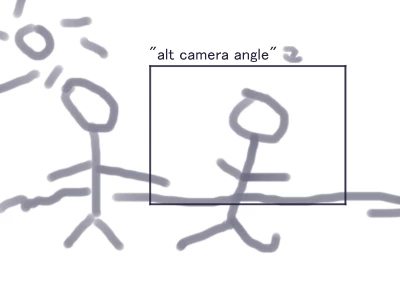
So I'm working on a 2D animation and I want to zoom in close on certain parts of the animation and out on others.  My problem is, I don't want there to be a zoom animation, just a clean cut from one shot to the next.I made a very crude drawing of what I mean.  Basically, I want the whole picture to take up the screen at some points, cut to the area inside the box for a bit, then cut back out with no smooth transitions.  How do I do it?
This topic has been closed for replies.
Correct answer Rick Gerard

You usually don't edit in After Effects, you make a comp for each shot. Sometimes short sequences can be done in a reasonable way in a single comp, but most of the time your comps should just be a single shot. That said you have two options.

  1. Add additional cameras. After Effects will only render the top camera. All you have to do is set an in point for the new camera
  2. Use one camera and hold keyframes for position. This is more efficient but you may also have to use hold keyframes for point of interest, or if you are moving your camera with a null you'll need to use hold keyframes there

Unless your video is under 30 seconds, if it were my project, I'd make a separate comp for each 'shot' and then render all the comps and edit them in Premiere Pro. You could also nest your individual comps in a main comp and render that. Changes, edits, and fine tuning will go a lot faster with this workflow than creating a 10 minutes movie in a single comp.

1 reply

Rick GerardCommunity ExpertCorrect answer
Community Expert
October 4, 2017

You usually don't edit in After Effects, you make a comp for each shot. Sometimes short sequences can be done in a reasonable way in a single comp, but most of the time your comps should just be a single shot. That said you have two options.

  1. Add additional cameras. After Effects will only render the top camera. All you have to do is set an in point for the new camera
  2. Use one camera and hold keyframes for position. This is more efficient but you may also have to use hold keyframes for point of interest, or if you are moving your camera with a null you'll need to use hold keyframes there

Unless your video is under 30 seconds, if it were my project, I'd make a separate comp for each 'shot' and then render all the comps and edit them in Premiere Pro. You could also nest your individual comps in a main comp and render that. Changes, edits, and fine tuning will go a lot faster with this workflow than creating a 10 minutes movie in a single comp.