
Inspiring
April 11, 2022
Answered

"Cuts" on the edges with the turbulent displace effect

  • April 11, 2022
  • 1 reply
  • 2275 views
Hello everyone.

I use the "turbulent displace" effect a lot on my compositions, but I come up against a problem: the borders.
These seem to ignore the actual area of ​​my vector objects, cutting them off whenever they are out of frame.

Here is a screenshot, with the "missing" shape of the blow in red...

Is there anything I can do to fix it?
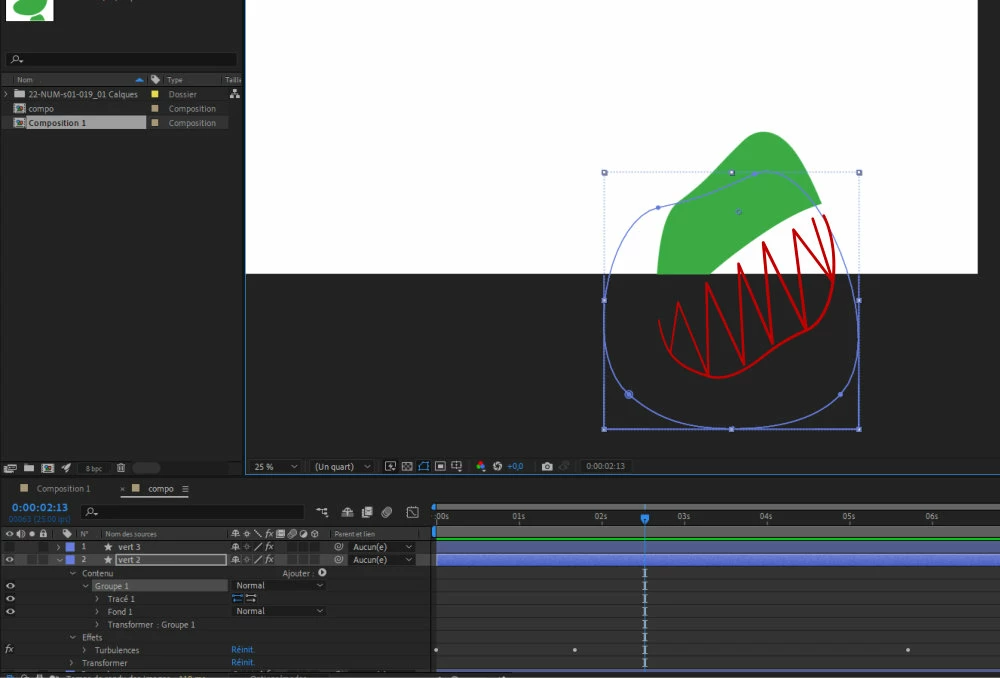

This topic has been closed for replies.
Correct answer Sylvain Martin

I had set a negative value for the "quantity" of the turbulence effect: that was the problem!

1 reply

Mylenium
Legend
April 11, 2022

Pre-compose your vector stuff to a sufficiently large composition and apply the effect in the parent comp.


Mylenium

Inspiring
April 11, 2022

Hello.

I tested your solution. I created a squarred shape - in rose to be visible - behind my green shape, and created a precomp with these 2, but as you will see the problem remains : the 2 shapes now are both "eaten" by the border on the screen :


Sylvain MartinAuthorCorrect answer
Inspiring
April 12, 2022

I had set a negative value for the "quantity" of the turbulence effect: that was the problem!