Yoan Boisjoli
Participating Frequently
December 7, 2023
Answered

Default File Naming Issue in After Effects Render Queue

  • December 7, 2023
  • 3 replies
  • 895 views

Product: Adobe After Effects 24.0.3 build 2

Operating System: Windows 11

Description: When adding compositions to the Render Queue in Adobe After Effects, the output module defaults to naming the file "tst.mov" instead of maintaining the composition's name. This requires manual renaming for each file, which can be time-consuming and prone to errors, especially when dealing with multiple render jobs.


Attachments:

  • Screenshot of the Render Queue with default file name "tst.mov".
  • Screenshot of the Save dialog with "tst.mov" pre-filled as the file name.

Additional Notes:

  • This issue has been present since the last after effect version. (the update did not fix the issue)
Correct answer Paul Uu

My guess is that you've set a Custom "Output To" filename that is stored in your preferences (and migrated across versions).

1. Go to an item in the Render Queue
2. Click on the down arrow to the right of "Output To"
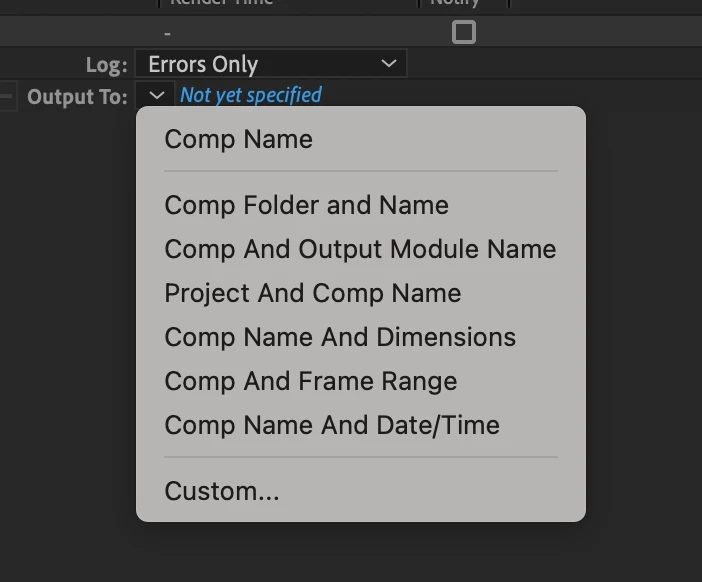
4. When you see this dropdown, is Comp Name at the top or is another Output To option at the top?

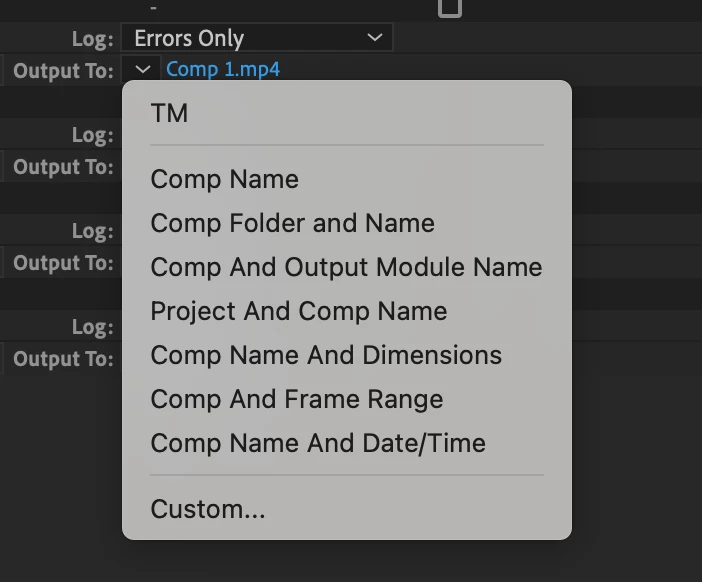
In the second example (below) you can see I've set an Output To default that is not Comp Name
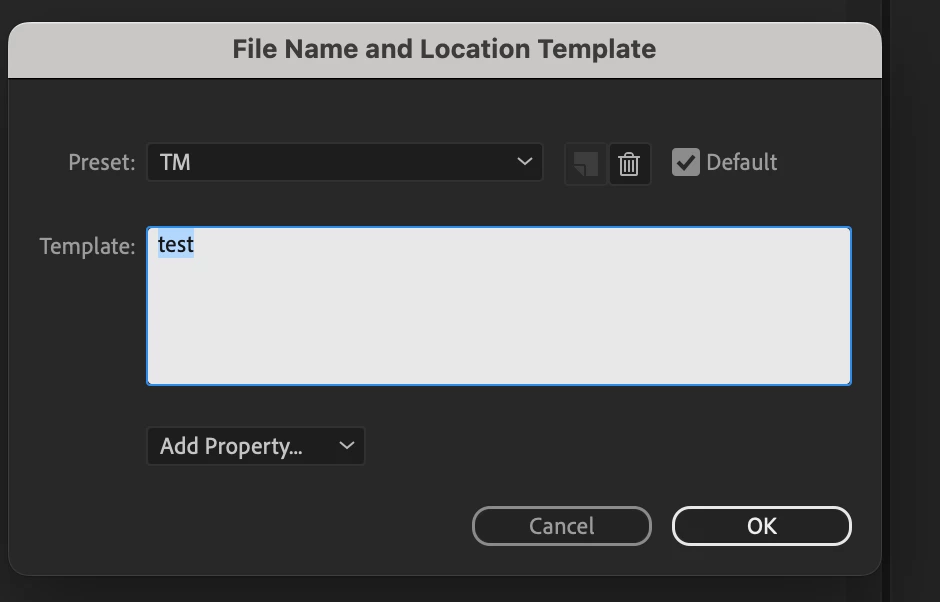
I've created this TM setting to look like this

You can see I've set the filename to be Test and the this to be the default Setting.
Now, every single file I add to the Render Queue will default to be Test...

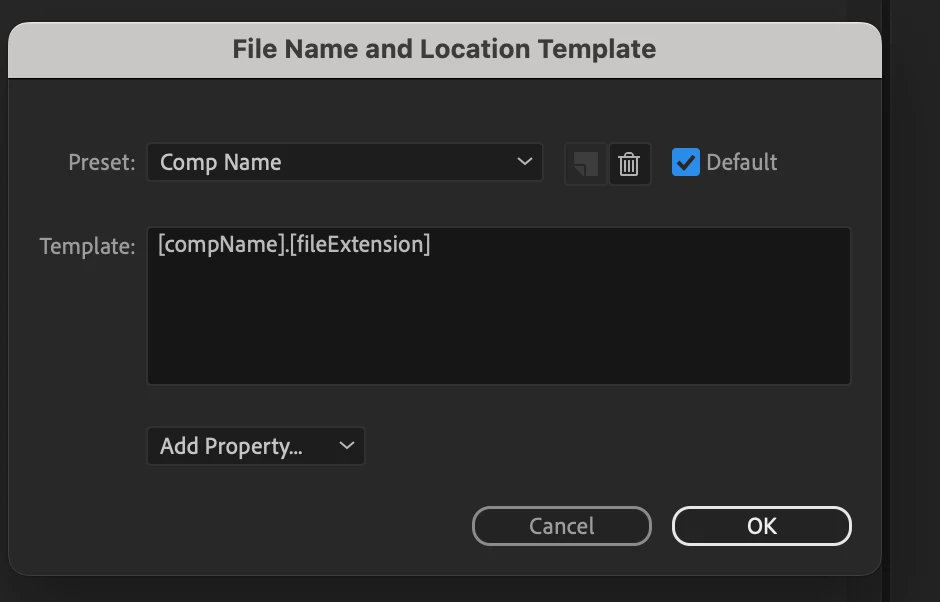
5. To change it back to Comp Name, go to Custom in the drop down list, Select Preset "Comp Name" and click the default checkbox.

This should resolve your problem.


3 replies

nishu_kush
Community Manager
Community Manager
April 10, 2024

Did the suggestion above help?

Feel free to reach out. Moving this thread from Bugs to Discussions for now.


Thanks,

Nishu

Yoan Boisjoli
Participating Frequently
March 19, 2025

Yes I had a  Custom "Output To" filename that was stored in my preferences (and migrated across versions). 

(sorry if I'm late responding to this thread!)

Paul UuCommunity ManagerCorrect answer
Community Manager
December 7, 2023

My guess is that you've set a Custom "Output To" filename that is stored in your preferences (and migrated across versions).

1. Go to an item in the Render Queue
2. Click on the down arrow to the right of "Output To"
4. When you see this dropdown, is Comp Name at the top or is another Output To option at the top?

In the second example (below) you can see I've set an Output To default that is not Comp Name
I've created this TM setting to look like this

You can see I've set the filename to be Test and the this to be the default Setting.
Now, every single file I add to the Render Queue will default to be Test...

5. To change it back to Comp Name, go to Custom in the drop down list, Select Preset "Comp Name" and click the default checkbox.

This should resolve your problem.


Community Manager
December 7, 2023

I'm unable to reproduce this. Can you start AE in Safe Mode (which will use temporary default/reset preferences -- Preferences -> Startup & Repair -> Start in Safe Mode) and see if it continues to repro.