
barbarah92217474
Participant
November 14, 2024
Answered

Delay multiple comps with random start times

  • November 14, 2024
  • 1 reply
  • 592 views

Hi,


I am a complete newbie to AE expressions. I have 24 comps that I don't want them all to start to play at the same time, I would like them to start randomly, essentially randomly delay each comp by a few seconds. I don't want to stagger the comps as the project may grow and I would rather use an expression if possible.


I found the code below but I am getting an error. Can someone please advise me? Any help would be greatly appreciated.

//time remap

delay = 5;

framerate = 25;

n = name - 1;

d = n*(delay)/framerate;

t = thisLayer.timeRemap.valueAtTime(time-d);

[t]


This topic has been closed for replies.
Correct answer barbarah92217474

Thank you so much for replying! I have added the code as per below but it doesn't seem to delay the comp playing in any way. Maybe I'm doing something esle wrong or maybe using the wrong approach?


//time remap

delay = 5;

framerate = 25;

n = Number(name.split(' ')[1]) - 1;

d = n*(delay)/framerate;

t = thisLayer.timeRemap.valueAtTime(time-d);

[t]
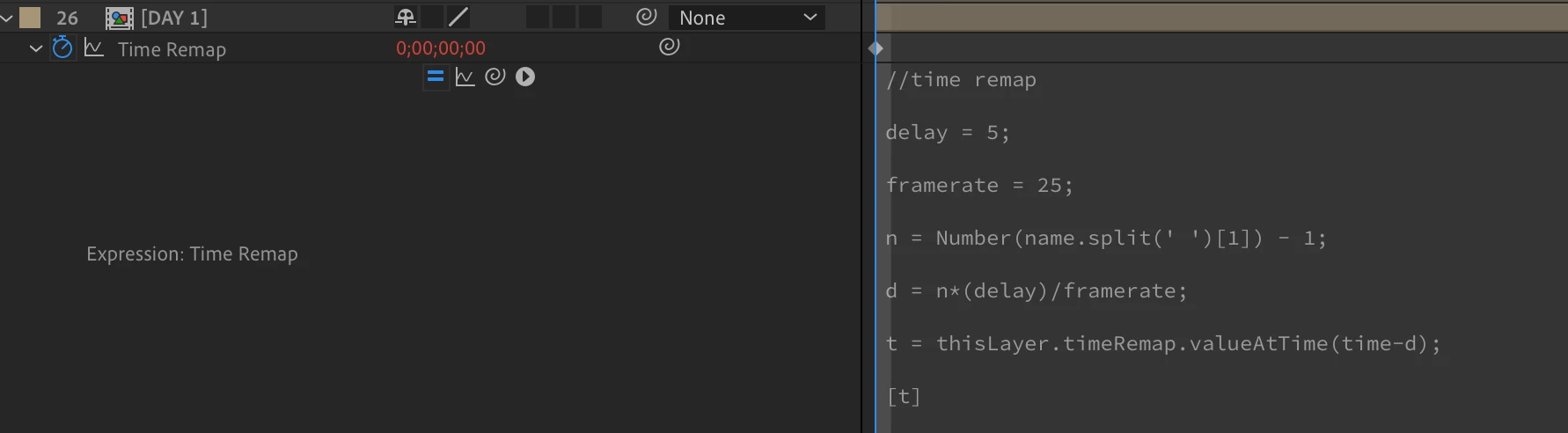
1 reply

Legend
November 14, 2024


name is the layer’s name, so:


n = DAY 1 - 1;


can't return a number.


You must either rename your layer (1, 2, 3, 4, 5...)

or extract the number from the layer’s name.


n = Number(name.split(' ')[1]) - 1;


barbarah92217474
barbarah92217474AuthorCorrect answer
Participant
November 14, 2024

Thank you so much for replying! I have added the code as per below but it doesn't seem to delay the comp playing in any way. Maybe I'm doing something esle wrong or maybe using the wrong approach?


//time remap

delay = 5;

framerate = 25;

n = Number(name.split(' ')[1]) - 1;

d = n*(delay)/framerate;

t = thisLayer.timeRemap.valueAtTime(time-d);

[t]

Legend
November 14, 2024
delay = Number(name.split(' ')[1]) - 1;
time - delay

Should be enough