Inspiring
August 3, 2021
Answered

Dependencies - Collect files not working?

  • August 3, 2021
  • 5 replies
  • 14018 views

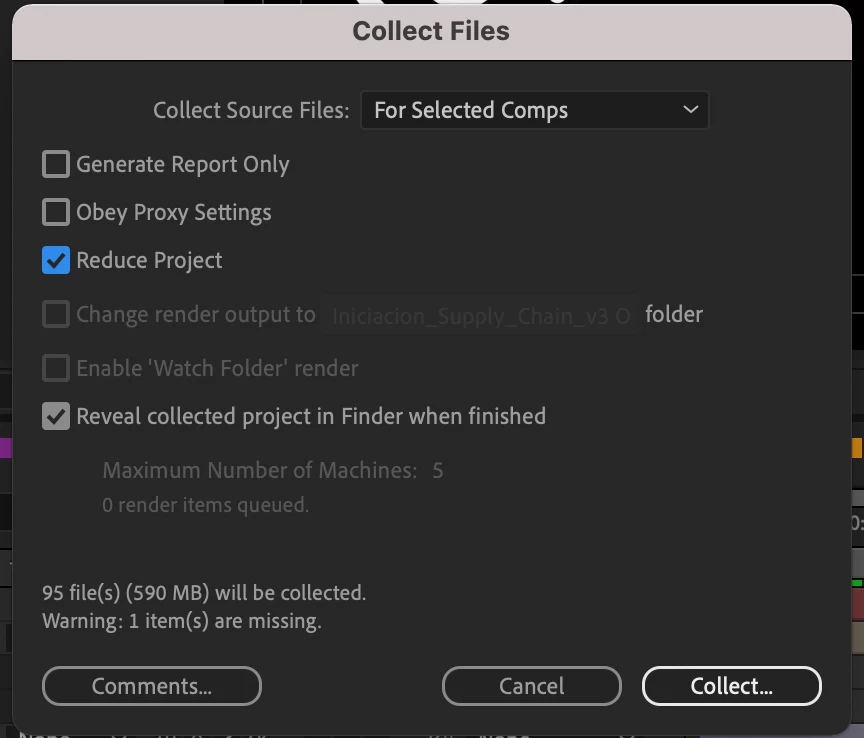
Hello, I don't know if I'm the only one having this issue... Everytime I try to collect a single comp from my project (Dependencies - Collect files), AE will make a copy of the whole project, even when "for selected comps" and "reduce project" is selected. 


The screenshots show that the file size doesn't change, no matter if I'm trying to save all the comps or one single, rather small, comp.


Using AE 18.2.1 in a Macbook pro M1
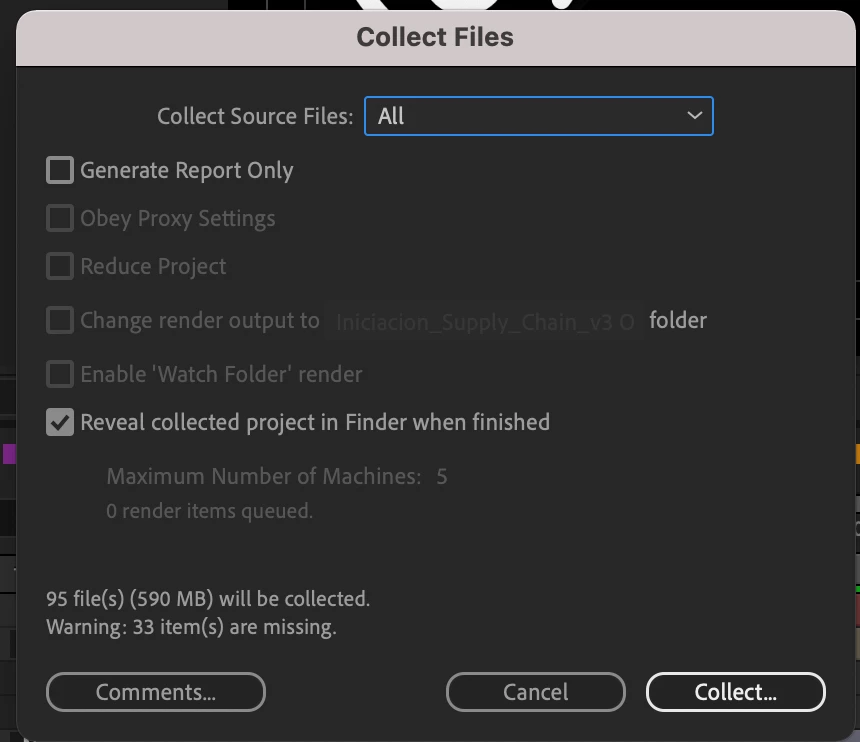
 

Anyone having the same issue / has a clue how to solve it?


Thanks! 


Correct answer Warren Heaton

Yeah, you have to do the reduce 1st then the collect (I usually do a Save As and add "_reduce" to the resulting project name to keep the orignal project unchanged). The Reduce Project option in the Collect Files checkbox has been borken for a very. very long time.  The AE team knows about this issue - not sure when it'll be fixed.


If you happen to be be collecting a project that's had other projects imported, it can be helpful to delete ".aep" from the resulting folder name in the AE Project tab before doing Collect Files.  That gets passed to the corresponding folder in the Finder during the Collect Files action and when veiwed afterward in the Finder it can look like an After Effects project rather than a sub-folder.

5 replies

S_ A
Inspiring
January 30, 2025

Hi,

I want to convert a premcomp into  a seperate AE file/comp so that I can bring that into another project, I googled and read stuff how to do that, go to dependencies- collect file- for selected comp- reduce project -save and I am  doing exactly what those ppl are doing. But none of them has greyed out 'reduce project'

My after effects is not helping me. what can I do to make my Ae to make 'reduce project' visible? 


Thank you. 

Warren Heaton
Community Expert
Community Expert
January 31, 2025

@S_ A 


Uncheck "Generate report only".  If that's enabled, there is nothing to reduce.


S_ A
Inspiring
January 31, 2025

Wow!! Thank you so much. 

Participant
September 20, 2024

this was working fine for the last few versions until it was broken again in the latest two Ae 2024  point updates. I found that a workaround is to collect qeued comps instead of selected ones and it will work. If you have a lot of comps to collect separately you still need to delete the previous qeued item but beats saving as, reducing and the collecting dozens of times.

Inspiring
August 3, 2021

Found a workaround published by @Warren Heaton10841144 :


https://community.adobe.com/t5/after-effects/dependencies-gt-collect-files-grabs-files-and-comps-that-aren-t-being-used/td-p/10949508


Saving the project as, then reducing it, then collecting, does work. However it still feels like unnecesary extra steps for something that used to work just fine 😕😕


Warren Heaton
Community Expert
Warren HeatonCommunity ExpertCorrect answer
Community Expert
August 3, 2021

Yeah, you have to do the reduce 1st then the collect (I usually do a Save As and add "_reduce" to the resulting project name to keep the orignal project unchanged). The Reduce Project option in the Collect Files checkbox has been borken for a very. very long time.  The AE team knows about this issue - not sure when it'll be fixed.


If you happen to be be collecting a project that's had other projects imported, it can be helpful to delete ".aep" from the resulting folder name in the AE Project tab before doing Collect Files.  That gets passed to the corresponding folder in the Finder during the Collect Files action and when veiwed afterward in the Finder it can look like an After Effects project rather than a sub-folder.

Mylenium
Legend
August 3, 2021

Without any info about the contents of the project and where what footage and effects are used nobody can tell you much. Simply sounds like you may have a footage item in there that is used in a gazillion comps and creates dependencies that necessitate collecting everything.


Mylenium

Inspiring
August 3, 2021

Fair point... The project does contain many heavy assets like video files etc. However, just to be sure I just tried ann created a new comp with nothing inside but a solid and tried to collect from it... same result. Tries to collect the whole project 😞

Community Expert
August 3, 2021

I'm also on an M1 Mac. If I select one comp and reduce file size I get 1 comp and no unnecessary files. It works just fine in 17, 18, and Beta AE.