
Participant
November 22, 2021
Question

Did AE 2022 remove the detailed 'current render' view?

  • November 22, 2021
  • 2 replies
  • 488 views

AE used to allow you to expand the "current render" option in the render queue, and it would let you watch a real-time log for what is being rendered (every frame, every layer). It was the only way I found to properly troubleshoot expensive effects and needlessly long render times. I found it so incredibly useful for optimisation...but now in 2022 it seems to have gone (maybe replaced with the handy, but way less useful 'render time' pane?). Did anyone else use this? Is there an alternative? Is it hiding away from me?
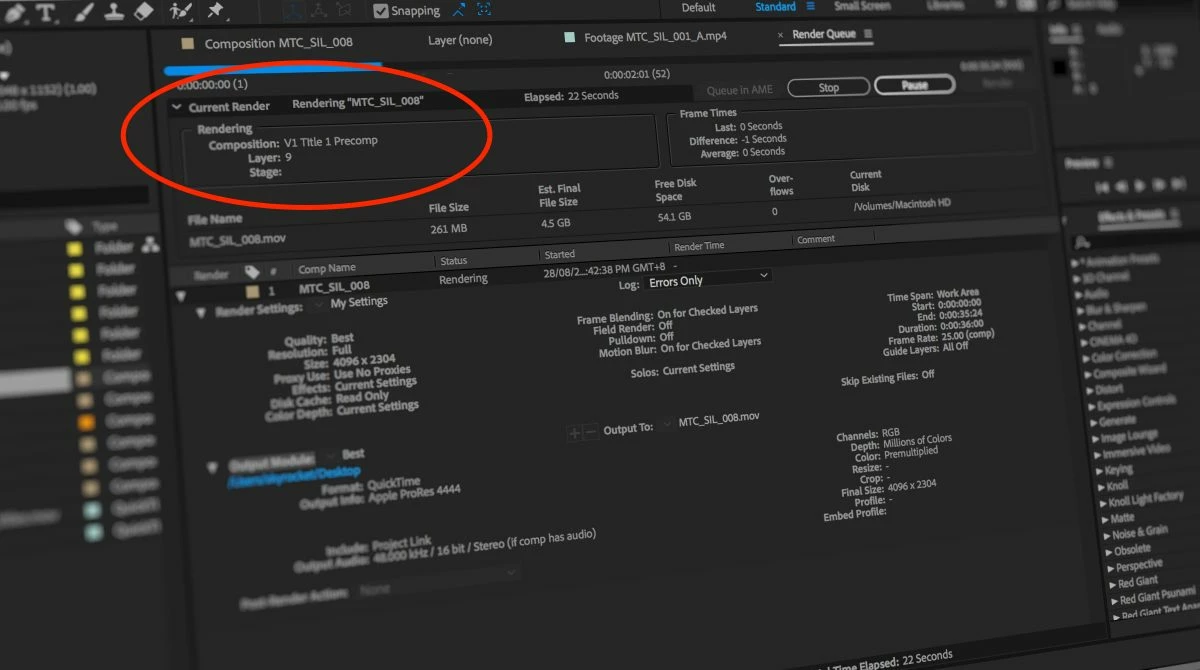
 

2 replies

Participant
November 23, 2022

Was this figured out? This is beyond frustrating. You used to be able to see clearly if asn effect or layer was taking a long time on each frame as well as get both the average and most recent frame times. Without this info optimization is based on guess work or at best uninformed trial and error..... Has it just moved or did a designer think it was ugly?


Participant
November 23, 2022

It's just gone. And it remains absolutely infuriating to me – this feature essentially taught me how to optimise, and as you say, optimisation is now back to mere trial and error (and attempting to recall what this feature taught me was expensive and what was not).

SquareEyz
Inspiring
May 27, 2025

I so relate to this!
Teaching myself AE back in the 1990s, this feature was the 'dashboard' I used to learn workflow optimization.


There is a newish feature in the comp timeline that gives you feedback during preview, which is useful.


I do say that I don't really want an additional column in my timeline at this point- as I pretty much always have trackmats, parenting, and blending modes enabled! So for me it is disabled, until I hit a wall with some heavy work.

if you toggle down individual operators/ effects, you get per operator feedback - which is indispensable.


In the render que, there is an info option that gives you the aggregated data, and averages.


To be fair, I do the majority of my rendering in Media Encoder, as I find it a more efficient experience- and at this point in my career, I'm able to use these old lessons about optimization as a matter of habit.

I finally got around to searching for this topic, and found this other thread as well
https://community.adobe.com/t5/after-effects-discussions/have-render-details-disappeared-from-the-info-panel-in-cc-2017/m-p/8987344#M25502


If someone wants to put in a feature request for per frame/layer/operator render calculation times back in the render que, I'd upvote!


Mylenium
Legend
November 22, 2021

You can use the performance profiling view in the timeline and of course you can still enable more verbose logging with "Extra Info per Frame" and all that...


Mylenium

Participant
November 22, 2021

Does "performance profiling" mean the render time pane, or is this something different?

Does "Extra info per frame" mean "plus per frame info" in the render view? I can't see a way to 'tail' this log – it only seems to write after render, is there some other way to get realimte feedback while rendering?