
poiuyto
Participant
November 17, 2021
Question

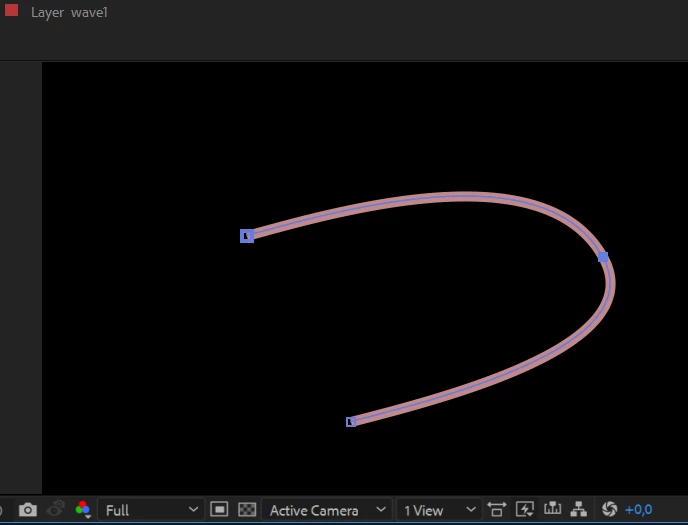
direction lines disappeared

  • November 17, 2021
  • 2 replies
  • 1131 views

Help me please! Where is direction lines? How can i get it back?
This topic has been closed for replies.

2 replies

Jose Panadero
Community Expert
Community Expert
November 19, 2021

You have the Rotobezier option active in your toolbar. Rotobezier path does not have bezier controls, you can only adjust the curve's tension. What you can do is:


- Select the path and go to Layer > Mask and Shape Path and deactivate Rotobezier option

- Disable the Rotobezier option when you select the pen tool (check attached image) for future paths.


poiuyto
poiuytoAuthor
Participant
November 26, 2021

Oh, wow! Thank you for your answer! I just tried again but with fill, not the stroke. And lines appeared! Guess it was a bug 

nishu_kush
Community Manager
Community Manager
November 19, 2021

Hi poiuyto,


That's not ideal.

What happens if you drag one of the anchor points with the Convert Vertex Tool? You could try resetting the preferences of After Effects: https://community.adobe.com/t5/after-effects-discussions/faq-how-to-reset-trash-preferences-in-after-effects/td-p/10634342

Let us know if it helps.


Thanks,

Nishu

poiuyto
poiuytoAuthor
Participant
November 26, 2021

Thank you! I just tried again but with fill, not the stroke. And lines appeared! Guess it was a bug
