
Participating Frequently
April 7, 2023
Question

Disable value editing in speed graph

  • April 7, 2023
  • 1 reply
  • 1377 views

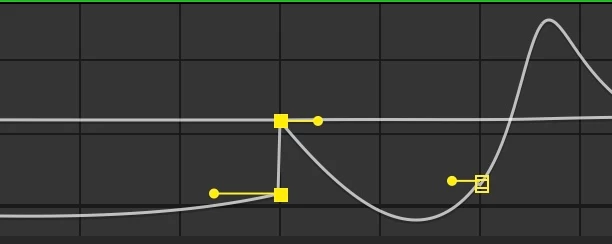
Ok, I don't need to change keyframe value when using the speed graph, It's too common for me to accidentally lift the keframe up on the graph and offset the value, no, I'm not talkng about the in betweened frames that are changed to match the speed, that's fine, I just hope there's a way to disable lifting up and down the keyframe.

This is the speed graph, not the value graph, if I want to change values, I'll use the value graph

Thank you
This topic has been closed for replies.

1 reply

Community Expert
April 7, 2023

Your screenshot shows an instantaneous jump in speed. If you want a smooth speed transition, slide the incoming and outgoing squares together so they are on the same line.  This will change the shape of either the left, right, or both sides of the speed curve. There is no way around changing the curve if you change the acceleration. Maybe it will help if you think of the speed graph as an acceleration graph. The steeper a rising curve is, the faster it will accelerate. If the timing remains the same when you accelerate or decelerate faster, the other end of the curve has to flatten out. The curve changes because the distance and time remain the same. You can hold down the Alt/Option key to snap the speed values together or split them. 


Maybe this tutorial I did will help:

Changing the timing of the keyframes does not change a motion path. Value graphs are almost completely useless for any property that has an array like Position. Value graphs can be helpful for properties like Rotation. The speed graph should be your most used view. 


Participating Frequently
April 7, 2023

Thanks for your response, the main reason I was bothered by this is because I was using time remapping to change the speed of a linear animation inside the precomp, but I found that it often would go reverse every once in while, which kinda messes up the animation which I'm trying to fix using only easing.

Participating Frequently
April 7, 2023

I was just wonering if there was a way to stop it from moving up and down as I often accidentally move it when trying to drag the bezier handles.