


Participant
April 27, 2017
Answered

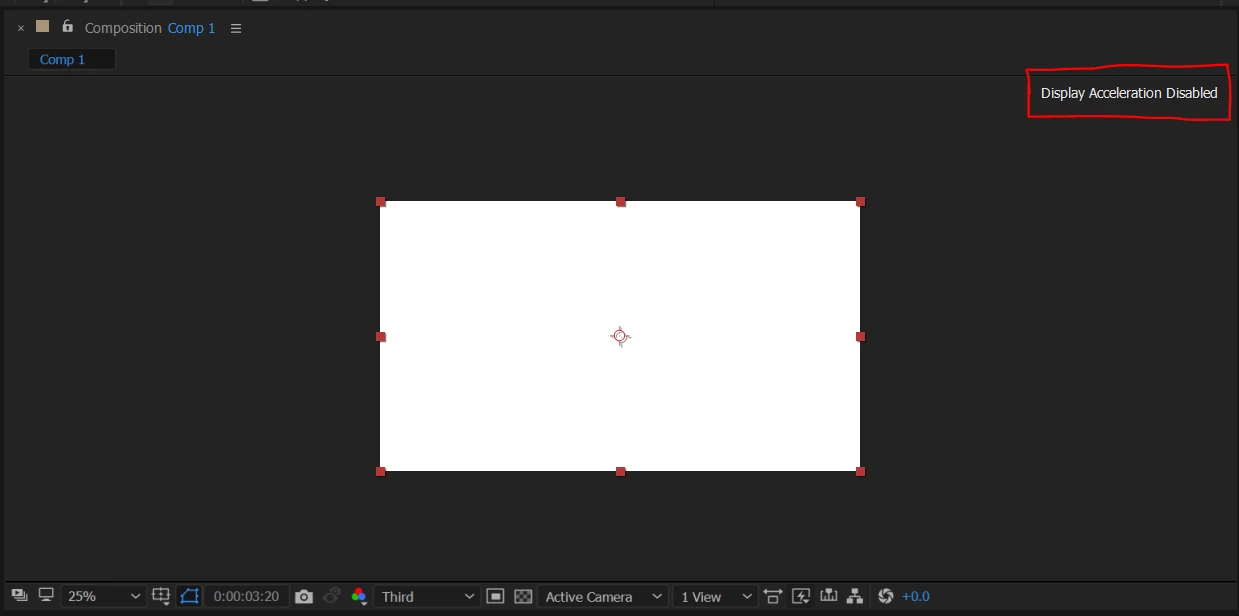
Display Acceleration Disabled on Win 10

  • April 27, 2017
  • 8 replies
  • 27553 views

Please help.

I have my graphics card enabled but this thing is not going away. Every time I hit the space bar to play and hit it again to pause, the composition panel flashes and everything is so slow too. I've used after effects before on same system but it was fine then. It is very frustrating. I've got 960M 4GB and 4720HQ with 16GB of RAM, this doesn't seem a hardware problem. I am not being able to fix it. HELP
This topic has been closed for replies.
Correct answer LaserLion

I had this same issue. This is what happened and how I fixed it.

I had opened up Premiere Pro earlier and was editing in there and then used media encoder to export a project. The next day I come in use the computer and open up After Effects. I get the display acceleration disabled. It runs very slow. I don't know if having used Premiere or Media Encoder caused any issues, but I close all the applications and restart and it went away.

8 replies

QuietWhiff
Participant
October 30, 2018

Here you have the settings that solve most problems with older or weaker Nvidia cards, they also help with overall performance.

Unfortunately in polish, but its quite easy to figure out what is what based on location of the setting.

(These are Nvidia Control Panel settings, you can open it by pressing RightMouseButton on desktop, and then choosing Nvidia Control Panel)

LaserLionCorrect answer
Participant
March 27, 2018

I had this same issue. This is what happened and how I fixed it.

I had opened up Premiere Pro earlier and was editing in there and then used media encoder to export a project. The next day I come in use the computer and open up After Effects. I get the display acceleration disabled. It runs very slow. I don't know if having used Premiere or Media Encoder caused any issues, but I close all the applications and restart and it went away.

Participant
February 11, 2018

So has anyone found a solution yet?  Having this problem on my Mac now after it worked perfectly prior.  Have restarted computer, and uninstalled, reinstalled AE.  Still no luck.  Ugh!

Participant
February 20, 2018

(This is how I fixed it on Win 10)

If you have a Nvidia graphics card and GeForce Experience installed, make sure it is updated. If it's not, update it (just start it, it should automatically update then). Next restart After Effects and it should be done. Hope this also works for you!jeffd82388400

simonp66503784
Participant
July 26, 2017

Hello,

I've the same issue "display acceleration Disabled " is always on top. It's really annoying ! The strangest is when I start AE cc (last version) when windows just starts there is no problem but then when I qui AE and i launch it again there's the problem. Maybe windows launch something that pertubs AE.

Config :

- W10
- Nvidia geforce 880M (driver 384.94)

kayh46290396
Participant
July 25, 2017

I had exactly the same problem but I found a way to fix it!

Hope I'm not too late but I found a solution for the twitching messages in the comp.

When I had this problem I couldn't find any thing on the internet.

Then I remember that I have this program called: Geforce experience.

When I started it up I got an error message It couldn't start because of a new Windows 10 updates.

So I updated it by downloading it from their site:

Download GeForce Experience | NVIDIA | GeForce

After installing the program I installed the main driver called:

Geforce Game Ready Driver

I thought this wouldn't work because it's for games but it actually did!

Without even restarting the computer.

So In quick steps:

1. Close After Effects.

2. Re-install or Install Geforce Experience:

Download GeForce Experience | NVIDIA | GeForce

3. Install the driver they recommend you to install called:

GeForce Gane Ready Driver

4. Open After Effects. and it's all fixed (at least that's how it worked for me)

Sorry for my bad English, I'm from the Netherlands.

Hope this helped.

Participating Frequently
May 25, 2017

I'm having this exact same issue.  Came into the office on Tuesday and AE just stopped using my GPU.  All options to enable acceleration are greyed out, Display Acceleration Disabled prompt is above the composition window.

Uninstalling GeForce Experience didn't help, seems like this is an AE or Windows 10 issue.

Szalam
Community Expert
Community Expert
May 30, 2017

WIndows probably tried to be helpful and installed a new driver or something. Try rolling back a version or two or three or four. Sometimes it takes a minute to find one that behaves.

Participating Frequently
May 30, 2017

It was Win 10 installing a new driver.  The issue for me is I am using an old Quadro 4000 card as my primary display adapter.  I have a pair of newer nVidia Titans (Pascal I think) solely for 3d acceleration and rendering.  The mixed architecture worked fine for the past year, but the new geforce drivers have dropped support for the old Quadro.

Unfortunately, I've not been able to find a workaround.  I've tried rolling back, but Win 10 in its infinite wisdom will auto-update. 

I suppose it's time to let go of the old quadro card.

Participant
May 4, 2017

close it and reopen it that always works

Participant
May 4, 2017

I have restarted my whole system for like a hundred times, still not fixed. Seems like I need to reinstall entire windows.

Szalam
Community Expert
Community Expert
May 4, 2017

That looks an awful lot to me like it's a "feature" of some GPU software. Do you have some "NVIDIA Experience" or similar kind of software installed?

Szalam
Community Expert
Community Expert
May 2, 2017

What driver version number are you using?

Also, what exact version number of After Effects are you using?

Participant
May 3, 2017

I am using the latest 381.89 Geforce driver and the latest april update of after effects. I tried to install older one hoping to solve the problem but it didn't. Please help me to get rid of it. I have plenty projects to do. Thank You

Szalam
Community Expert
Community Expert
May 3, 2017

What operating system are you using?

What monitor are you connected to?

Try going back three driver versions or so.