Known Participant
March 15, 2017
Answered

Display result of expression in graph editor

  • March 15, 2017
  • 1 reply
  • 3380 views

Hello there,

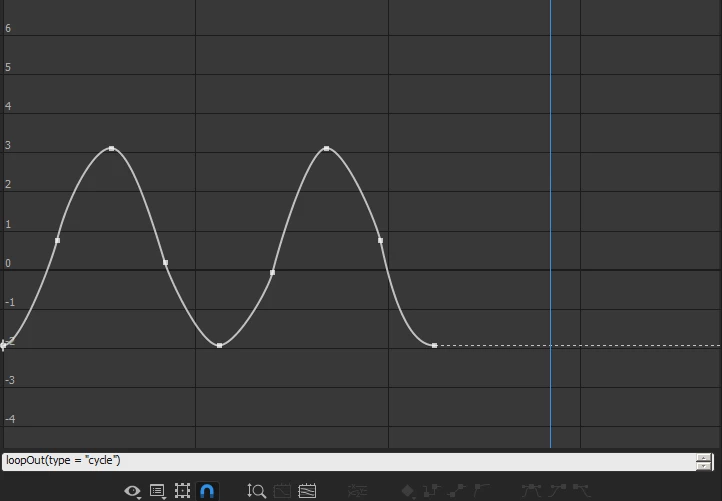
I would like to see the result of my expression inside the graph editor but here the dotted line is flat.

The expression works well in the composition viewer but I don't see that in the graph editor.

Maybe I've disable an option somewhere but I can't find where.

Any help appreciated
    This topic has been closed for replies.
    Correct answer Rick Gerard

    There is a little switch that looks like a graph between the expression on off switch (=) and the Pickwhip that you must turn on.

    This is real basic UI stuff that is covered in the Help files and community resources available through the Search help field at the top right corner of AE.

    1 reply

    Rick GerardCommunity ExpertCorrect answer
    Community Expert
    March 15, 2017

    There is a little switch that looks like a graph between the expression on off switch (=) and the Pickwhip that you must turn on.

    This is real basic UI stuff that is covered in the Help files and community resources available through the Search help field at the top right corner of AE.

    gobgobgobAuthor
    Known Participant
    March 15, 2017

    Thank you for your help!

    I actually did a search but haven't found it.
