


Participant
Aug 21, 2023 4:19 PM UTC
Answered

Draft 3D: Not Available (inadequate VRAM or graphics driver)

Yesterday, I installed After Effects version 22.6.5. When I navigated to Preferences > Preview > GPU Information, I came across the following details:
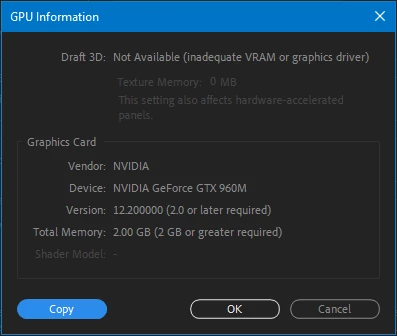


What might be the issue here? My MSI Laptop, equipped with an i7 6700HQ processor running at a boosted 3.2GHz, and a GTX 960M 2GB graphics card, seems to meet the system requirements. Despite this alignment, I'm unable to utilize the draft 3D feature.

 

Mylenium
MyleniumCorrect answer
Legend
Aug 21, 2023 6:43 PM UTC

Not correct. Da Vinci dabbled in refining the Mona Lisa until he died and allegedly he painted it at least twice on different media. The first four to seven years were only the first version. Anyway, yes, it stinks, but Adobe really want you to buy new hardware every three years or so. If at least there was a payoff with GPU stuff actually working...

Mylenium 

9 replies

Participant
Oct 9, 2024 6:15 PM UTC

Draft 3D: Not Available (inadequate VRAM or graphics driver)
Texture Memory: 0.00 MB
Graphics Card
Vendor: NVIDIA
Device: NVIDIA GeForce 930MX
Version: 12.500000 (2.0 or later required)
Total Memory: 2.00 GB (2 GB or greater required)
Shader Model: -

Translate
Participant
Sep 3, 2024 5:07 AM UTC

Go to edit>preferences>startup and repair. Click on "reset all preferences to defaults". 

Translate
Legend
Aug 24, 2024 3:58 PM UTC

If you have a small setup, you can use a cloud computer.
I’ve been using it for years, it’s great.
You can connect from any device a old laptop or even a mobile phone and take advantage of all the power of your cloud computer as if you had it at home.
There’s no maintenance required on your part, the provider replaces worn-out components, and the servers/computers are kept in a cold room.
All you need is a good internet connection.
I don’t have a great connection, so it lags/freezes occasionally, but for $30/month, I can’t complain.

Translate
Mylenium
Legend
Aug 21, 2023 4:23 PM UTC

Your graphics hardware is like 500 years too old and no longer supported. Nothing you can do about it.


Mylenium 

Translate
Participant
Aug 21, 2023 4:42 PM UTC

I'm curious about 1503 when Leonardo da Vinci started painting the Mona Lisa. It took him three to four years to complete, what's the graphic card in that year looks like lol


I understand that it might be outdated, but I assumed that all the specifications would meet the system requirements. Do I actually need to consider downgrading? Just so you know, I have 16GB of RAM.

Translate
Mylenium
MyleniumCorrect answer
Legend
Aug 21, 2023 6:43 PM UTC

Not correct. Da Vinci dabbled in refining the Mona Lisa until he died and allegedly he painted it at least twice on different media. The first four to seven years were only the first version. Anyway, yes, it stinks, but Adobe really want you to buy new hardware every three years or so. If at least there was a payoff with GPU stuff actually working...

Mylenium 

Translate