richpalmer71
Participant
November 18, 2019
Question

Dual preview in AE 2020 in macOS

  • November 18, 2019
  • 3 replies
  • 938 views

I'm having issues when trying to preview work in AE, when I hit the space bar the preview window seems to 'pop-out' and plays to the side of the main window. Can't seem to find a solution and its driving me nuts, any suggestions appreciated!


Latest AE installed - un-installed and re-installed!

MacOS 10.13.6 High Sierra
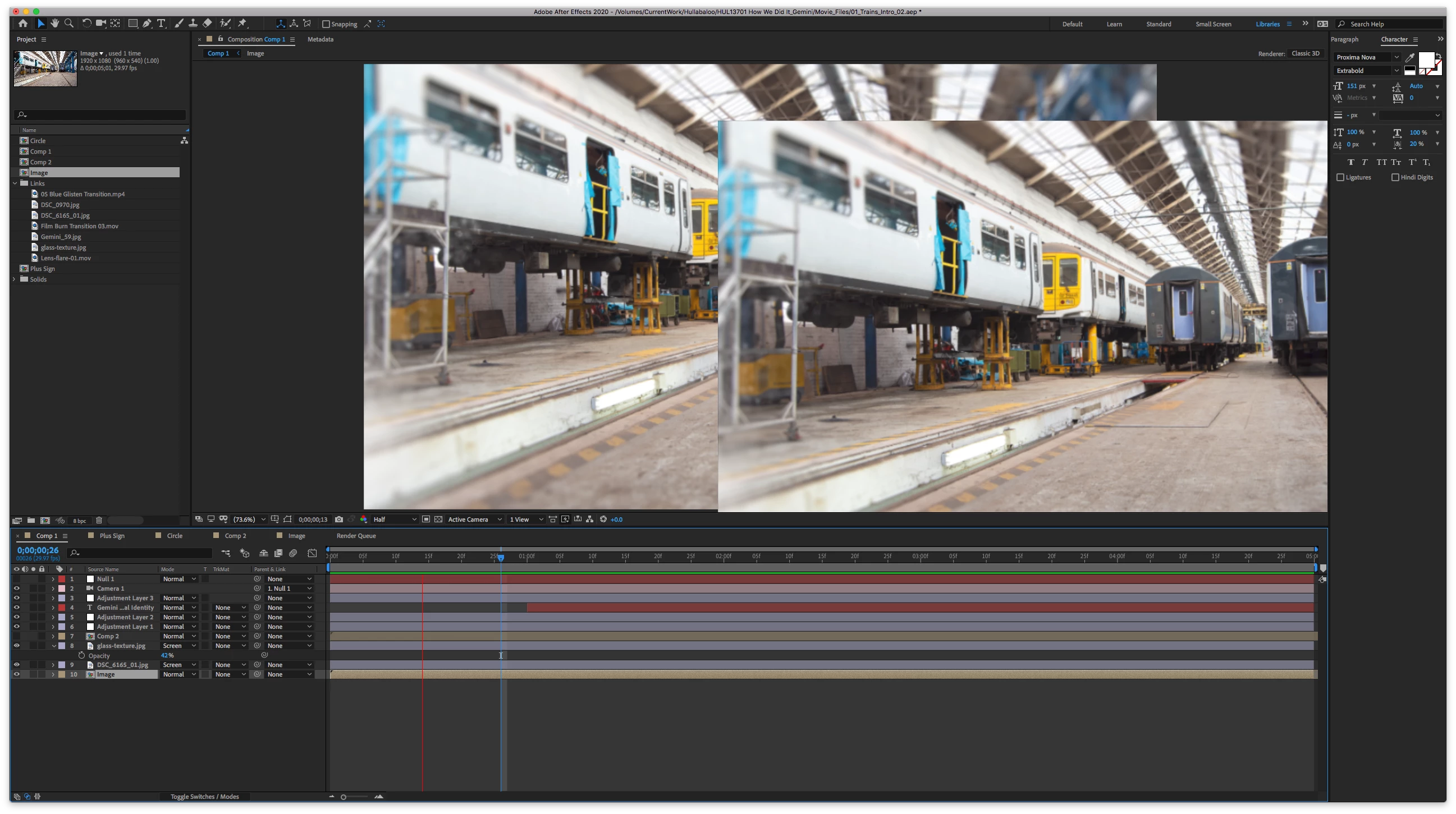
 

Title edited by Mod

This topic has been closed for replies.

3 replies

gupta shivangi
Legend
December 11, 2019

Hi all,


Thanks for your patience. Adobe After Effects has released a patch update which provide a fix for the duplicate preview issues. For more information, please check https://helpx.adobe.com/after-effects/kb/fixed-issues.html


Let us know if you have any other questions.


Thanks,

Shivangi

steffenf28504258
Participating Frequently
December 11, 2019

Shivangi,


thank you very much. The has solved the problem in my case. One detail: The patch notes say: Fixed a rendering issue where Mac hardware built before mid-2012 (…). In fact, I had experienced this error on a Late-2012 Mac Mini. 


Thanks,

Steffen

steffenf28504258
Participating Frequently
November 19, 2019

I am experiencing exactly the same issue (AE 17.0.0 MacOS 10.14.6, Mac mini (Late 2012)  2,3 GHz Intel Core i7 Intel HD Graphics 4000 1536 MB.  Never happened with former AE versions on this machine (starting with CS). I have switched off Preferences/Display/Hardware Accelerate Composition, Layer, and Footage Panels and restarted, same result. If this is a known issue, a detailed way to fix it would be much appreciated. AE without video preview is pretty much useless.


richpalmer71
Participant
November 19, 2019

Hi steffen

Please post on here if you find anything! I have googled this and switched various settings, but not really getting anywhere.... If I do manage it I'll do the same, although I am close to launching my iMac out of the window!!

Regards
Rich

Participant
November 20, 2019

Hi, I have the same problem, you already found a solution?

Community Expert
November 18, 2019

Switch your hardware acceleration options. This is a fairly common issue.

yusufuh34621887
Known Participant
November 18, 2019

Thanks, Rick.


I'm new to Afetr Effects, but I'm experiencing the same issue...


Could you advise me where to find my "hardware acceleration options"? Also, what would I switch it to?


Thanks again