

Devvine
Participant
April 19, 2024
Question

Duplicating forest background and foreground

  • April 19, 2024
  • 3 replies
  • 502 views

I'd like to manipulate the amount of greenery in a long still shot and adjust it where it is. Is there a way in after effects to do this seamlessly?

For example
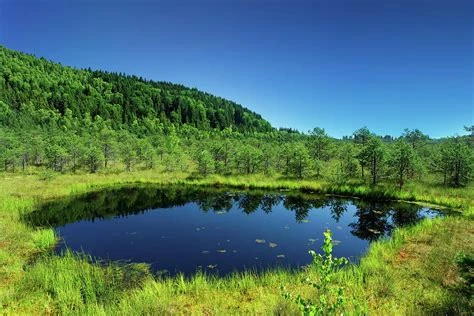
if i wanted the vacant right sky to have some tress from the left.

This topic has been closed for replies.

3 replies

thepixelsmith
Community Expert
Community Expert
April 21, 2024

In general, if this is just a still shot I would never recommend using After Effects for this type of work. While AE does have the ability to duplicate and mask layers and even has a clone stamp tool to clone areas of a layer to other areas it isn't really intended for this type of work on still images.

A better choice would be to use photoshop for this type of image editing. It has all the tools that AE does but many other specialized ones like generative fill, content aware fill, spot healing and the patch tool that would make this type of work much easier and quicker.

Devvine
DevvineAuthor
Participant
April 22, 2024

Wow much to think about, I appreciate it sincerely

Mohammad.Harb
Community Expert
Community Expert
April 21, 2024

I would prefer using adobe photshop Generative Ai to fill the area.

expand the canvas, make a selecfion , press generate .
Give it a try, the reult will be outstanding!

Devvine
DevvineAuthor
Participant
April 22, 2024

Would this be as ideal for moving picture? I intend to use a video clip over 20 minutes

Mylenium
Legend
April 21, 2024

Just duplicating the left trees will inevitably show recognizable repeating patterns and you will need additional footage/ photos. Otherwise it seems perfectly doable, assuming the footage is high resolution enough and not just the tiny image you posted. It's just not going to be a one-click thing.


Mylenium