Rowby
Inspiring
February 16, 2017
Answered

Dynamic link from AE to Premiere -- creates sequence with nothing in it

  • February 16, 2017
  • 1 reply
  • 2492 views

Hello

I created a composition in AE CC 2017.

Now I want to use dynamic link to get  the AE comp into to Premiere CC 2017.

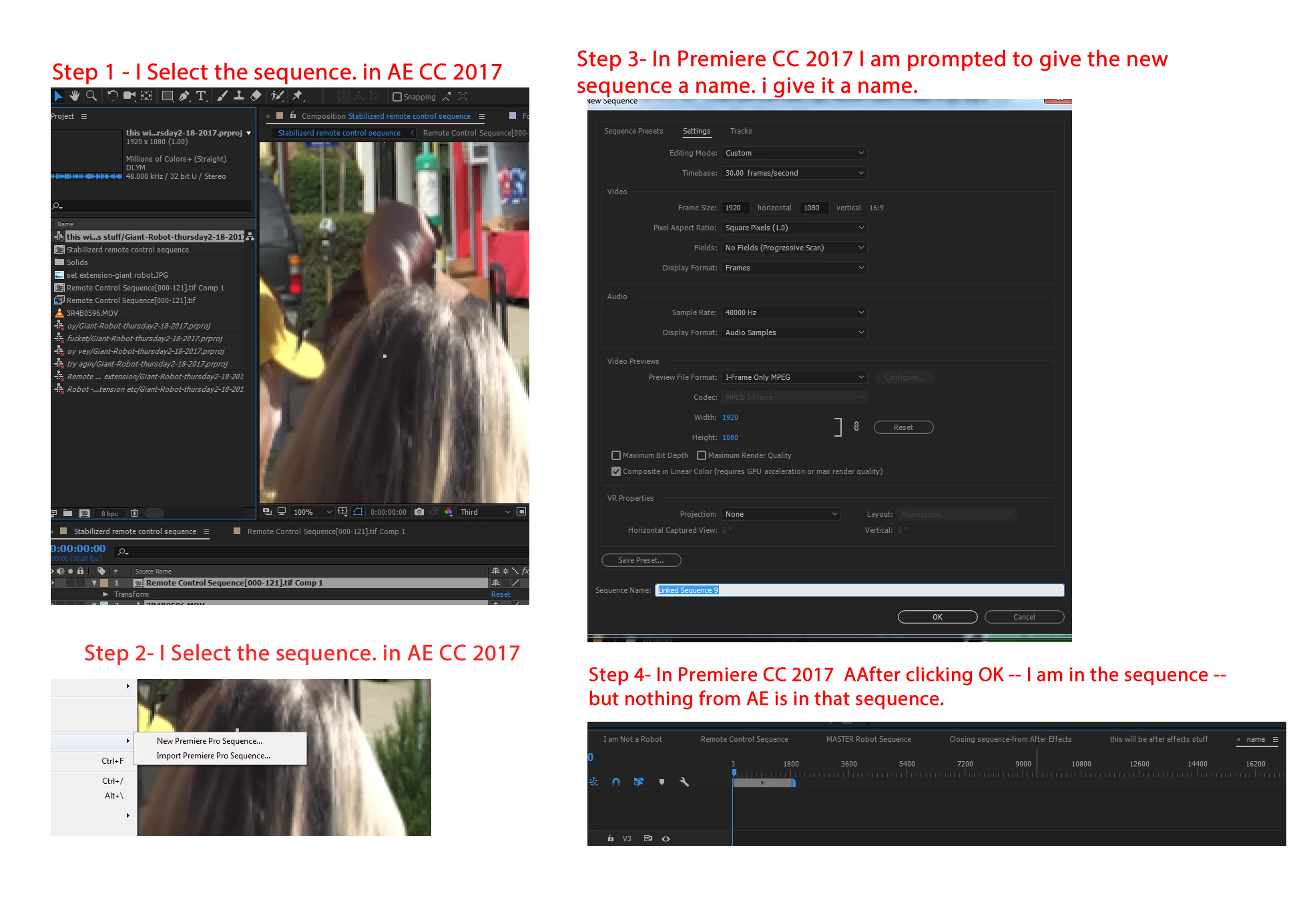
In AE I highlight the composition I want to send over to Premiere.  From the After Effects File menu I select "Adobe Dynamic Link:" and click the "New Premiere Pro Sequence"


Premiere prompts me to give the sequence a name and I do so.  But it results in a sequence with nothing in it.

Here's a screen capture of the steps I take.

???

Thanks for any help on this.  Perhaps a Youtube link.  (I see plenty starting with Premiere Pro and sending that to AE and then back to Premiere.  But not seeing much on Starting with AE and then adding it to an existing Premiere Pro cc 2017 project.

Thanks!

    This topic has been closed for replies.
    Correct answer Rick Gerard

    You are not using the right workflow. File>Adobe Dynamic Link>New Premiere Pro sequence is working exactly as designed and exactly the same way it has always worked.

    If you choose Fine>Dynamic Link>New Premiere Pro Sequence what you end up with new footage in the After Effects Project. This footage is an empty Sequence that opens in your existing or a new Premiere Pro Project. You can then add any media you have in the Premiere Pro Project and edit the sequence into something that can be used in After Effects. That new sequence will be dynamically linked back to After Effects and treated as any other media asset in After Effects. The original media (footage) used in the Sequence will not be imported or available in the After Effects Project. For me, this feature has very limited usefulness because there is no way to adjust any of the timing inside AE, you have to go back to Premiere Pro.  I see a couple of situations where this is an efficient workflow. I probably use this feature about once a year to pull in an edited sequence where I am cleaning up an audio track or finding a specific part of a very long shot. I will also use the feature occasionally when I want to apply a specific effect to sequence of several shots. This is the only way to get an edited sequence into After Effects as footage without having to render.

    If you want to use an After Effects Composition in Premiere Pro you need to create your composition in After Effect and then go to Premiere Pro and use File>Adobe Dynamic Link>Import After Effects Composition. This will not import the media (footage) used in the After Effects composition into your Project Panel in Premiere. The dynamic link server will launch and give you the opportunity to find a AEP project fine, look inside that project and then choose one or more of the compositions to import as media into your Premiere Pro Project. If you need access to the original media use in the Composition you will need to find it and import it into Premiere Pro.

    If you need to have the original media (footage) available in After Effects for further editing you will need to select all of the shots you want in your Composition from a Sequence in Premiere Pro and then use File>Adobe Dynamic Link>Replace with After Effects Composition. When the Comp is created in After Effects the footage will also be imported to the After Effects Project. You just have to be careful when you select the shots used in the Premiere Pro Sequence and make sure that none of them are After Effects Compositions.

    All of this information and more detailed instructions are available in the help files. You should probably spend a little time studying up on workflow. As you get to know both programs a little better you will get a better understanding of how the programs talk to each other.


    1 reply

    Dave_LaRonde
    Inspiring
    February 16, 2017

    Did you retain your 2015 Creative Cloud apps?  I recommend working in them.  If not, get them back -- you can get the apps all the way back to CS6 if you want.  Personally, I'd go with CC 2014.  It was the most bug-free.

    In contrast, CC2017 is so full of bugs you need a can of Raid.  Maybe a case of the stuff.  This forum contains some good diagnosticians.  I'll let them ask the questions.  But don't count on fast resolution.  This stuff can take days to get right.

    Rowby
    RowbyAuthor
    Inspiring
    February 16, 2017

    Hi Dave,

    Hee hee!  This should be an interesting thread.

    Yes, I can get those older apps back, if necessary.   But let's see if anyone else here  has a solution for this.

    After trying every possible way of doing the dynamic link, from After Effects to Premiere -- I thought I was going nuts.

    Maybe as a workaround I could make a dummy sequence in Premiere CC 2017 and then and doing a "Replace with after effects composition"

    To put this question another way, is anyone successfully using Dynamic Link between After Effects and Adobe premiere CC 2017?  Specifically starting a project in AE and then dynamically linking it to a premiere pro CC project.  Or any variation of this???

    I'm using Premiere Pro 2017.0.2 Release       Version 11,9-0 Tanq

    After Effects 2017.1 ReleaSe    Version 14.1.0.57

    Rowby

    Rick GerardCommunity ExpertCorrect answer
    Community Expert
    February 17, 2017

    You are not using the right workflow. File>Adobe Dynamic Link>New Premiere Pro sequence is working exactly as designed and exactly the same way it has always worked.

    If you choose Fine>Dynamic Link>New Premiere Pro Sequence what you end up with new footage in the After Effects Project. This footage is an empty Sequence that opens in your existing or a new Premiere Pro Project. You can then add any media you have in the Premiere Pro Project and edit the sequence into something that can be used in After Effects. That new sequence will be dynamically linked back to After Effects and treated as any other media asset in After Effects. The original media (footage) used in the Sequence will not be imported or available in the After Effects Project. For me, this feature has very limited usefulness because there is no way to adjust any of the timing inside AE, you have to go back to Premiere Pro.  I see a couple of situations where this is an efficient workflow. I probably use this feature about once a year to pull in an edited sequence where I am cleaning up an audio track or finding a specific part of a very long shot. I will also use the feature occasionally when I want to apply a specific effect to sequence of several shots. This is the only way to get an edited sequence into After Effects as footage without having to render.

    If you want to use an After Effects Composition in Premiere Pro you need to create your composition in After Effect and then go to Premiere Pro and use File>Adobe Dynamic Link>Import After Effects Composition. This will not import the media (footage) used in the After Effects composition into your Project Panel in Premiere. The dynamic link server will launch and give you the opportunity to find a AEP project fine, look inside that project and then choose one or more of the compositions to import as media into your Premiere Pro Project. If you need access to the original media use in the Composition you will need to find it and import it into Premiere Pro.

    If you need to have the original media (footage) available in After Effects for further editing you will need to select all of the shots you want in your Composition from a Sequence in Premiere Pro and then use File>Adobe Dynamic Link>Replace with After Effects Composition. When the Comp is created in After Effects the footage will also be imported to the After Effects Project. You just have to be careful when you select the shots used in the Premiere Pro Sequence and make sure that none of them are After Effects Compositions.

    All of this information and more detailed instructions are available in the help files. You should probably spend a little time studying up on workflow. As you get to know both programs a little better you will get a better understanding of how the programs talk to each other.