Inspiring
April 1, 2019
Question

Element 3D AE, see through sss

  • April 1, 2019
  • 2 replies
  • 1690 views

Hi guys.

I have a 3d "paper glass" with a texture and all.

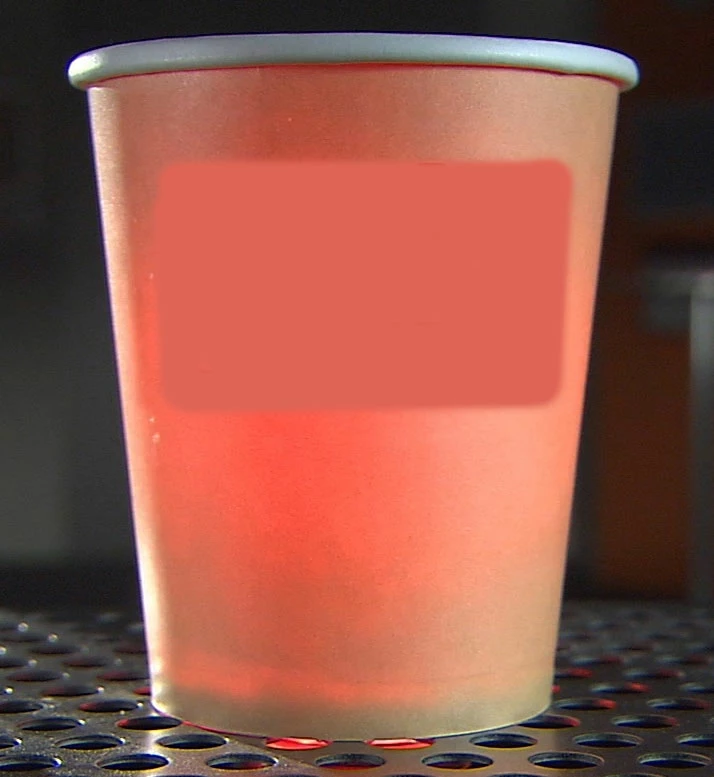
I would like to put a light inside,a red one, and be able to see the light through the paper glass, something like the image here:
This topic has been closed for replies.

2 replies

Mylenium
Legend
April 2, 2019

I would like to put a light inside,a red one, and be able to see the light through the paper glass, something like the image here:

That's not possible. E3D's SSS is a fake incidence based shader, not real transparency and scattering. Aside from that even in a 3D program this would be far from trivial due to how those settings interact. You have to fake it with layered compositing.

Mylenium

seeyo76Author
Inspiring
April 2, 2019

Oh hey, with layered compositing ? like ?

Community Expert
April 1, 2019

Go to the developer's site and dig through the tutorials. Texturing and lighting inside Element 3D is not at all part of AE's UI, it's part of their custom UI. You can do a lot with Element 3D, but you can't just poke around in the UI and figure it out. VIDEO COPILOT | After Effects Tutorials

seeyo76Author
Inspiring
April 1, 2019

I did already, I'm pretty good with E3D... and already checked the site, that's why I'm posting here.

Community Expert
April 1, 2019

I would start by adding an AE Point Light at the center of your model. You'll have to figure the position based on the position of the model. Then start working with the settings in the Scene Setup for Element.

Without seeing what you are trying it's very hard to give you meaningful suggestions. Cropped screenshots are pretty useless. Show us the timeline with the modified properties of the layers involved revealed (uu) and show us your Scene Setup with the properties you are trying to modify revealed and maybe someone can help.