Participant
May 5, 2019
Answered

Element 3D blurring low resolution textures

  • May 5, 2019
  • 4 replies
  • 5846 views

Hello,

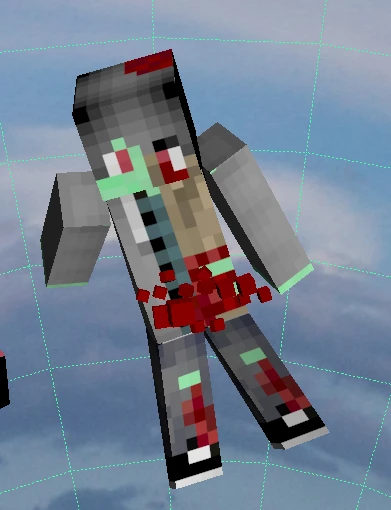
My .obj-file has textures with a 64x64 resolution. however, after effects seems to blur it.

how it should look:
how it actually looks:
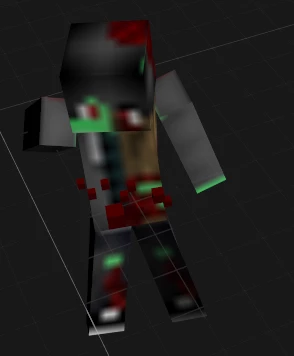
How can I fix this? Any help would be appreciated.

This topic has been closed for replies.
Correct answer Mylenium

You cannot turn off texture filtering in E3D. So rather than trying to fix the problem on the wrong end, simply create large enough textures that remain sharp even with filtering.

Mylenium

4 replies

Participant
June 2, 2023

I use E3D for editing and modeling.


The solution to fix the low quality blurred texture is if you are using a solid layer, 

you need to fit the resolution properly.

Mine was blurred because I put my solid layer resolution as 100x100. I was supposed to put 1080x1920.


hope this helped!

Participating Frequently
October 15, 2021

Ive had the same problem so how did you do it? The answers below dont seem to work or I'm doing something wrong, more info would be very helpful! 

kirkeric
Inspiring
May 6, 2019

I use E3D a ton and honestly not familiar with texture filtering BUT, most definitely make it large from the beginning.  Then once you close the E3D interface, use your camera to zoom in and not just cursor zoom in which would be misleading.  The good thing is you can go and enlarge in the E3D interface and up the segments.

I would also up the tessellation to extreme for best edges.

I've never encountered that kind of blur.

Eric

Mylenium
MyleniumCorrect answer
Legend
May 6, 2019

You cannot turn off texture filtering in E3D. So rather than trying to fix the problem on the wrong end, simply create large enough textures that remain sharp even with filtering.

Mylenium