Answered
Element 3D distortion
Does someone knows why this happens?
When i use the "expand edges" in order to get the whole circle in red color, some shape is poping out.
Here is the video:
https://www.youtube.com/watch?v=lzfzkIOARzk
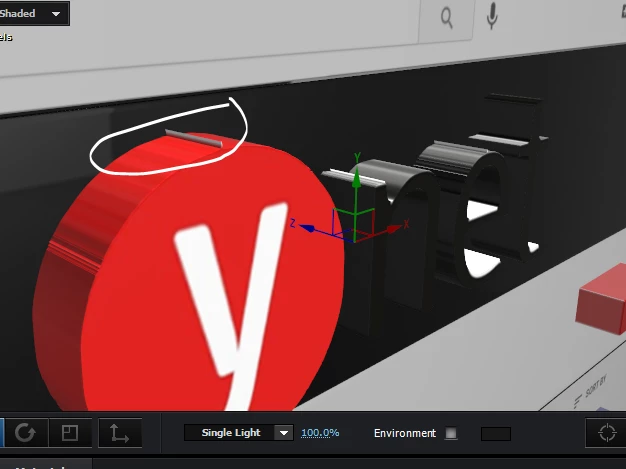

Does someone knows why this happens?
When i use the "expand edges" in order to get the whole circle in red color, some shape is poping out.
Here is the video:
https://www.youtube.com/watch?v=lzfzkIOARzk
OK I GOT IT!
The problem was that in the firstplace i used AutoTrace and as @Mylenium suggested i cleaned up the mask, but all the way - Cause usually AutoTrace creates a bunch of points (which probably caused the Distortion), so after that i mask manually with the circle shape, thats all.
and everything worked out.
Already have an account? Login
Enter your E-mail address. We'll send you an e-mail with instructions to reset your password.
 AdChoices