


Inspiring
Feb 3, 2018 2:59 AM UTC
Question

Empty Composition Window in After Effects... Just Grey with Open Options

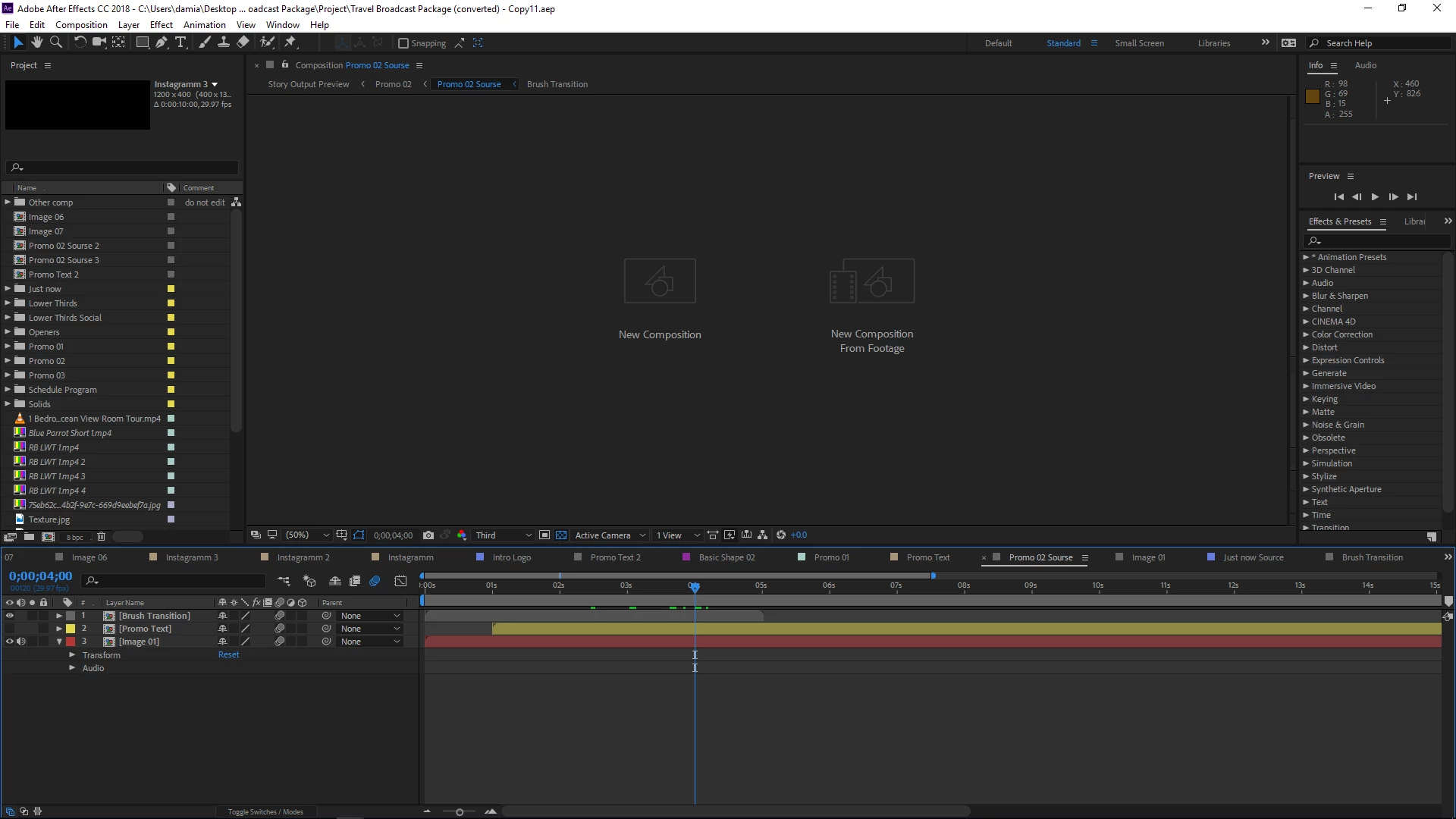
Whenever I open any After Effects project, I get a grey blank screen in my composition preview window. All I see are the two options to create a new comp, or new composition from footage. Occasionally, if I reset my preferences to default by launching After Effects and holding down CTRL + ALT + SHIFT, it will resolve the problem, however, it may take a couple tries. Resetting the workspace does not work, creating a new workspace does not work, and creating new comps makes no difference. Zooming in to fit the screen to 100% does not work either. So for now, I am just forced to constantly try and restart my AE in different ways through a project file, through administrator, or through resetting preferences and hopefully one of them will work to display my composition.

While this is a work around it takes time and shouldn't be happening to begin with. Any idea what the solution is here? Seems like the 2018 releases of Adobe are pretty glitchy. Premiere Pro is also giving off a weird glitch where if you import certain files within certain bins, your timelines freezes up, and won't respond, but Windows will, and you have to click on a menu item on top of the program to make it work. But that's a whole other issue for a whole other forum post.

Here's a screenshot of what I see in After Effects:
16 replies

Known Participant
Jan 27, 2025 8:57 AM UTC

Old thread, but had the same problem. Emptying the cache, cleaning the database, and then restarting After Effects was the solution that worked for me.
(EDIT: Temporarily. Doesn't prevent the issue form reoccuring pretty much every time I work with After Effects. This seems to be a bigger problem.)

Translate
t.moussa
Participating Frequently
Mar 24, 2021 9:53 AM UTC

updating to AE last version 18.0.1 solved it for me

Translate
Participant
Jul 30, 2024 6:53 PM UTC

Old thread, I know.  But to anyone who, like me, came here and none of these suggestions still worked, here's the solution that did the trick for me. Just remove the extra unnecessary spaces from the project file name.  After trying everything, I was relectuant but gave it a shot. And thank Jesus....voila! So hopefully this blesses someone else.

Translate
Participant
Mar 17, 2021 8:35 PM UTC

Copying my content into a new coposition worked for me.

Translate
Participant
Feb 7, 2021 9:38 PM UTC

Having the same issue, did you ever find a permanent solution? 

Translate
Community Expert
Feb 7, 2021 10:09 PM UTC

Did you try double-clicking the currently selected workspace, or using Window/Workspace to reset the current workspace? Have you tried changing the workspace?

Translate
t.moussa
Participating Frequently
Jun 22, 2020 1:46 PM UTC

I had this issue with Ae and Pr, it was solved by resetting windows and installing a clean after effects and premiere

Translate
t.moussa
Participating Frequently
Jun 21, 2020 11:16 AM UTC

I have the same isuue, tried everything on the community and the internet, nothing worked

this is really frustrating.

Translate
Participating Frequently
Dec 10, 2018 11:04 PM UTC

I just underwent this glitch. Empty Disk Cache, quit the project and start again. This seems to clear up a lot of glitches. And there are a lot of glitches. That cleared it up for me.

Translate
Participating Frequently
Jul 16, 2021 9:11 PM UTC

emptying all the cache was did the trick for me too!.

Thanks for the post/suggestion. I was worried I'd broken the project file - disaster!

Translate
Community Expert
Feb 5, 2018 2:59 AM UTC

I cannot reproduce your problem on any of the Mac (4 of them) or Windows machines I am working on almost every day. I suggest looking at GPU drivers, trying a clean install, or looking for 3rd party software that may be causing conflicts with your particular system. No comp panel, even if you close it and then re-open it, is not a common bug and without system and os details down to the last decimal point I have no solution that I know will work.

Translate
Inspiring
Feb 5, 2018 1:21 AM UTC

No one knows? Guess this truly is a massive glitch/bug on Adobe's part. I'll be reverting back to the old version then :/ ...

Translate
Kevin J. Monahan Jr.
Legend
Feb 13, 2018 1:14 AM UTC

Sorry for this frustration, GSmaniamsmart. Kindly contact our agents so that they can assist you with this issue: FAQ: How do I contact Adobe Support?

Thanks,
Kevin

Translate
Kevin Monahan - Sr. Community and Engagement Strategist – Adobe Pro Video and Audio
t.moussa
Participating Frequently
Jun 22, 2020 1:45 PM UTC

 I had this issue with Ae and Pr, it was solved by resetting windows and installing a clean after effects and premiere

Translate