
Participant
May 12, 2022
Answered

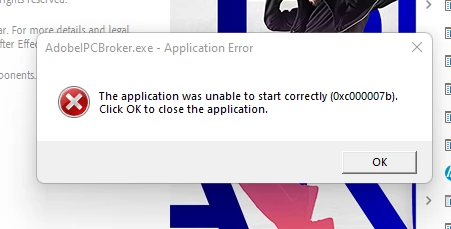
Error 0xc000007b When opening After Effects.

  • May 12, 2022
  • 2 replies
  • 1105 views

Hello. i get the error shown in the title and image when attempting to open after effects. i did a windows update yesterday and this is when my issue began. I have all my drivers updated and tried 2010, 2012, 2013 and 2015 versions of visual studio to install to no avail.

SPECS: 8GB ram (looking into an upgrade)

Core I5 8th Gen

nVidia GTX 1050Ti

2TB intel Optane SSD
This topic has been closed for replies.
Correct answer Liam.AEP

I decided to downgrade after effects, then upgrade it, and for some reason that worked. That was the only fix I was able to find work. Thanks for all the help.

2 replies

nishu_kush
Community Manager
Community Manager
May 13, 2022

Hi Liam,


Welcome to the community and sorry for your issue.

Please try the solution mentioned in the following article: https://community.adobe.com/t5/after-effects-discussions/faq-how-to-fix-common-after-effects-crashes/td-p/10684130

Let us know if any of the steps help.


Thanks,

Nishu

Liam.AEPAuthor
Participant
May 13, 2022

running it as an admin showed this. how can i install this dll as reinstalling AE did not create this file. CRClient.dll?

Liam.AEPAuthorCorrect answer
Participant
May 13, 2022

I decided to downgrade after effects, then upgrade it, and for some reason that worked. That was the only fix I was able to find work. Thanks for all the help.

Mylenium
Legend
May 12, 2022

This is an install/ uninstall that never finished correctly. Terminate the IPCBroker.exe in task manager and see if the app launches at all. If not, boot into safe mode and uninstall the whole Creative Cloud stuff, then reinstall it with a clean download from the web site. You can also try to play around with other potential fixes like signing in and out of the CC app or simply changing the language and running a reinstall in that new language, then switch back to the original setting. More advise also here:


Fix Adobe Creative Cloud download and install errors


Outside that the usual stuff applies as well: Check your drivers, your Windows Update status, security settings, integrity of the Windows Installer and its database and so on. Anything that may interfere with install operations, basically.


Mylenium

Liam.AEPAuthor
Participant
May 13, 2022

this did not wok for me. i uninstalled creative cloud and reinstalled it to no avail, reinstalled AE, nothing. in fact, now i dont even get a splash screen, just the same error.