
Participant
August 3, 2021
Question

Error 37 66 when trying to auto trace Text

  • August 3, 2021
  • 1 reply
  • 196 views

Dearest Adobe community, 

I hope you can help me out. 

I've been trying to auto trace th text you can see below on my timeline. The error occurs and it seems that the auto traced text lasts only 2 seconds, so 1/3rd of entire composition. 


It actually worked with a previous text fully, however after I changed the location of the text it simply does not work anymore. I've been trying to relocate it again, auto-trace a solid and nothing. 


Also, after the error occurs everything freezes, can't quit AE or do anything for about 5 minutes of non-stop clicking "OK". 


My memory is quite free, checked it couple of times and restarted everything twice. 
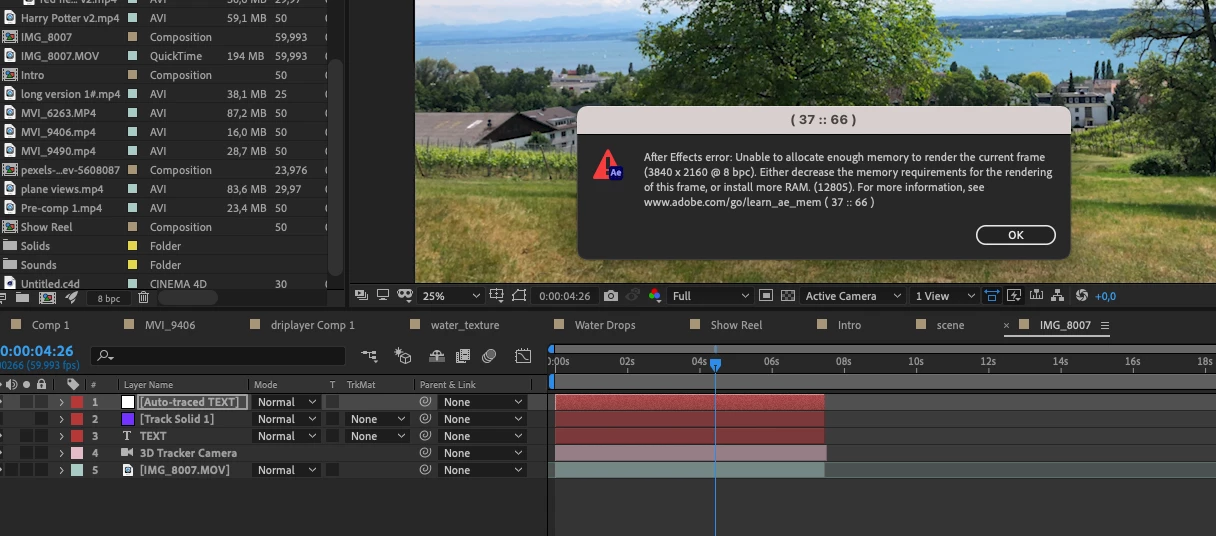
Any kind of suggestions are welcome!


Please don't judge my project pannel mess. 


Thanks a lot!


This topic has been closed for replies.

1 reply

Mylenium
Legend
August 3, 2021

It's not realyl clear what you are doing there, but if you placed a text layer in a 3D tracked scene, at the very least you would have to pre-compose it for Auto Trace to even work. This cannot be applied directly to 3D layers. Other than that of course any such procedure can create insane amounts of mask paths and keyframes, so it's still possible you will simply run out of memory. You may want to consider alternative options, but you realyl would have to explain what actualyl you are trying to achieve for anyone to advise.


Mylenium

Participant
August 3, 2021

This is exactly what I was trying to do here - apply autotrace to 3D text layer and do fun things with it later. And you were right, apparently after cleaning memory it just started to work. I'm still running on low, but at least that was succesfull. Thank you!


But for everyone out there - yes it is possible to do with 3D layers. And it can help with really cool effects.