


Inspiring
October 31, 2023
Answered

Error in expression

  • October 31, 2023
  • 2 replies
  • 593 views

Hi all


I'm trying to write an expression for a property in one of the project's compositions.


comp("MaskPrep").layer("Pre_Source_Crop").("Effects")("Colorize Lightness")("Slider");

 

The expression references a property in another composition in the project. I get an error.
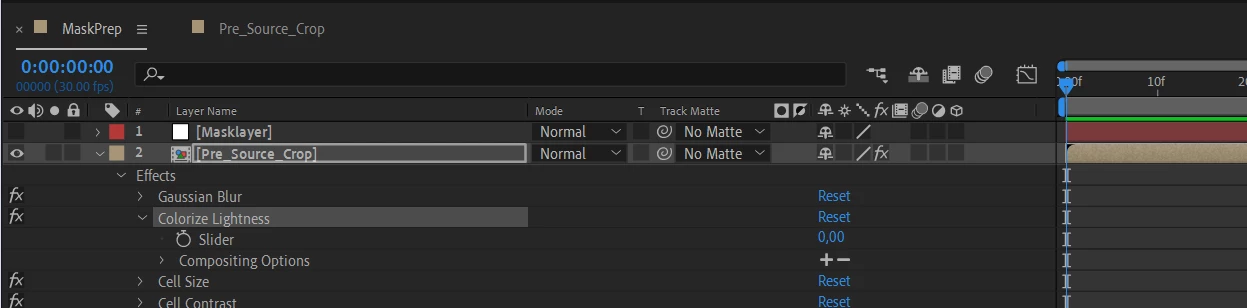


Error: layer named "Pre_Source_Crop" is missing or does not exist...


???!??? 


Adobe After Effect version 23.3.0

This topic has been closed for replies.
Correct answer Dan Ebberts

Another possibility is that you have more than one comp named "MaskPrep" and the expression is looking at the wrong one.

2 replies

Dan Ebberts
Community Expert
Dan EbbertsCommunity ExpertCorrect answer
Community Expert
November 1, 2023

Another possibility is that you have more than one comp named "MaskPrep" and the expression is looking at the wrong one.

AnyONAuthor
Inspiring
November 1, 2023

Replacing a composition name with an index in an expression 

error:  Layer index 2  out of  range !!!!

Retrieving an expression from a locked effects control panel produces the same result !!!

AnyONAuthor
Inspiring
November 1, 2023

Yes, I had two compositions in my project named "MaskPrep"

Community Expert
October 31, 2023

You might have a space in the layer or the comp name.


Try locking the Effects Control Panel for the slider, then drag the pickwhip from the Colorize Lightness property in the timeline to the locked expression control slider. That should work. You'll then be able to see the space.


You could also try typing in the comp, layer, and effect names and take the auto-complete if you have that turned on.


If that still does not work, try renaming the layer, or the Effect Control Slider, or the Comp and see if the rename translates to the comp.