

Participating Frequently
Jan 19, 2023 2:29 PM UTC
Answered

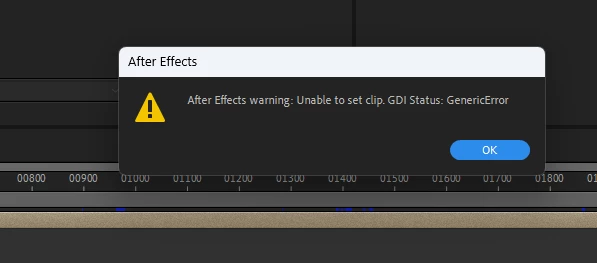
Error message Unable to set clip. GDI Status: GenericError while previewing the Timeline
Unstable releases- I am seriously considering not updating to new versions at least until 2 revisions.

This topic is closed to new replies. Start a new post to keep the conversation going.
oOo Tomy oOo
oOo Tomy oOoCorrect answer
Participant
Feb 27, 2023 10:28 PM UTC

Hi,

I find a solution who work for me.

It was an audio problem.

Go to your audio setting in Edit-> Preferences ->Audio Hardware and change your "Default Output".


21 replies

Participating Frequently
Sep 18, 2024 11:46 AM UTC

I experience the same issue from time to time. I know the solution to the problem, but I am unable to save the file when this error pops up as my preview is on loop, and after closing it, it immediately pops up again. How can I save my file?

Translate
Participating Frequently
Sep 18, 2024 12:09 PM UTC

Mine stopped prompting eventually when I had just spammed the 'OK' button enough times. Hope that helps despite it being a silly solution...

Translate
Participating Frequently
Sep 18, 2024 12:14 PM UTC

Also it seemed that a certaing element in the timeline triggered the loop. Maybe try and make sure the composition isn't still trying to play back that bit. Click to move the playhead or try and press space to stop it before the next prompt, maybe that works.

Translate
oOo Tomy oOo
oOo Tomy oOoCorrect answer
Participant
Feb 27, 2023 10:28 PM UTC

Hi,

I find a solution who work for me.

It was an audio problem.

Go to your audio setting in Edit-> Preferences ->Audio Hardware and change your "Default Output".


Translate
Participating Frequently
Jun 15, 2023 1:14 PM UTC

This is the correct answer. Happens everytime i switch headphone jack on my PC. Thank you Tomy!

Translate
oOo Tomy oOo
Participant
Jun 15, 2023 1:22 PM UTC

You're welcome!

Translate
Ishan Y
Inspiring
Jan 23, 2023 2:24 PM UTC

Hey Raj,

Welcome to the community, and sorry for the issue. Could you let us know what action triggers this error message? Let us know your current After Effects version (Here's how to check). We're here to help.


Thanks,

Ishan

Translate
Participating Frequently
Jan 26, 2023 5:53 PM UTC

Hi, it appears while playing the timeline(spacebar) and keeps on appearing instantly when closing it. The only way I found to escape this is to force close the app in the task manager. Here is the version.


Translate
Ishan Y
Inspiring
Feb 1, 2023 2:05 PM UTC

Do you see this issue with a specific project? I'm curious if a particular media file or effect is causing the error message to trigger. GPU drivers might cause similar issues as well. Let us know your system specifications (OS, OS version, CPU, GPU, RAM). 

Translate