


Inspiring
Oct 4, 2025 8:06 AM UTC
Answered

error message - unable to start after effects 2025 on Macbook Pro M4 (2024)

Hi Adobe Experts

can't start Adobe after effects on my new macbook pro M4 - always get the same error - see my attached warning and shutdown-message by starting the tool. - thanx for some helping adivces how to start -


i did already the safe start - don't work also i've deleted every not compatable plugins. -

deleted also every older versions - no chance - thanx for help. 


adobe tutorials and online help desks don’t show helpful answers and guidance. -


This is the error message:


 Zuletzt protokollierte Meldung: Transmit plugin „DeckLinkTransmit“ ist während des Aufrufs von „tmResult ML::TransmitEntry::Startup(const dvacore::UTF16String &, const tmModule *, tmStdParms *, tmPluginInfo *)“ abgestürzt.. 
 

SchmidtworksCorrect answer
Inspiring
Oct 4, 2025 2:06 PM UTC

Hey Folks


Solution for the problem is found.

Now both tools are able to launch: Premiere Pro 2025 and After Effects 2025 on Macbook Pro M4


This is the path to bugfix.

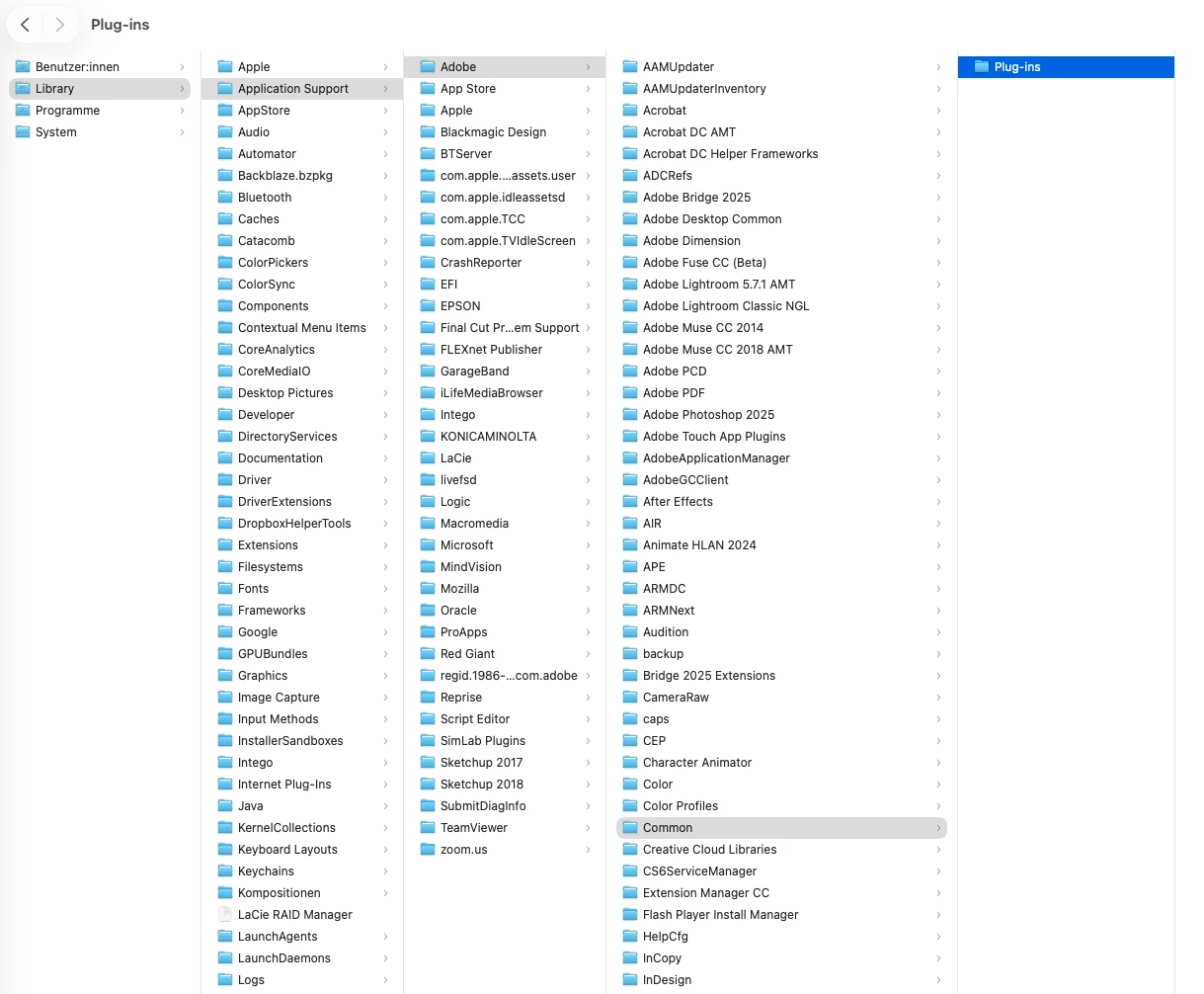
delete the content in the "plug-ins" folder - following this path:

Library/Application Support/Adobe/Common/Plug-ins -

then the content inside this folder "plug-ins" should be checked and deleted. 


good to know 😉 - see added screenshot.


10 replies

bbb_999
Community Manager
Community Manager
Oct 6, 2025 2:56 PM UTC

The message you're seeing says that Blackmagic's Transmit plugin is crashing. 


Translate
SchmidtworksAuthorCorrect answer
Inspiring
Oct 4, 2025 2:06 PM UTC

Hey Folks


Solution for the problem is found.

Now both tools are able to launch: Premiere Pro 2025 and After Effects 2025 on Macbook Pro M4


This is the path to bugfix.

delete the content in the "plug-ins" folder - following this path:

Library/Application Support/Adobe/Common/Plug-ins -

then the content inside this folder "plug-ins" should be checked and deleted. 


good to know 😉 - see added screenshot.


Translate
jane-e
Community Expert
Community Expert
Oct 4, 2025 10:13 AM UTC

@Schmidtworks 


Duplicate posts merged to one thread


Jane

Translate
Inspiring
Oct 4, 2025 9:21 AM UTC
Hi Adobe Experts

I can't launch Premiere Pro 2025.
See attached screenshot.

Creative Cloud and all Adobe applications are up to date and are constantly updated.
The programs should run stably and crash-free on a latest-generation MacBook Pro M4 (2024).

I urgently need qualified troubleshooting and support.


Translate
Inspiring
Oct 4, 2025 9:59 AM UTC

these are the hardware facts of my Macbook Pro M4 - if relevant ?!

Translate
Inspiring
Oct 4, 2025 8:06 AM UTC

Hi Adobe Experts


can't start Adobe after effects on my new macbook pro M4 - always get the same error - see my attached warning and shutdown-message by starting the tool. - thanx for some helping adivces how to start - i did already the safe start - don't work also i've deleted every not compatable plugins. - deleted also every older versions - no chance - thanx for help. 


if possible send me your solution path al

Translate