Participant
October 14, 2025
Answered

Error started form yesterday
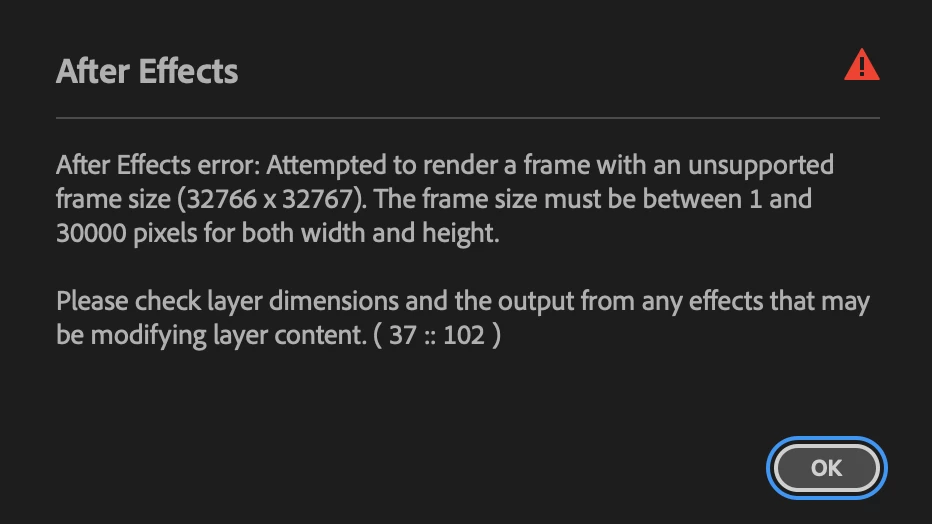
  • October 14, 2025
  • 3 replies
  • 231 views

When I import Ai layer with text that is not outlined, this error appears; but this never happened before until yesterday

Hopefully someone can help me with this.

Thanks a lot!

Correct answer kay_9987

It seems to be the problem of the latest version Ai.

When I save the Ai file with 2024 ver, no error appears!
Thanks everyone.

3 replies

kay_9987AuthorCorrect answer
Participant
October 15, 2025

It seems to be the problem of the latest version Ai.

When I save the Ai file with 2024 ver, no error appears!
Thanks everyone.

nishu_kush
Community Manager
Community Manager
October 14, 2025

The message in the screenshot says that the resolution of the text or the Ai file is too large. Try optimising that. If that's not the case, please share the Ai file with me for testing. Feel free to share via DM if you prefer not to share it publicly.

Looking forward to your response.


Thanks,
Nishu

kay_9987Author
Participant
October 15, 2025

The problem has been solved! Thank you for answering!

Participating Frequently
October 14, 2025

Hey this error usually happens when After Effects can’t read editable text from an Illustrator file, which often means the AI file wasn’t saved with PDF compatibility enabled. To fix it, open the file in Illustrator and go to File → Save As, then make sure “Create PDF Compatible File” is checked and save it again in a version that matches your AE (like CC or CS6). After that, go back to After Effects and reload or re-import the file using “Composition – Retain Layer Sizes.” If the issue continues, you can also convert the text to outlines before importing, or export the artwork as a PSD instead and bring it in that way.

kay_9987Author
Participant
October 15, 2025

The problem has been solved by degrade Ai! Thank you for answering!

nishu_kush
Community Manager
Community Manager
October 15, 2025

Thank you for updating the thread. If possible, please share the faulty file so that I can investigate what exactly caused the error.


Thanks,
Nishu