



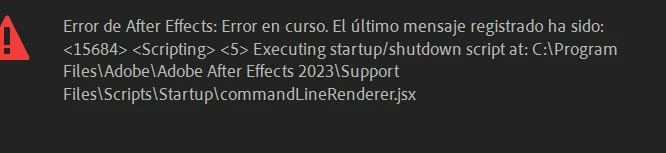
Error starting After Effects 23.6: "Executing startup/shudown script at: C:\Program Files\...
Hi. I have reinstalled After Effects 23.6 on my newly formatted laptop on windows 11 with an Nvidia 3070 graphics card. It is the same computer on which AE was running perfectly. In this installation there are no plugins or external extensions installed.
I have tried reinstalling After Effects, the error still occurs:
---------------------------------------------------------
At startup, I get this error (then it saves the project and quits):
---------------------------------------------------------
When I access the error log, it indicates:
[2023-09-24_15-28-27][11668][Warn] [general] We are going to deprecate hostInfo access soon. Please use HostInfoController instead.
[2023-09-24_15-28-27][11668][Warn] [general] We are going to deprecate hostInfo access soon. Please use HostInfoController instead.
[2023-09-24_15-28-27][11668][Warn] [general] We are going to deprecate hostInfo access soon. Please use HostInfoController instead.
[2023-09-24_15-28-27][11668][Info] [general] UXP will use the WebView2 runtime in the system as no WebView2 runtime path is provided by the host.
[2023-09-24_15-28-28][11668][Error] [general] The Host version is lower than what plugin: com.adobe.ccx.start is compatible with
---------------------------------------------------------
If you start AE by double clicking on a project (even if it is empty), it doesn't give the error, although I don't know if it remains stable and it is certainly not ideal.
 AdChoices