


Known Participant
Aug 18, 2022 9:13 PM UTC
Answered

Error: The file you are attempting to open was created with AE version 23.0x24 (Apple Arm64) and...

I worked on a project with AE Beta and now can't open my project with my normal AE. Is there a way I can convert it back? I got this message, when I tryed to open it with AE 22.5
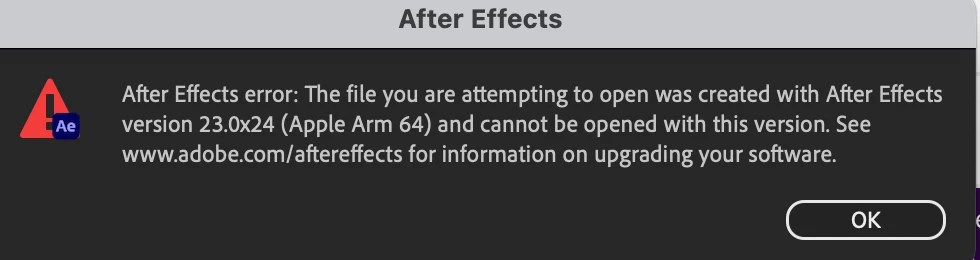
All my programs are updatet to the latest versions.

Macbook Air M1 12.5.1 

AE Beta 23.0

AE 22.5

This topic is closed to new replies. Start a new post to keep the conversation going.
Mylenium
MyleniumCorrect answer
Legend
Aug 19, 2022 7:00 AM UTC

This has never been different. AE is not backwards compatible. If at all you can try and save it back to the previous older version from within the Beta using Save As..., but if that doesn't work then there is simply no way.


Mylenium

8 replies

Mylenium
MyleniumCorrect answer
Legend
Aug 19, 2022 7:00 AM UTC

This has never been different. AE is not backwards compatible. If at all you can try and save it back to the previous older version from within the Beta using Save As..., but if that doesn't work then there is simply no way.


Mylenium

Translate
Known Participant
Aug 19, 2022 9:36 AM UTC

Strange. I nether had that issue before. So i have to wait until AE officaly releases version 23, because there is no option to save it as an older file version. 

Translate
Known Participant
Aug 19, 2022 10:08 AM UTC

saving it as older versions worked! thx!

Translate
nishu_kush
Legend
Aug 18, 2022 11:58 PM UTC

Hi aichanq60554787,


Sorry for your issue.

Which beta version you were using when you created this file? Are you able to open the file in the beta version? Have you tried importing your file into a new project instead of opening it?

Let us know.


Thanks,

Nishu

Translate
Known Participant
Aug 19, 2022 9:32 AM UTC

I used beta version 23 and can't import it either.

Translate