Participant
August 25, 2026
Answered

Exact cube value

  • August 25, 2026
  • 7 replies
  • 135 views

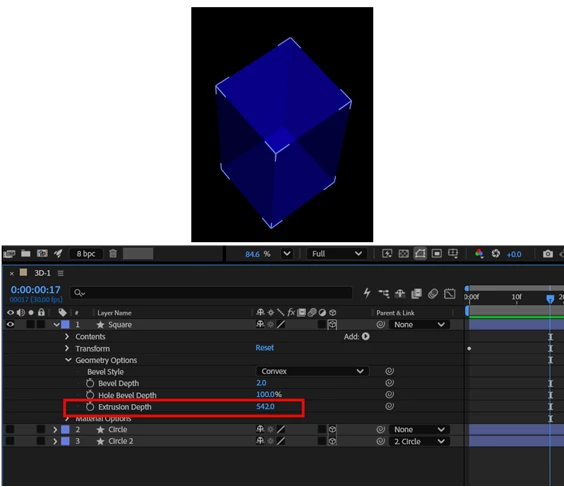
What should be the value to get an exact cube?


    Correct answer Nishu Kushwaha

    @abstract_hands0688 Saw your file. I couldn’t find a way to convert the rectangle to a non-bezier. If you’re worried about the animation, you can simply copy the Transform from your existing layer and paste it on the new layer.

    Hope that helps.


    Thanks,

    Nishu

    7 replies

    Participating Frequently
    August 27, 2026

    If the Size property is missing, it may be because the square was created differently. I’d check the layer’s transform/path settings and make sure you’re working with a regular parametric shape rather than a converted path. That should make it easier to get the exact dimensions and set the extrusion depth correctly.

    Nishu Kushwaha
    Community Manager
    Community Manager
    August 26, 2026

    Hi, thanks for reaching out.

    To make it a perfect cube, the Extrusion Depth should match your square's side length exactly. So if your square is 200×200 pixels, set the Extrusion Depth to 200. Same idea for any size — the depth just needs to equal one side.


    3UF7D3P

    Hope it helps. Let me know how it goes.


    Thanks,

    Nishu

    Participant
    August 26, 2026

    Your layer [Shape Layer1] & my layer [Square] both are Shape Layers but your layer has Size property my one is missing.


    Nishu Kushwaha
    Community Manager
    Community Manager
    August 27, 2026

    Thanks for getting back. In the tools panel, ensure that the Bezier Path is disabled before drawing the rectangle. Check out the screenshot.

    You can also use the Cude tool and draw a cube if that helps. Here’s how: 

    Let me know how it goes.


    Thanks,

    Nishu