

Expanding the buffer via SmartFX.
I am getting completely ignored when it comes to buffer expansion via SmartFX and I do not know why. Here is what I learned until now:
- Both rects must be set to the expanded rect
- Account for buffer expansion in SmartRender
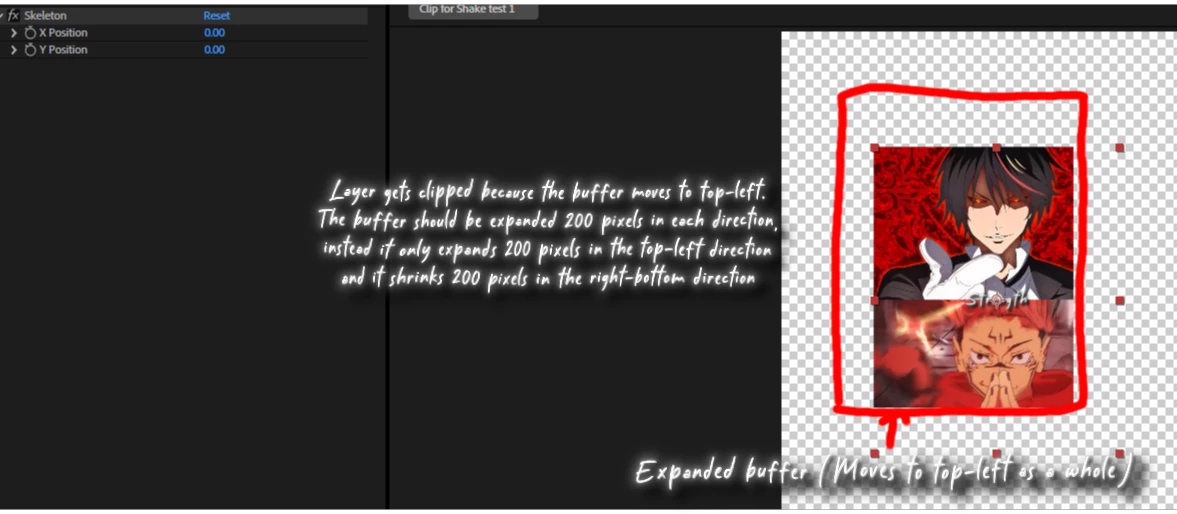
Here is the issue I currently have (expanding the buffer 200 pixels in each direction):
The buffer only expands in the top-left part and it looks smth like this: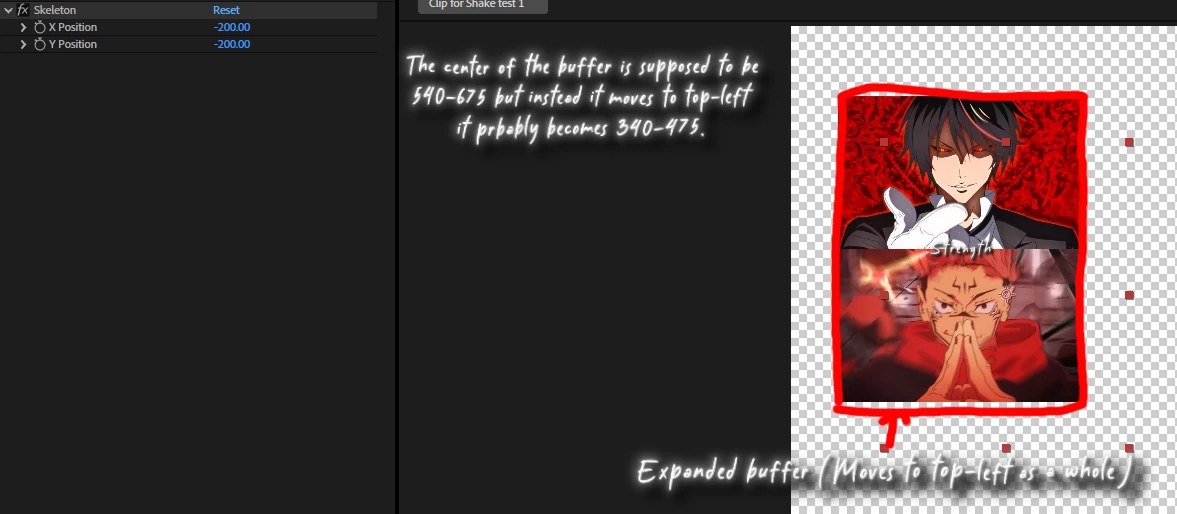
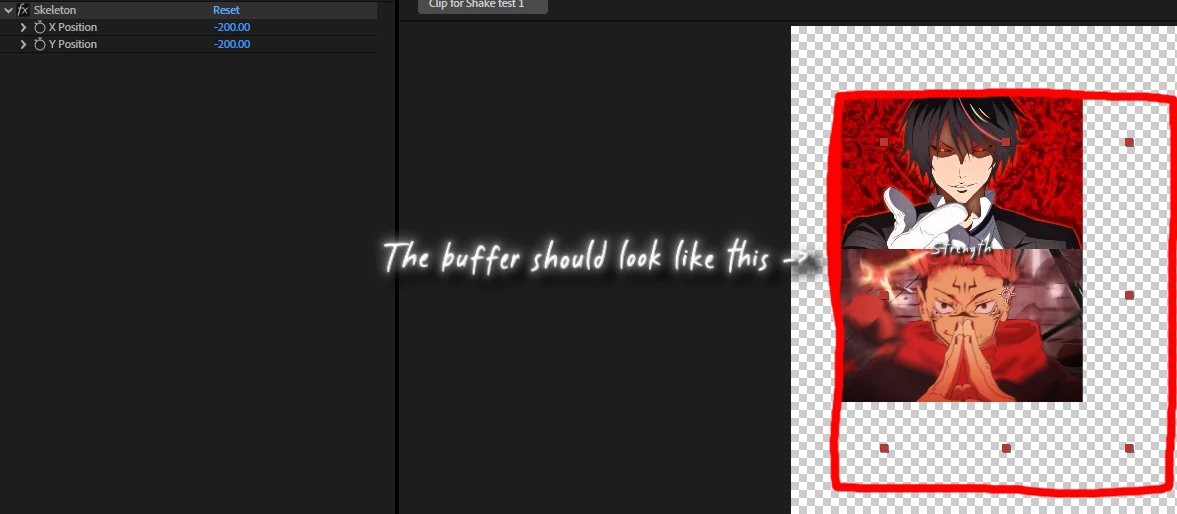
It should clearly look something like this instead:
Now, absolutely no one wants to help, I don't have the slighest idea why this happens. The buffer expands in the top-left direction but it shrinks in the bottom-left direction. It does not make any sense. Here is my current code (btw if you set both rects to the expanded rect, PF_RenderOutputFlag_RETURNS_EXTRA_PIXELS is not needed:
static PF_Err
PreRender(
	PF_InData* in_data,
	PF_OutData* out_data,
	PF_PreRenderExtra* extra)
{
	PF_Err err = PF_Err_NONE;
	PF_RenderRequest req = extra->input->output_request;
	PF_CheckoutResult in_result;

	ERR(extra->cb->checkout_layer(in_data->effect_ref,
		SKELETON_INPUT,
		SKELETON_INPUT,
		&req,
		in_data->current_time,
		in_data->time_step,
		in_data->time_scale,
		&in_result));


	PF_LRect expanded_rect = in_result.result_rect;
	expanded_rect.left -= 200;
	expanded_rect.top -= 200;
	expanded_rect.right += 200;
	expanded_rect.bottom += 200;

	extra->output->result_rect = expanded_rect;
	extra->output->max_result_rect = expanded_rect;

	extra->output->flags |= PF_RenderOutputFlag_RETURNS_EXTRA_PIXELS;

	return err;
}


static PF_Err
SmartRender(
	PF_InData* in_data,
	PF_OutData* out_data,
	PF_SmartRenderExtra* extra)
{
	PF_Err err = PF_Err_NONE;
	AEGP_SuiteHandler suites(in_data->pica_basicP);

	PF_EffectWorld* input_worldP = NULL;
	PF_EffectWorld* output_worldP = NULL;

	ERR(extra->cb->checkout_layer_pixels(in_data->effect_ref, SKELETON_INPUT, &input_worldP));

	if (!err) {
		ERR(extra->cb->checkout_output(in_data->effect_ref, &output_worldP));

		if (!err && input_worldP && output_worldP) {
			PF_ParamDef x_param, y_param;
			AEFX_CLR_STRUCT(x_param);
			AEFX_CLR_STRUCT(y_param);

			ERR(PF_CHECKOUT_PARAM(in_data, SKELETON_X, in_data->current_time, in_data->time_step, in_data->time_scale, &x_param));
			ERR(PF_CHECKOUT_PARAM(in_data, SKELETON_Y, in_data->current_time, in_data->time_step, in_data->time_scale, &y_param));

			if (!err) {
				A_long origin_x_offset = input_worldP->origin_x - output_worldP->origin_x;
				A_long origin_y_offset = input_worldP->origin_y - output_worldP->origin_y;

				OffsetInfo offsetInfo;
				offsetInfo.xOffset = x_param.u.fs_d.value + origin_x_offset;
				offsetInfo.yOffset = y_param.u.fs_d.value + origin_y_offset;
				offsetInfo.input_world = input_worldP;

				PF_PixelFormat pixelFormat;
				PF_WorldSuite2* wsP = NULL;
				ERR(suites.Pica()->AcquireSuite(kPFWorldSuite, kPFWorldSuiteVersion2, (const void**)&wsP));
				ERR(wsP->PF_GetPixelFormat(output_worldP, &pixelFormat));
				ERR(suites.Pica()->ReleaseSuite(kPFWorldSuite, kPFWorldSuiteVersion2));

				switch (pixelFormat) {
				case PF_PixelFormat_ARGB128:
					ERR(suites.IterateFloatSuite1()->iterate(
						in_data,
						0,
						output_worldP->height,
						input_worldP,
						NULL,
						(void*)&offsetInfo,
						(PF_IteratePixelFloatFunc)MyOffsetFunc<PF_PixelFloat>,
						output_worldP));
					break;

				case PF_PixelFormat_ARGB64:
					ERR(suites.Iterate16Suite1()->iterate(
						in_data,
						0,
						output_worldP->height,
						input_worldP,
						NULL,
						(void*)&offsetInfo,
						MyOffsetFunc<PF_Pixel16>,
						output_worldP));
					break;

				case PF_PixelFormat_ARGB32:
				default:
					ERR(suites.Iterate8Suite1()->iterate(
						in_data,
						0,
						output_worldP->height,
						input_worldP,
						NULL,
						(void*)&offsetInfo,
						MyOffsetFunc<PF_Pixel8>,
						output_worldP));
					break;
				}

				PF_CHECKIN_PARAM(in_data, &x_param);
				PF_CHECKIN_PARAM(in_data, &y_param);
			}
		}
	}

	if (input_worldP) {
		ERR(extra->cb->checkin_layer_pixels(in_data->effect_ref, SKELETON_INPUT));
	}

	return err;
}
And also some debugging with default values (0/0):
[2025-06-15 17:18:43] === PreRender START ===
[2025-06-15 17:18:43] Original request rect: left=-108, top=-135, right=1188, bottom=1485
[2025-06-15 17:18:43] Input result rect: left=0, top=0, right=1080, bottom=1350
[2025-06-15 17:18:43] Before expansion: left=0, top=0, right=1080, bottom=1350
[2025-06-15 17:18:43] After expansion: left=-200, top=-200, right=1280, bottom=1550
[2025-06-15 17:18:43] === PreRender END ===

[2025-06-15 17:18:43] === SmartRender START ===
[2025-06-15 17:18:43] Input world: width=1080, height=1350, origin_x=0, origin_y=0
[2025-06-15 17:18:43] Output world: width=1480, height=1750, origin_x=-200, origin_y=-200
[2025-06-15 17:18:43] Origin offsets: x_offset=200, y_offset=200
[2025-06-15 17:18:43] Parameters: x_param=0, y_param=0
[2025-06-15 17:18:43] Final offsets: xOffset=200, yOffset=200
[2025-06-15 17:18:43] Buffer bounds check: Input bounds: (0,0) to (1079,1349) Output bounds: (0,0) to (1479,1749)
[2025-06-15 17:18:43] Expansion analysis: Left expansion: YES Top expansion: YES Right expansion: YES Bottom expansion: YES
[2025-06-15 17:18:43] === SmartRender END ===


 AdChoices