


Participant
November 13, 2025
Answered

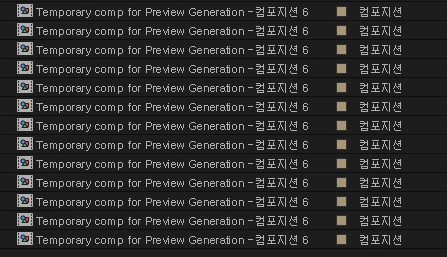
Exporting Mogrt gives Temporary comp instead of mogrt itself
  • November 13, 2025
  • 2 replies
  • 121 views

 I'm using AE 25.5 on my new PC, and exporting mogrt won't do anything but give these temporary comps which is basically 640*360 version of the original mogrt.

 I've tried downgrading all the way to AE 24 and same thing happens, no matter how simple the mogrt would be(like only 1 line of text)

 I did find out that the mogrts are stuck in Temp>aegraphic>(randomfilename)>aemogrtFiles, but in .aeg and not actual mogrt. It seems like AE manages to make .aeg files, but fail merge it with the temporary comp for the preview and get stuck...

How could I fix this?

Correct answer 기린37920666ikua

Thank you for your fast reply. Unfortunately that didn't work because the options don't even pop up when pressing the export button, just cancelling the export right away.

I did however solve this by changing my windows username from Korean to English. I believe this has been an issue for a lot of Korean users, not only just for Adobe, but this particular problem wasn't discussed very much. As long as I know is happens because the file path is unreadable in some cases when the username within the file path is in Korean.

2 replies

Kevin-Monahan
Community Manager
Community Manager
November 14, 2025

Hi,

This looks like it could be an issue with the Generate Preview option of mogrt export. Could you try exporting mogrts without that option checked? If it fixes your issue, let me know. I hope I can help you.


Thanks,
Kevin


Kevin Monahan - Sr. Community and Engagement Strategist – Adobe Pro Video and Audio
기린37920666ikuaAuthorCorrect answer
Participant
November 14, 2025

Thank you for your fast reply. Unfortunately that didn't work because the options don't even pop up when pressing the export button, just cancelling the export right away.

I did however solve this by changing my windows username from Korean to English. I believe this has been an issue for a lot of Korean users, not only just for Adobe, but this particular problem wasn't discussed very much. As long as I know is happens because the file path is unreadable in some cases when the username within the file path is in Korean.

Kevin-Monahan
Community Manager
Community Manager
November 13, 2025

Hi,

Thanks for the post. I alerted the team about your issue. I hope they or a community expert will drop by soon to assist. Sorry for the frustration.


Thanks,
Kevin


Kevin Monahan - Sr. Community and Engagement Strategist – Adobe Pro Video and Audio
Gaël38573816gu7o
Participant
February 23, 2026

Hey, same problem here (in France), I’ve tried to change everything in english, but I had the same issues.

Hope someone will find a way, 

Best regards,

Gael