
Inspiring
July 15, 2024
Answered

Expression Help: Highlight Word(s)

  • July 15, 2024
  • 2 replies
  • 952 views

Hi all,

i have to modify a setup, which allows the user to highlight one or multiple words by adding “**” before and after. The original setup works by adding “=” ( For example: This is a =Highlight=). On a separate Text Layer, everything outside those two “=” characters is then faded out by an expression selector and a specific font is chosen to generate a colored box behind the marked text (in this example only behing the word “Highlight”). This setup works pretty good so far, but i can not find a way to mark the words to be highlighted with "**" (two characters) instead of one ("="). Anyone any idea how to modify the following code to make this work? I have already tried to add && txt[i+1] == "*" to the if-statement, but that doesn`t seem to work as expected. It kind worked / find`s the right In-Point / Start of the highlighted word, but messes up the letters / doesn`t find the correct Out-Point of the marked word.

Many thanks in advance!


const txt = thisComp.layer(“Master_Text”).text.sourceText.replace(/\n|\r|\u0003/g,””);

var txt_highlight = false;

var count = textIndex;

for (i = 0; i < count; i++) {

if (txt[i] == “=”) {

txt_highlight =! txt_highlight;

count++; i++;

}

}

if (txt_highlight == 1){

0;

}

else{

100;

}
This topic has been closed for replies.
Correct answer BenterA

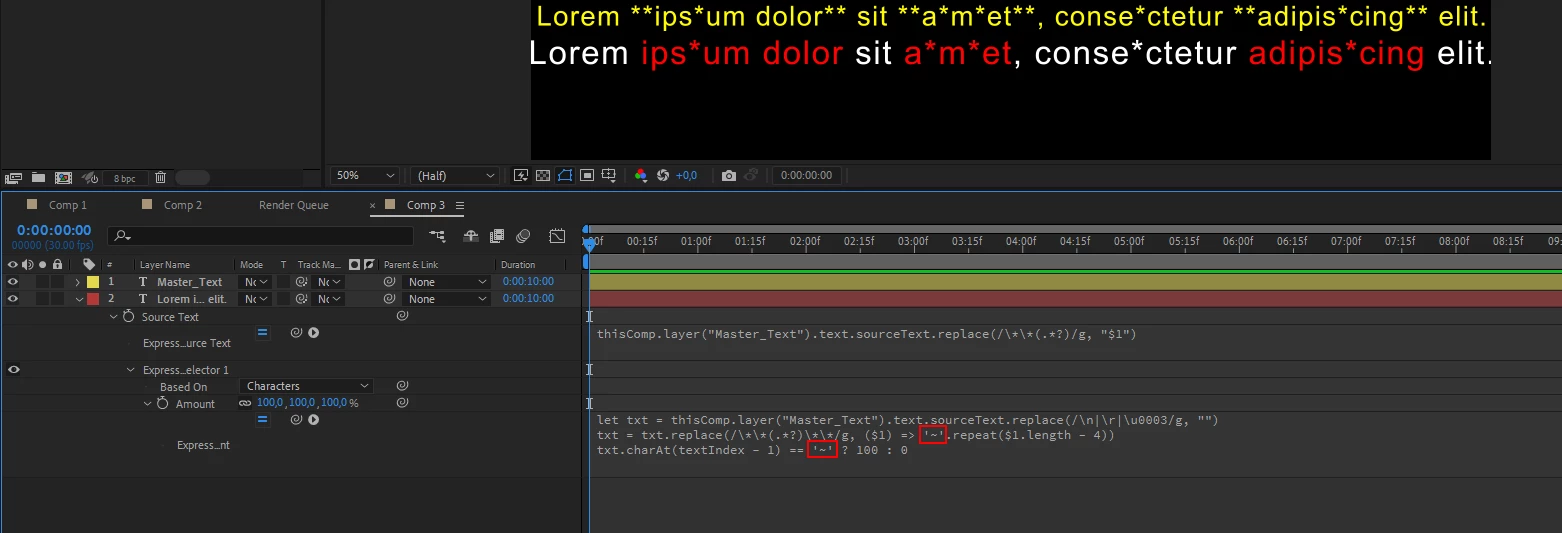
You can use another symbol like this "~":

let txt = thisComp.layer("Master_Text").text.sourceText.replace(/\n|\r|\u0003/g, "")
txt = txt.replace(/\*\*(.*?)\*\*/g, ($1) => '~'.repeat($1.length - 4))
txt.charAt(textIndex - 1) == '~' ? 100 : 0


Perfect! Thank you very much!

2 replies

Legend
July 15, 2024

Maybe something like this:

 source text expression:


thisComp.layer("Master_Text").text.sourceText.replace(/\*\*(.*?)/g, "$1")


Amount expression:


let txt = thisComp.layer("Master_Text").text.sourceText.replace(/\n|\r|\u0003/g, "")
txt = txt.replace(/\*\*(.*?)\*\*/g, ($1) => '*'.repeat($1.length - 4))
txt.charAt(textIndex - 1) == '*' ? 100 : 0


BenterAAuthor
Inspiring
July 15, 2024

Thanks a lot for your support, Airweb! Seems to work! Unfortunately it seems that this solution doesn`t allow the use of one single "*" as regular character in the text (which has to be an option)?

Legend
July 15, 2024

I updated the code above a few minutes ago, it should work.

Mylenium
Legend
July 15, 2024

It would probably make a lot more sense to just work on the regEx in the .replace function. Otherwise strings are treated as literals. Looking for two asterisks would have to be written as such "**". That said, special characters most of the time need to be escaped or else they are treated as "magic" and trigger other treatment, so the truth may be closer to "\"*"\"*"". 


Mylenium

BenterAAuthor
Inspiring
July 15, 2024

Hi Mylenium,
unfortunately i do not understand (hardly) anything you just said, but i really appreciate your effort to help me out 🙂

Ben