

StefanStehlik
Inspiring
February 17, 2023
Answered

Expression - Move layer by same increment

  • February 17, 2023
  • 2 replies
  • 1021 views

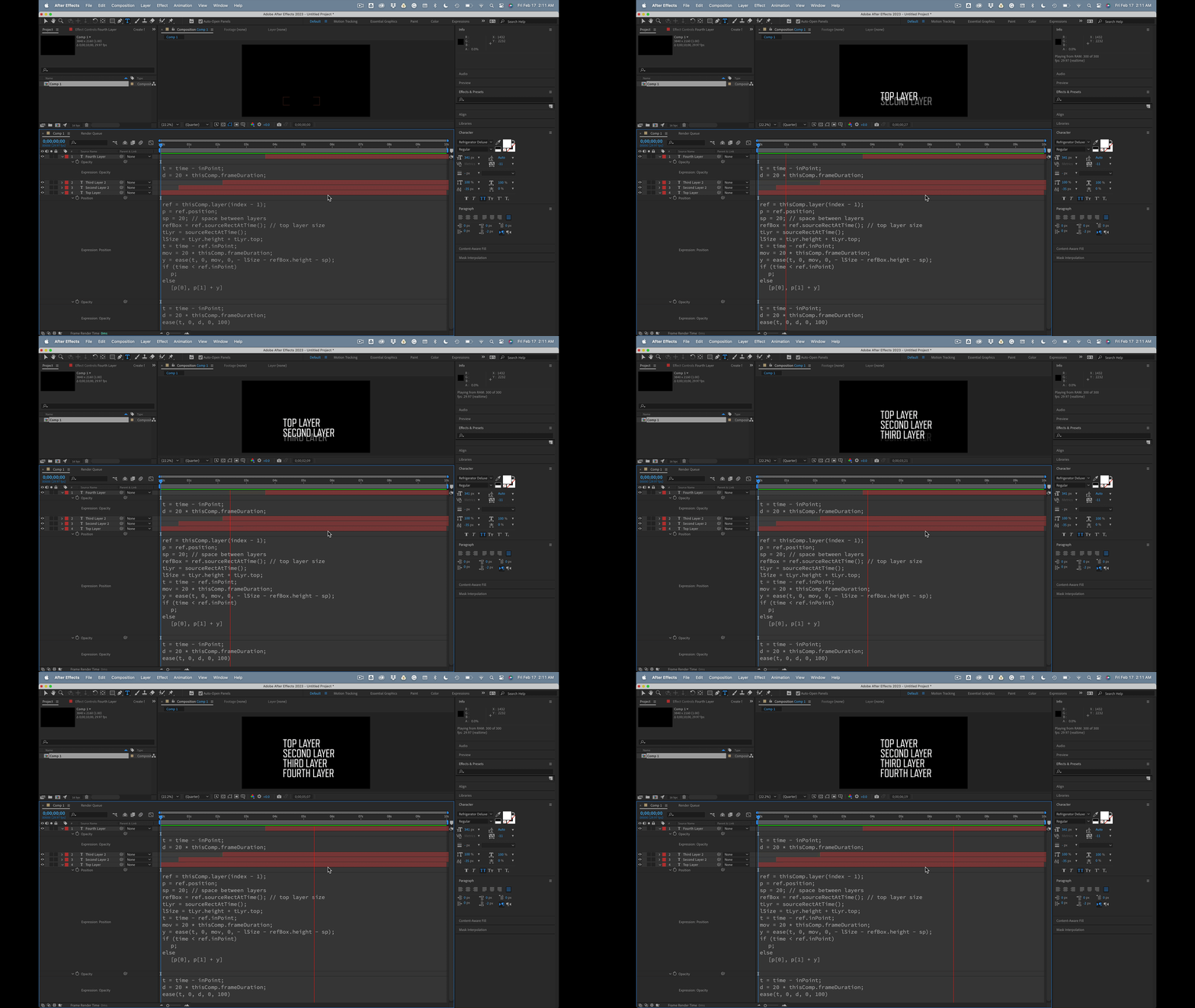
I want to create an expression that will move all the layers in a composition by the height of the composition, based on the in-point of each layer. This means that every layer will move by the same percentage from the bottom when the layers start. Do you have any suggestions for how I could achieve this differently? My goal is to be able to control the movement of each layer relative to all the layers both above and below it. The picture below is just a draft of want I need. I want to have 30 and more comp layers in the projects that are not the same.
This topic has been closed for replies.
Correct answer Rick Gerard

The top layer has no expression. The next layers have this expression for Position:

ref = thisComp.layer(index - 1);
p = ref.position;
sp = 20; // space between layers 
refBox = ref.sourceRectAtTime(); // top layer size
tLyr = sourceRectAtTime();
lSize = tLyr.height + tLyr.top;
t = time - ref.inPoint;
mov = 20 * thisComp.frameDuration;
y = ease(t, 0, mov, 0, - lSize - refBox.height - sp);
if (time < ref.inPoint)
	p;
else
	[p[0], p[1] + y]

 This will move each layer under another layer up by the height of the current layer plus the sp (padding) over 20 frames. 


If you add this expression for opacity to all layers they will fade in over those same 20 frames.

t = time - inPoint;
d = 20 * thisComp.frameDuration;
ease(t, 0, d, 0, 100)

You will end up with something like this and it will work for Shape and text layers as long as you don't scale the layers.

It is easy to modify the timing if you pay close attention to the expressions.  The position of the stack is controlled by the position of the top layer.

2 replies

Rick GerardCommunity ExpertCorrect answer
Community Expert
February 17, 2023

The top layer has no expression. The next layers have this expression for Position:

ref = thisComp.layer(index - 1);
p = ref.position;
sp = 20; // space between layers 
refBox = ref.sourceRectAtTime(); // top layer size
tLyr = sourceRectAtTime();
lSize = tLyr.height + tLyr.top;
t = time - ref.inPoint;
mov = 20 * thisComp.frameDuration;
y = ease(t, 0, mov, 0, - lSize - refBox.height - sp);
if (time < ref.inPoint)
	p;
else
	[p[0], p[1] + y]

 This will move each layer under another layer up by the height of the current layer plus the sp (padding) over 20 frames. 


If you add this expression for opacity to all layers they will fade in over those same 20 frames.

t = time - inPoint;
d = 20 * thisComp.frameDuration;
ease(t, 0, d, 0, 100)

You will end up with something like this and it will work for Shape and text layers as long as you don't scale the layers.

It is easy to modify the timing if you pay close attention to the expressions.  The position of the stack is controlled by the position of the top layer.

StefanStehlik
Inspiring
February 17, 2023

Great, this works perfectly!

Mylenium
Legend
February 17, 2023

If they are staggered in correct sequence as per your picture, it would be as trivial as:


X=value[0];

Y=(thisComp.numLayers-index)*100;


[X,Y]


If the timing is all over the place or there are other things to consider, it would of course take more complex code.


Mylenium