Participant
November 21, 2019
Question

Expression slider control error.

  • November 21, 2019
  • 4 replies
  • 5184 views

Hi everyone.

I just recently upgraded my After Effects to 2020 version but now it seems like that wasn't good idea at all.


First of all I've got this weird and REALLY annoying problem with expression slider control.

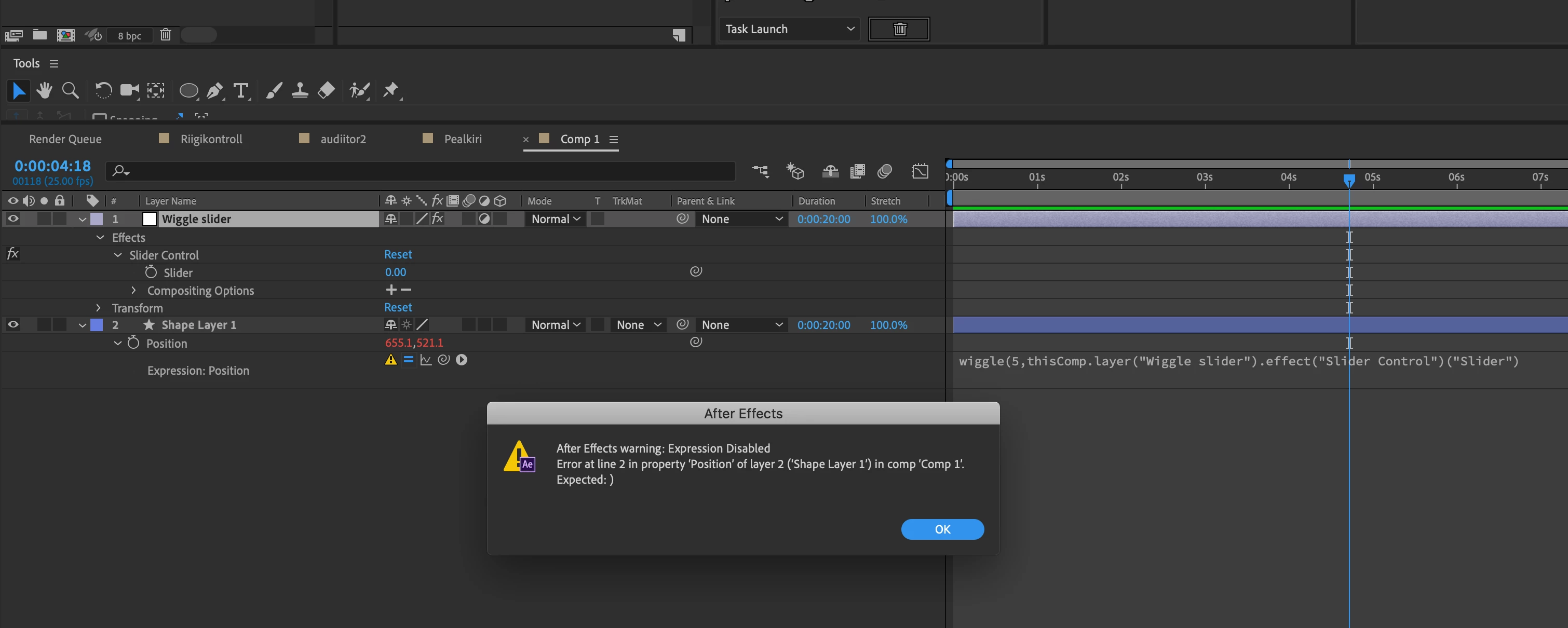
Can anyone explain why this expression gets disabled (screenshot attached)?

Though I'm not an expression expert but I've used slider control hundreds of times and never had a single problem. So frustrating.


Thanks a lot already.

Reimo.
 

This topic has been closed for replies.

4 replies

Participant
July 22, 2022

Please , im facing the same problem could you pls tell me how to solve

Community Expert
July 23, 2022

We need a screenshot showing the modified properties of the problem layer and a copy of the expression to figure out what is going on. 


* The "Drag & Drop here..." area works, but it is a pain for the forum users to access the photos. Please do not use it to share images. You can use the toolbar, drag your pictures to the reply field, or even copy and paste the file directly in the reply field, then size them up so we can easily see them.

Martin_Ritter
Legend
November 21, 2019

Just do what the error message says and add a ) at the end. Your wiggle() isn't closed yet.

Also, always end a command with ;


*Martin

Community Expert
November 21, 2019

The error is reported to be in line 2, but your screenshot just shows one line and there is no semicolon at the end of the line.


To diagnose the problem we need to see the expression.

Participant
November 21, 2019

Thanks a lot for your quick response Rick.


Well I think that this IS the actual problem. After Effects thinks that there's more than 1 line, but there isn't really. Or am I missing something here. That's the whole expression there.


I added another screenshot.


Participant
November 21, 2019
Participant
November 21, 2019