
Inspiring
October 28, 2022
Answered

Expression that don`t work

  • October 28, 2022
  • 3 replies
  • 254 views

Hello! 

I have this expression on my Opacity parameter 

var a = thisComp.layer("Shape Layer 1").xPosition;  
if(thisLayer.transform.xPosition == a){
	0
}else{100}

  Its mean that if my second shape layer will be in the same X position as first shape layer it will disappear 

But expression is doesnt work

I thought that AE can`t get number from layer, but I pickwheeped his xPosition to Source Text cuz I want to check it and its work 
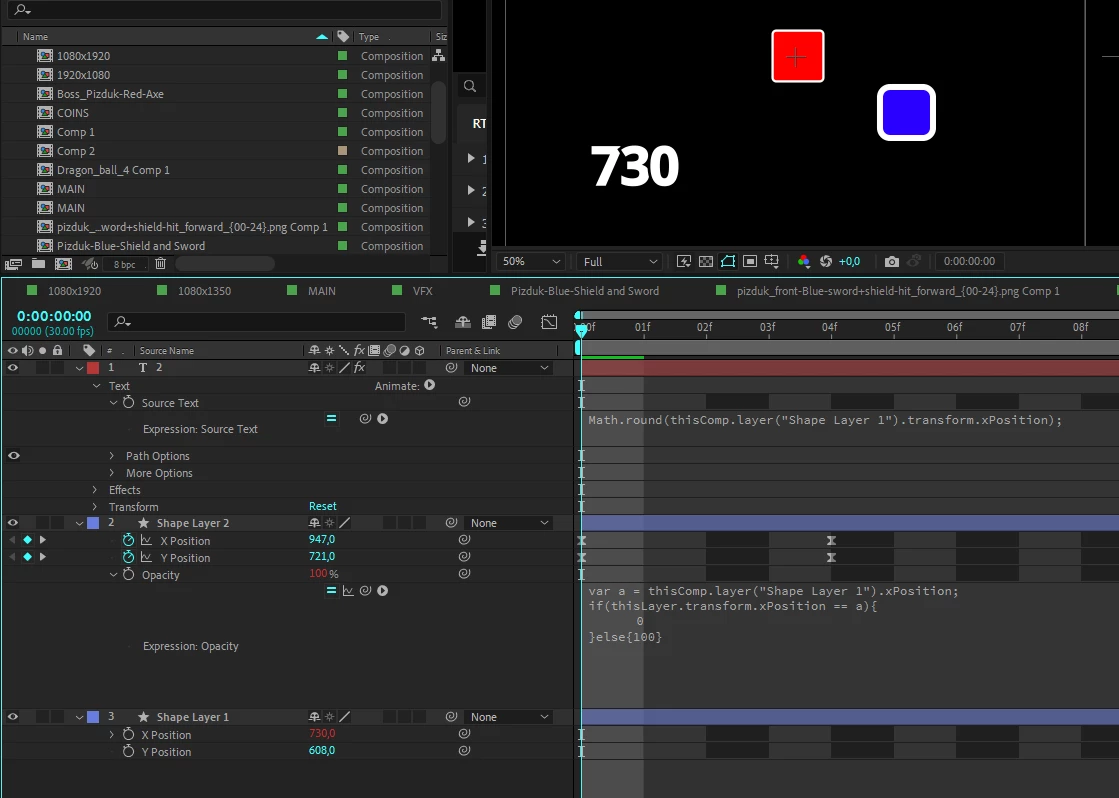


I have no idea whats I`m doing wrong, pls help :(((


This topic has been closed for replies.
Correct answer Mylenium

Such comparisons are always exact matches and your approach is simply unsuitable to solve a geometric issue, even more so in 3D. The slightest discrepancy in the numerical values, be that just a thousandth fraction will stop it from working. You need to filter this through a linear() expression or measure the distance with length or combine both methods. Something like this would work:


refPos=thisComp.layer("Shape Layer 1").xPosition;

myPos=thisLayer.transform.xPosition;


mDist=length(refPos;myPos);


linear(mDist,0,0.5,0,100);


Point in case: You need to give it some tolerance like in my example where it's half a pixel or else the conditions may never be met during animation.


Mylenium


3 replies

Mylenium
Legend
October 28, 2022

It simply measures the absolute distance and if it's below 0.5 pixels, the opacity is lowered to 0 with only a tiny "slope" inbetween. This could be further refiend in any way you want, including making a true hard switch with a Math.floor() or including additional conditions.


Mylenium

Mylenium
MyleniumCorrect answer
Legend
October 28, 2022

Such comparisons are always exact matches and your approach is simply unsuitable to solve a geometric issue, even more so in 3D. The slightest discrepancy in the numerical values, be that just a thousandth fraction will stop it from working. You need to filter this through a linear() expression or measure the distance with length or combine both methods. Something like this would work:


refPos=thisComp.layer("Shape Layer 1").xPosition;

myPos=thisLayer.transform.xPosition;


mDist=length(refPos;myPos);


linear(mDist,0,0.5,0,100);


Point in case: You need to give it some tolerance like in my example where it's half a pixel or else the conditions may never be met during animation.


Mylenium


MoistoffAuthor
Inspiring
October 28, 2022

Thank you for answer! I understand now

"mDist" is smth like divide two numbers and get distance between two layers? 

MoistoffAuthor
Inspiring
October 28, 2022

I tried to write a number instead of my variable and its worked, but its not good for me

I have a 900 layers and moving object, those 900 layers must dissapear then reach position from my moving object