Known Participant
July 26, 2022
Answered

Expression to Control X and Y Position

  • July 26, 2022
  • 1 reply
  • 624 views

Hey there everyone,


I'd like to pick whip the x and y values to two seperate slider controls (one for the x, one for the y) for a shape group. I'm wondering if there's an expression that will allow the increase / decrease of those position values that I can control with the slider?
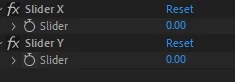
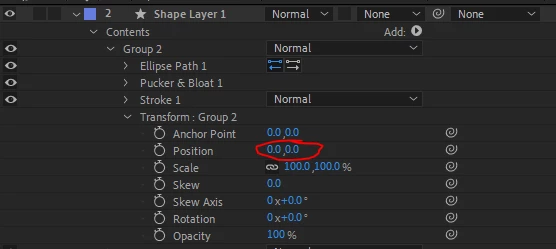


Thank you!


This topic has been closed for replies.
Correct answer Dan Ebberts

Try it like this:

X = thisComp.layer("Shape Layer 1").effect("Slider X")("Slider");
Y = thisComp.layer("Shape Layer 1").effect("Slider Y")("Slider");
[X,Y]

1 reply

Mylenium
Legend
July 26, 2022

X=thisComp.layer("XYZ").effect("Slider X");

Y=thisComp.layer("XYZ").effect("Slider Y");


[X,Y]


Mylenium

Max8132Author
Known Participant
July 26, 2022

Hey Mylenium,


Thank you very much! I believe this is the correct expression, however I'm running into the following error: effect named 'Slider X' is missing. I'm a little confused, as the effect does exist, is on layer the expression is tied to, and named properly. Any idea what's going on?


Thank you.


Dan Ebberts
Community Expert
Dan EbbertsCommunity ExpertCorrect answer
Community Expert
July 26, 2022

Try it like this:

X = thisComp.layer("Shape Layer 1").effect("Slider X")("Slider");
Y = thisComp.layer("Shape Layer 1").effect("Slider Y")("Slider");
[X,Y]