Participant
January 25, 2022
Question

Expression to extract the Position of a Shape Layer Object after transformation?

  • January 25, 2022
  • 3 replies
  • 374 views

Hey there Mathemagicans,

I'm looking for an expression to extraxt the position data from an object that is nested multiple times and transformed within a shape layer. My aim is to link a Null object to the dummy object within the shape layer like you can see in the picture attached. As you can see the object's anchor point is displayed correctly. I just have a hard time accessing it. 

Any help is much appreciated ❤️
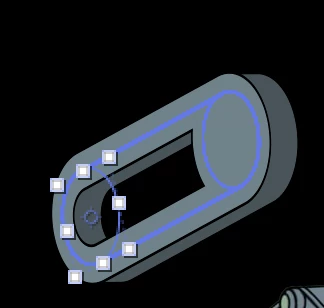
 

This topic has been closed for replies.

3 replies

Mylenium
Legend
January 26, 2022

Jewelry is displayed in shop windows all the time, yet is inaccessible to many. Welcome to reality! again, your issue could likely be solved, but you need to change your workflow. no point in going crazy as to why and how things are as they are and shape layer data is so hard to deal with...


Mylenium

Participant
January 27, 2022

OK wow where is the dislike button for that reply. If you dont know the answer to the problem, its fine, just say it. No need to give me a whole "Welcome to reality" line. Its very sad to see that you rather choose making up an absurd example then just admitting to your lack of knowledge on this. Telling someone to change their workflow, without knowing the intention of their chosen workflow is also not helpful at all. 


Have a day sir no further reply needed

Mylenium
Legend
January 26, 2022

Not really going to work due to how the shear on shape layers is calculated. As soon as you extend the ring, the angle changes. you need to figure out this fundamental problem first before even dreaming of changing things with a Null object. With that being the case it may be simpler to just set everything up in 2D in separate comps and then transform things globally with an effect.


Mylenium

Participant
January 26, 2022

I just can not understand, how something, that can be displayed correctly, can not be easyly accessed 😄

Mylenium
Legend
January 25, 2022

Good luck with that. At best it's a matter of using multiple steps of layer space transforms such as toWorld(), fromWorld() and toComp() to convert across the different coordinate spaces, but even that may not correctly reflect stuff done with shape layer-specific features. Otherwise you're facing a whole slew of complex vactor/ matrix math. On the bright side, if you have not messed around with changing transforms too much, a simple toComp() may retrieve the anchor point. Eitehr way, any specific suggestion would require the exact structure and what was used. Cropped screenshots of only the comp contents are pretty much useless, wehn the real magic happens in the timeline and the nested comps.


Mylenium

Participant
January 26, 2022

Oh noo, haha, thanks Mylenium.

I'm attaching another screenshot, maybe its more helpful. There is two major manipulations happening here. 

I have a REF object which is nested inside a rotation group. The anchorpoint for the rotation sits inside the fill area (image above). The rotaion group is nested inside a skew group that will do the distortion. I hope that helps. I still don't understand the difference between World and Comp, whatever I do I never get what I need. What really is hard to understand, how I can not tap into the display code. If AE manages to display it correctly, there must be a way to extract that data right? 


Thanks Herb