russell888
Participating Frequently
July 3, 2017
Question

expression to swap compositions based on path direction, orientation or rotation?

  • July 3, 2017
  • 2 replies
  • 430 views

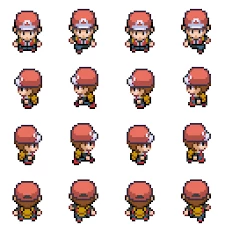
Say I have an object following a path, is there an expression to automatically swap to another composition or frames within a composition based on path direction?

So in the below image, the composition with the first line of sprites will be used when the character is moving downward.

When the character is moving left (or rotates 90 degrees) the expression swaps to the composition containing the second line of sprites etc.

Maybe this can be done with all the sprites in the one composition and the expression swaps to different frames within the one composition?

If you don't know the expression, any advice on where to look to find out more about this would be much appreciated.
    This topic has been closed for replies.

    2 replies

    Kevin J. Monahan Jr.
    Legend
    July 31, 2017

    Hi Russell,

    Are you still facing this problem? If not, let us know how you solved it. If so, please let us know so we can assist you further.

    Thanks,

    Kevin

    Kevin Monahan - Sr. Community and Engagement Strategist – Adobe Pro Video and Audio
    Participating Frequently
    March 18, 2021

    Yep, would have been good to find a solve. I'm faking a game board with an avatar with different animated cycles based on which way it is moving along a path. I can (and am) keyframing visibility of differnt comp cycles using transparency. Not hard, but woudl be nice for client iterations to just have her animation swap as we redesign and redesign the animation path.

    Mylenium
    Legend
    July 3, 2017

    You cannot "swap" compositions. To create a sprite-sheet/ strip you have to have all elements in a pre-composition and use time-remapping or something like that. I'm just not sure why you would want to use convoluted expressions, especially since AE is not interactive and you still have to keyframe stuff. I mean figuring out the walk direction is not that difficult, but how would you determine in which direction he is looking? You still need some parameter for that. It's not like you would push a button on a gamepad. That being the case, you might just as well keyframe everything from the start. In fact then you'd don't even need any time-remapping and just cut your looping clips together while they are e.g. parented to a Null that you move around.

    Mylenium