
Participating Frequently
November 16, 2022
Answered

Expression together with protected region (MOGRT)

  • November 16, 2022
  • 3 replies
  • 1864 views

Hello,


I would like to create a MOGRT with some text in it which has the Typewriter effect together with the following expression (securing a constant typing speed at 25fps despite the text length):

text.animator("Animator 1").selector("Range Selector 1").start = (100 / (text.sourceText.length / 25)) * time;


Because idk how long the text will be displayed later on in Premiere I set a protected region on the first 5 seconds of the animation (that's after the text is fully displayed no matter what).
But if I stretch out the MOGRT in Premiere the timing of the animation is affected.

Is there any way to create a protected region for an animation with an expression instead of keyframes? Or does a value (some kind of "stretch factor") exist which can be incorporated into the expression?

Thank you in advane for your support and kind regards from Germany!
Matthias
This topic has been closed for replies.
Correct answer Rick Gerard

Nope, the same problem: stretching out the animation in Premiere slows down the animation.
Do you have a working example of an AEP/MOGRT together with a PPROJ?


You should only need two protected regions and a space between them. Try this project file:

I've uploaded a 22 and a 23 version of the project. MOGRT files are not compatible with the uploads, so you'll have to save your own.


3 replies

Community Expert
November 18, 2022

All you should have to do is add a comp marker one or two frames before the end of the comp and set that to the only protected region. You can also simplify the expression. I would use the layer in-point like this:

t = time - inPoint;
100 / text.sourceText.length * t * 25;


Participating Frequently
November 22, 2022

Thank you for your help. Unfortunately, with this solution, I can no longer extend the sequence in Premiere. And if I use your AEP file and export the template without any changes, than I can indeed stretch out the sequence in Premiere but the longer the sequence the slower is the animation.
What I wanted to achieve was a template with which you can set a text in Premiere that is always animated at a constant speed and holds at the end for as long as needed without having to make a cut, add a frame hold and extend the frame hold (the final MOGRT would have more text and other things in it, but that one line is the minimum to try if it could work at all).
Or at least if this is not possible, I would like to understand why this particular expression does not work with the protected region and is not responsive. Is "time" the keyword (and if so, are there more?) that cannot be used when a MOGRT should be "responsive"?

Community Expert
November 22, 2022

Try putting two protected areas. Protect the first 4 seconds and the last 1/2 second. The first protected area needs to protect the longest animation you will need. The last lets you stretch out the middle where there is no animation. You can always Cut the graphic if it is too long. 

Dan Ebberts
Community Expert
Community Expert
November 17, 2022

I think it would be helpful if you posted screen shots of how you have things set up in AE. It seems like it might be possible to account for any stretching by basing your calculation on the duration of the protected area marker rather than on the global time value. 

<edit> Actually, try replacing your expression with this and see if it makes a difference:

(100 / (text.sourceText.length / 25)) * (time - thisComp.marker.key(1).time)
Participating Frequently
November 17, 2022

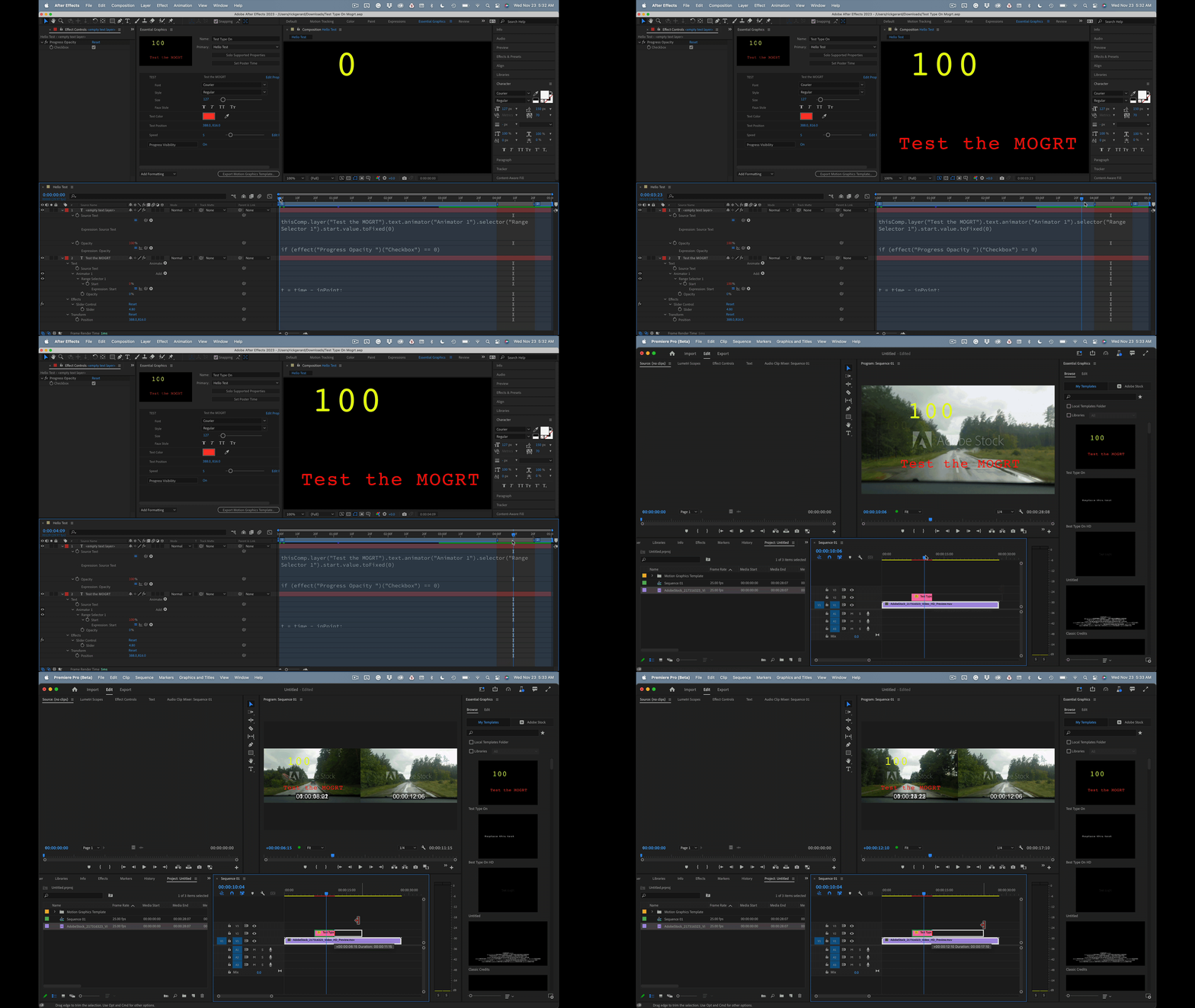
I created a small example project and a screenshot. Thats's what I did:
1. Create composition, add text layer

2. Drop Typewriter effect onto text layer

3. Remove keyframes and insert expression

4. Create protected region

Mylenium
Legend
November 16, 2022

You can't really avoid the stretching behavior and unfortunately the template doesn't really know how it is stretched out in Premiere. Therefore it might make more sense to manipulate this by actually creating a slider. Otherwise you could remap the ranges based on soem reference measure with valueAtTime() and interpolate the actual timing with a linear() function, so it knows the timing e.g. for 10 letters and applies it to the other ranges. Dan Ebberts or Rick Gerard provided an example for this a few weeks ago, so perhaps you can find it. Otherwise it would be easy enough to re-create.


Mylenium

Participating Frequently
November 17, 2022

Unfortunately, this is with what I have read so far, but I wanted to ask again, because sometimes you just search with the wrong terms.


I'm not so experienced with After Effects, Expressions and MORGTs and I don't understand what's different with the Typewriter effect from a technical point of view. With other animations the protected regions work as expected and I can extend the animation in Premiere wihtout any retiming.


Which effects or expressions do not work when I want to create a responsive animation? Is there a list of what is safe and what you should not use?


Matthias