The Projection Studio
Participating Frequently
July 6, 2019
Answered

Expressions error - "expression needs 3 or 5 arguments"

  • July 6, 2019
  • 3 replies
  • 7884 views

Hi,

I hope someone can help.

Ive been following some tutorials on simple animations of parameters using key frames generated from an audio file.

All of these tutorials have at some point used expressions such as 'ease(A,B,X,Y)

However, aftereffects says that this is an error and that the, "expression needs 3 or 5 arguments'.

Has the language of expressions changed?

If so, how would you write this expression now?

[Here is the list of all Adobe forums... https://forums.adobe.com/welcome]

[Moved from generic Cloud/Setup forum to the specific Program forum... Mod]

This topic has been closed for replies.
Correct answer Rick Gerard

The ease() or linear() methods generate one value. If you look at the method generated by the Expression Language Menu you will see something like this:

ease(t, tMin, tMax, value1, value2)

Let's break that down. Inside the parentheses, t is a number.  tMin is the minimum value that number is going to be, tMax is the maximum value for t. When you are using the Keyframe Assistant to Convert Audio to Keyframes you generally define t like this and then define a valud (v) for the ease method.

t = thisComp.layer("Audio Amplitude").effect("Both Channels")("Slider");

v = ease(t, tMin, tMax, value1, value2);

To figure out what values you should be using for tMin and tMax it is a good idea to pick the ("Both Channels")("Slider") in the graph editor looking at only the value graph and choose the minimum and maximum values you want to use to trigger your effect. Here's what a typical graph of the Both Channels Slider would look like:
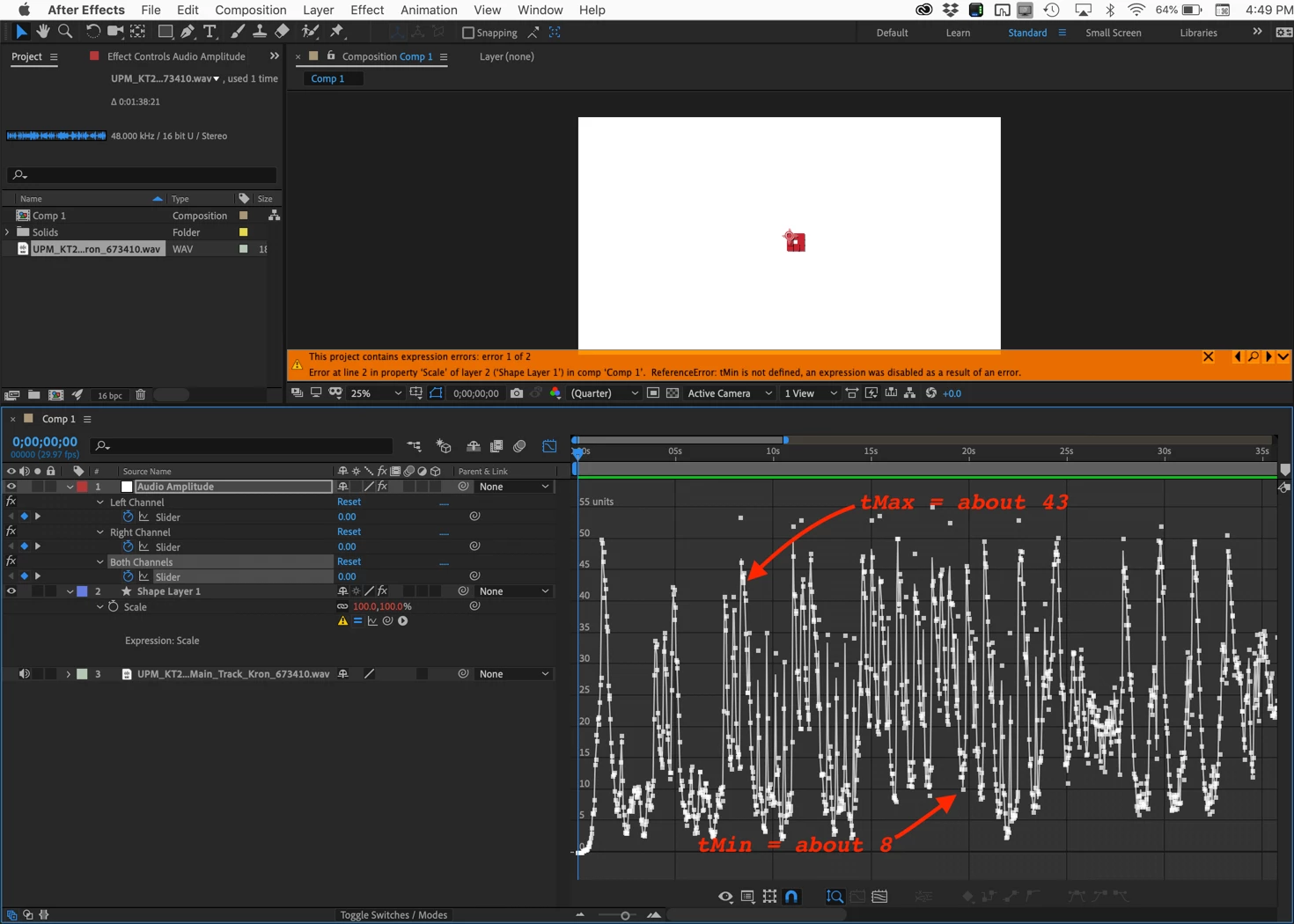
This music swells from zero to a maximum value of about 55. I want the start of my animation to happen at about 8 and the maximum value to happen at about 43 so those would be my tMin and tMax values. I am applying this effect to scale. Scale is always an array of at least 2 numbers, but if the layer is 3D then there are 3 values. To fix the expression error I need to add the values generated by the ease() method into an array and set a minimum and maximum scale value for value1 and value2. I don't want to go above 100% scale so that will be the value for value2, and I don't want to go below 60% (your choice here) so that will be the value for value1. We're almost done. So far the expression looks like this:
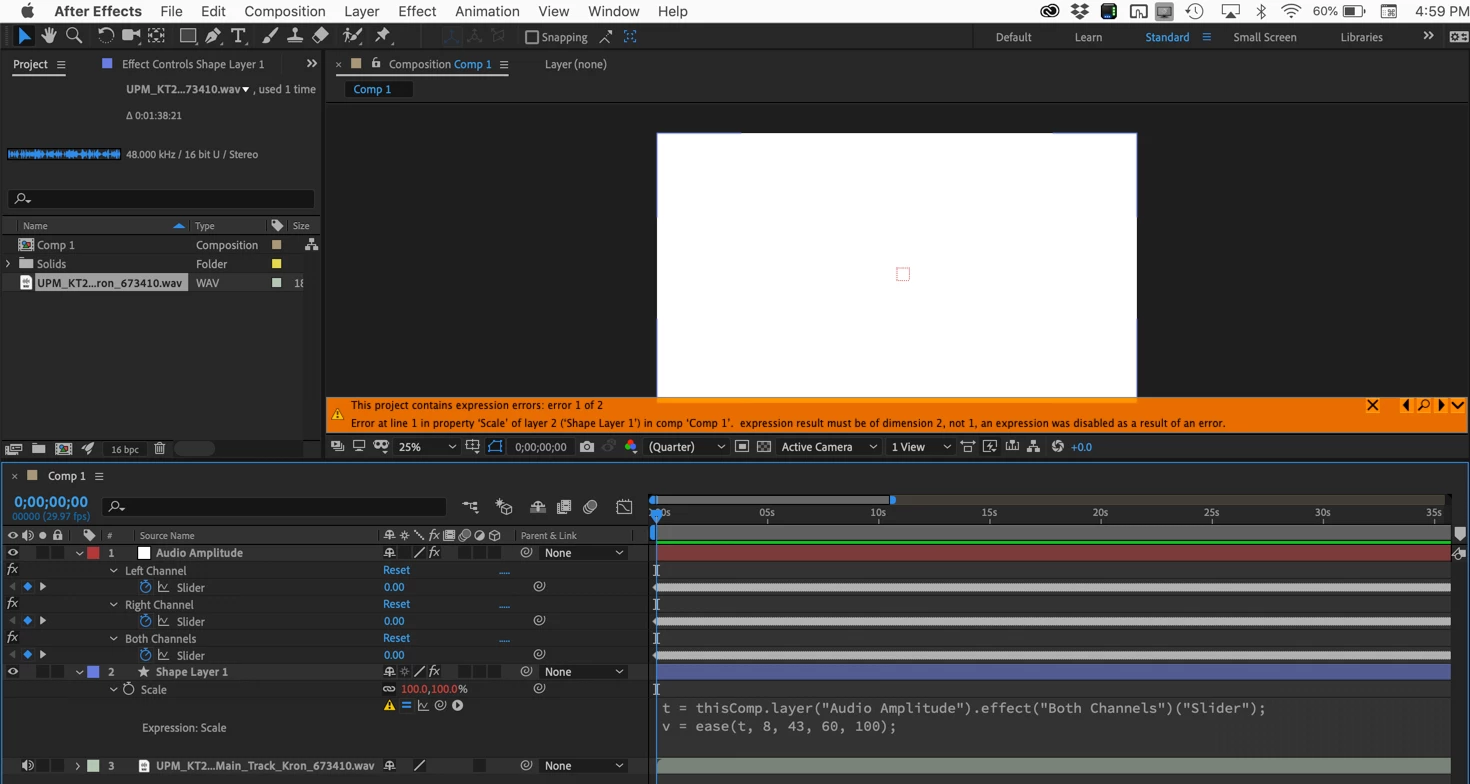
I still have an error because I have not generated the array. For this project, I want to only scale in Y so the layer grows from the bottom in time with the music. I set the anchor point at the bottom of the layer in the center and then complete my array like this:

t = thisComp.layer("Audio Amplitude").effect("Both Channels")("Slider");

v = ease(t, 8, 43, 60, 100);

[100, v]

I hope that makes sense. If you are manipulating color you will have a 4 value array. Position, Scale, and Anchor Point have 2 or 3 values, Rotation and opacity only have one so no array is needed.

The other option for the ease or linear method is ease(t, value1, value2) which does not give you the ability to scale the value. This is the method that needs 3 arguments, the previous example needs 5.
3 replies

The Projection Studio
Participating Frequently
July 7, 2019

Im sorry but I have another follow up question.

I have moved the anchor point to the (centre, back) of my image but it is still scaling from the (centre, centre) when it animates.

You say:

"I still have an error because I have not generated the array. For this project, I want to only scale in Y so the layer grows from the bottom in time with the music. I set the anchor point at the bottom of the layer in the center and then complete my array like this:

t = thisComp.layer("Audio Amplitude").effect("Both Channels")("Slider");

v = ease(t, 8, 43, 60, 100);

[100, v]"

I am trying to scale only in the Z axis.

The parameter [100, v] doesn't seem to relate to the Y axis as in your example so I assume that this is not axis specific?

When I add [100, v] to my version of the expression aftereffects tells me its an error.

Error message - 'Expression must be of dimension 1, not 2'

My version at the moment looks like this:

t = thisComp.layer("Audio Amplitude").effect("Both Channels")("Slider");

v = linear(t, 8, 35, 1, 2);

PS. I found that setting the parameters at 60,100 meant that the model was stretched to infinity (at least well beyond the scale of the comp.).

Community Expert
July 7, 2019

A 3D layer array looks like this [x, y, z]. The first value in a scale or position array is x, the second y, and the third z. If the array was for color it would have 4 values, Red, Green Blue, and Alpha. If you want to scale z then the expression would look like this:

t = thisComp.layer("Audio Amplitude").effect("Both Channels")("Slider");

v = linear(t, 8, 35, 1, 2);

[100, 100, v]

This expression would set up a relationship between 8 and 35 that would drive the output from 1 to 2 so when the audio amplitude was 8 the scale would be 1 and when the audio amplitude was 35, the scale would be 2. That is not enough of a difference in scale for you to see.

Now let's talk about scaling in z.  Run this test on a couple of 1000 X 1000 pixel solids in a standard HD Comp. Set them up like this:

As you can see the anchor point of the red solid has been set to 1000, the bottom of the layer and the red layer has been rotated 90º on the X-axis. The Blue layer has had the Anchor Point changed from the zero, layer center, to 1000 and that moves it 1000 pixels toward the Active Camera. I changed the blend mode to Hue to make it easy to see when the layers perfectly lined up.

Now change the Z scale of the blue solid to 50% and you get this:

Because the blue layer is perpendicular to the Camera (active camera) the only apparent change in the blue layer is the size of the layer. If you move the red layer down or add a camera and offset it so you can see some perspective in the red layer you will be able to see that the blue layer is moving on the Z axis like this:

Adding an audio track and converting audio to keyframes and adding the expression I showed above will give you this:

You can see from the waveform that I have moved the CTI to the loudest part of the audio track and the scale is 2% in Z. At the lowest part of the audio track, when the value is 8 or lower, the scale is 1%. This makes the movement along the Z-axis very small. You almost can't see the difference.

Leave "value1" at 1, because a z scale of zero will make the layer disappear)  and change "value2" to 100 and the layer will move from the back edge of the red solid to the front edge like this:

Here's a CC 2019 project file without audio: Dropbox - Scale in Z.aep

You said the model was stretched to infinity... What model? I'd have to see your timeline to understand what is going on. Scaling a layer in Z has no effect on the layer's depth unless it is extruded. If you are using Element 3D some other third party 3D plug-in to scale a model in Z then you have a completely different setup. The z-axis of a model could easily have dimensions separated so no array is necessary. This is why it is important to include a complete workflow description and a screenshot of the project with the modified properties of the layers giving you problems when you ask for help. I included all of these screenshots and the project file to help anyone with a similar question. If you want me, or anyone else to help you solve your specific problems we need a lot more details. If your Z value is a separate property you can't be using Transform>Scale because only Transform>Position can be separated.

Roland Kahlenberg
Legend
July 7, 2019

Rick's given you a pretty good insight into the use of the Interpolation Method. If you still require assistance, you should provide the actual Expression/code you are using which throws up the error. Then, add a little background info on the source property you are using to affect the target property. With these details, we will be better able to help you solve your issue.

Very Advanced After Effects Training | Adaptive & Responsive Toolkits | Intelligent Design Assets (IDAs) | MoGraph Design System DEV
The Projection Studio
Participating Frequently
July 7, 2019

Thank you for your interest.

I m sorted now, but thanks for helping.

Much appreciated.

Rick GerardCommunity ExpertCorrect answer
Community Expert
July 7, 2019

The ease() or linear() methods generate one value. If you look at the method generated by the Expression Language Menu you will see something like this:

ease(t, tMin, tMax, value1, value2)

Let's break that down. Inside the parentheses, t is a number.  tMin is the minimum value that number is going to be, tMax is the maximum value for t. When you are using the Keyframe Assistant to Convert Audio to Keyframes you generally define t like this and then define a valud (v) for the ease method.

t = thisComp.layer("Audio Amplitude").effect("Both Channels")("Slider");

v = ease(t, tMin, tMax, value1, value2);

To figure out what values you should be using for tMin and tMax it is a good idea to pick the ("Both Channels")("Slider") in the graph editor looking at only the value graph and choose the minimum and maximum values you want to use to trigger your effect. Here's what a typical graph of the Both Channels Slider would look like:

This music swells from zero to a maximum value of about 55. I want the start of my animation to happen at about 8 and the maximum value to happen at about 43 so those would be my tMin and tMax values. I am applying this effect to scale. Scale is always an array of at least 2 numbers, but if the layer is 3D then there are 3 values. To fix the expression error I need to add the values generated by the ease() method into an array and set a minimum and maximum scale value for value1 and value2. I don't want to go above 100% scale so that will be the value for value2, and I don't want to go below 60% (your choice here) so that will be the value for value1. We're almost done. So far the expression looks like this:

I still have an error because I have not generated the array. For this project, I want to only scale in Y so the layer grows from the bottom in time with the music. I set the anchor point at the bottom of the layer in the center and then complete my array like this:

t = thisComp.layer("Audio Amplitude").effect("Both Channels")("Slider");

v = ease(t, 8, 43, 60, 100);

[100, v]

I hope that makes sense. If you are manipulating color you will have a 4 value array. Position, Scale, and Anchor Point have 2 or 3 values, Rotation and opacity only have one so no array is needed.

The other option for the ease or linear method is ease(t, value1, value2) which does not give you the ability to scale the value. This is the method that needs 3 arguments, the previous example needs 5.

The Projection Studio
Participating Frequently
July 7, 2019

Thank you for this excellent answer.

As usual it was pilot error, I had missed a parameter from my code.

Thanks again,