



Participant
March 1, 2022
Answered

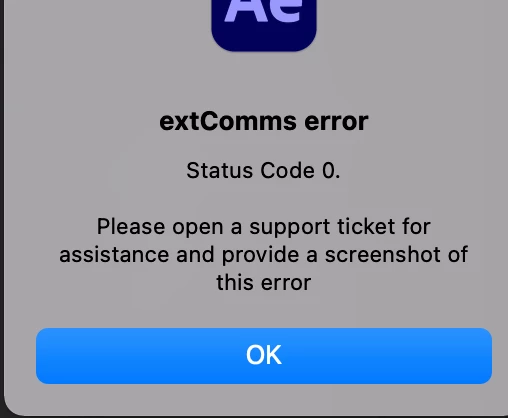
extComms error - Status code 0

  • March 1, 2022
  • 3 replies
  • 3558 views

I'm receiving this error in both after effects 22.2 and after effects 22.3 beta. It happens as soon as the app loads. It doesn't cause a crash, but I can't figure out what's causing it.


I'm working on a Macbook Pro 16" 2019 (intel based), macOS 12.2.1, 64gb ram, 8-core


I have opened a support ticket, but not sure what lead-times are for those so thought I'd try the forum as well.


Any help is much appreciated, thanks!
 

This topic has been closed for replies.
Correct answer akaHomebody

Ah interesting - I have Limber but it doesn't cause this issue for me. It turns out it was the Keystone plugin (https://aescripts.com/keystone/). I have since been in touch with the dev of the plugin and they've helped by sending a revised zxp for me to install which fixed it.


Thanks for the help anyway!

3 replies

nishu_kush
Community Manager
Community Manager
March 4, 2022

Hi akaHomebody,


Sorry for the late response.

I reached out to the After Effects team and they think that a third-party extension called Limber could cause this issue. Are you using it?

Let us know if this is helpful.


Thanks,

Nishu

akaHomebodyAuthorCorrect answer
Participant
March 6, 2022

Ah interesting - I have Limber but it doesn't cause this issue for me. It turns out it was the Keystone plugin (https://aescripts.com/keystone/). I have since been in touch with the dev of the plugin and they've helped by sending a revised zxp for me to install which fixed it.


Thanks for the help anyway!

Mylenium
Legend
March 3, 2022

I'm not a Mac guy, so I'm just guessing around based on what I read here and elsewhere. To me it seems that this could be anything from a certificate error to the necessary headers getting filtered by your router. The 0 simply suggests that this is a very critical error and basicalyl nothing works right. If you haven't already, at least try to create a new user and log in as that. This seems to help a lot with users who have a borked network config. Outside that I suppose the usual steps might be appropriate: Reset/ reboot your Internet router, switch connections, use a cable connection instead of WiFi, check your cables, sign out of your CC app and back in.


Mylenium

Mylenium
Legend
March 2, 2022

I would assume it refers to an issue with secure network communication and the connection cannot even be established, so maybe start by checking your network stuff and user permissions...


Mylenium

Participant
March 2, 2022

@Mylenium Any certain settings I should be looking at? I tried changing a few things fromthe firewall to app permissions to user permissions etc but nothing seemed to do the trick.