

dmoz15
Inspiring
Jun 27, 2016 5:29 PM UTC
Answered

Extend duration of imported PSD "footage" layers

I have imported a layered Photoshop file into After Effects as a layered comp with several .psd "footage" layers:
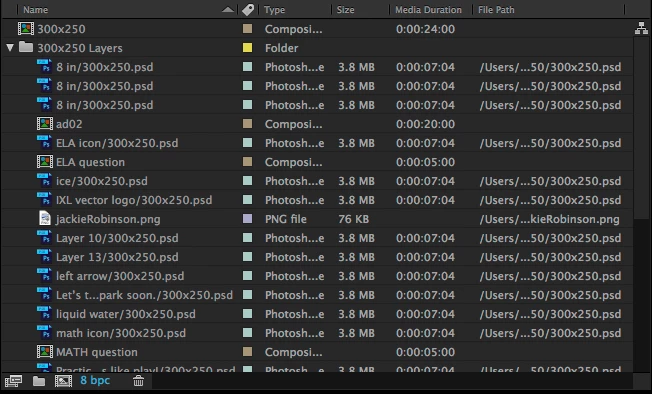
I've created and edited the comps within the 20s main comp with animations and effects. Now I need to extend the .psd layers(all ~7s) to the length of the main comp(20s).

I've tried dragging to extend their regions and right-clicking > Time > Enable Time Remapping(this allows me to extend the region with keyframes, but the content still ends proportionally short of the containing comp duration).

When I right-click the .psd layer and click "Open Layer Source", the preview shows the layer duration extending to the same time as it shows in the timeline(~7s)...

but the green "render bar" only goes to 5s. And no content is showing while the playhead is at 6s, below...
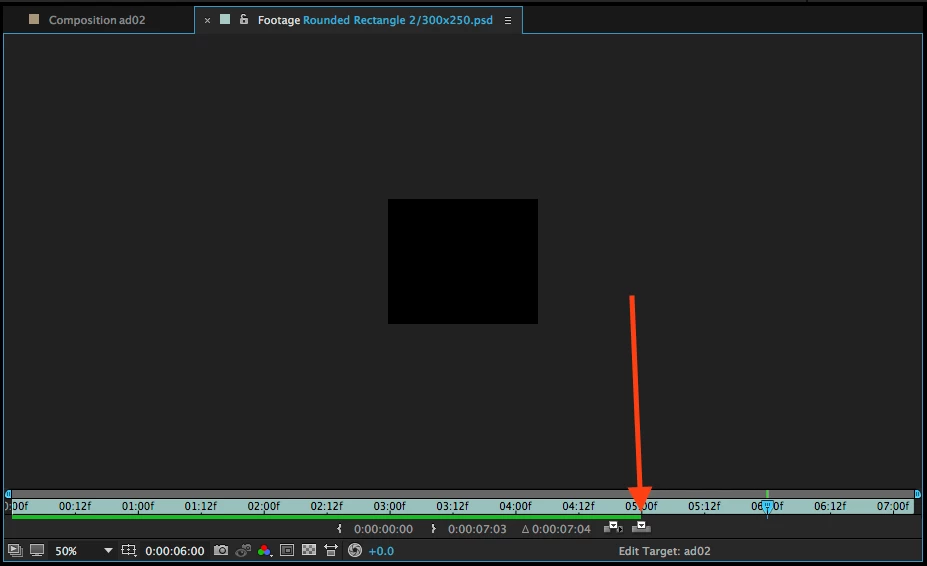
This is also reflected when I drag the playhead in the main comp timeline—the layers with this problem disappear at 5s even though their regions extend to 7s.

1. I need to get these layer regions to extend the length of my 20s comp.

2. It seems like the layer source only goes to 5s when I "Open Layer Source", so even though the region currently extends to ~7s, the 'content' only goes to 5s.

How do I get extend everything to 20-seconds without doing all of my keyframes/animations/effects over again?

Or is there a way to re-import just those layers at a longer duration, but keep all of my keyframes/animations/effects.

Using the latest Photoshop CC 2015.5 & After Effects CC v2015.3.

Thanks!
dmoz15
dmoz15Correct answer
Inspiring
Jul 1, 2016 3:50 PM UTC

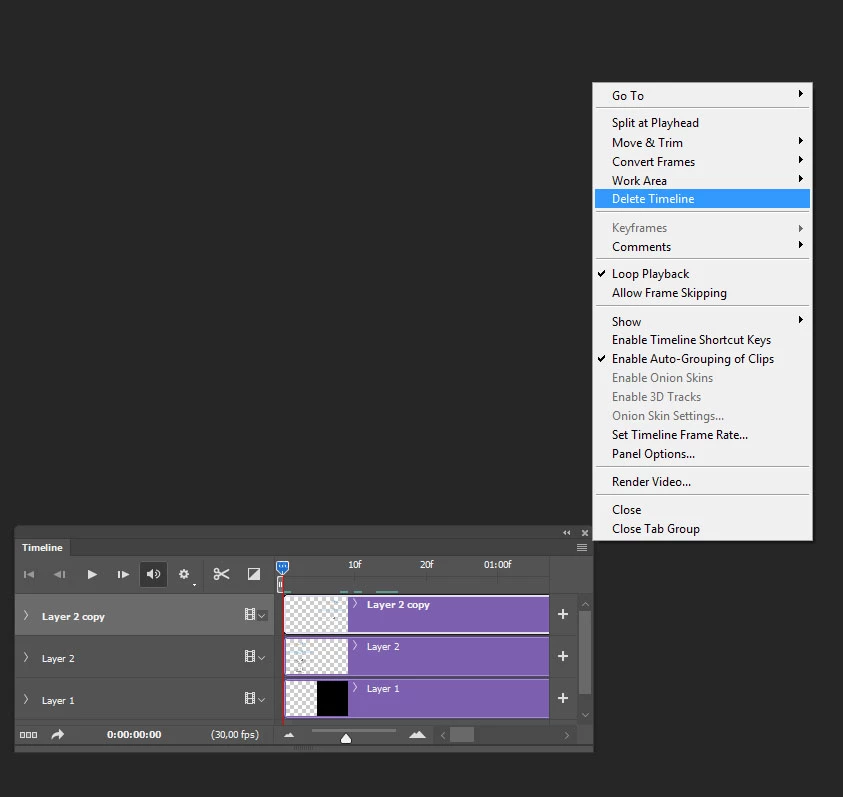
Pretty sure sskaz is onto it, check if there's a timeline attached to your psd in Photoshop and delete it:

You can also just freeze your layers in After Effects and just make them longer


Beautiful!! That was it!

I couldn't for the life of me figure out why each layer in the imported PSD was limited to such a random duration. I had triple-checked my Import Preferences to "Match Comp Duration", my unchecked "...as PS Sequence" Import options, but they were all set correctly. Hopefully this helps someone else.

Thanks to everyone for their help!

26 replies

Participating Frequently
Jan 16, 2024 8:55 AM UTC

Oh, I encountered this "problem" 15 years ago when I was working in television. it didn't exist then. Now I will explain to you why this is not a "problem" at all.

The fact is that AE uses the settings of the LAST created composition when importing PSD files.
That is, if you just create a new composition for 15 seconds, then when you import the PSD, it will automatically make all the layers 15 seconds long. This rule has always worked since early versions of AE and has never changed. Good luck to everyone! I hope I helped someone

Translate
Participating Frequently
Jun 2, 2026 1:04 PM UTC

this worked for me (after looking everywhere on the internet) thank you!

Translate
Participant
Mar 31, 2020 12:12 AM UTC

I figured it out, on the timeline in after effects, on those brown/bronze/goldish PSD layers, right click on the bar, press time > time stretch > and type in the new desired amount of time in duration you'd like. Hope this helped.

Translate
lukew66275192
Participant
May 6, 2020 10:39 PM UTC

I ran into this issue today and couldn't figure out why it didn't allow me to extend layers like the last one that I did.  The only real difference between the two files was that one of them was saved on my network folder, (browsed to by the actual network folder, not a mapped drive).  I was able to fix the problem by saving the file onto my desktop before importing it.  I have no idea why this fixed it but I'm happy that I found a fix.

Translate
Participant
Nov 7, 2016 3:17 PM UTC

Hi I just realised when you import the file in the first page if you click options and extend the page you'll see there is a selection for Photoshop Sequence you should uncheck this  ones and everything turns back to normal.

Translate
Inspiring
Sep 13, 2018 5:45 PM UTC

yay that was it! I had the same issue. Thanks for posting.

Translate
Szalam
Community Expert
Community Expert
Jun 27, 2016 5:58 PM UTC

I usually just drag the end of the layer in the timeline to extend it.

Translate
dmoz15
dmoz15Author
Inspiring
Jun 27, 2016 6:05 PM UTC

Szalam , you'll see above that I've already tried that. That's the whole problem: the regions for these static .psd layers won't extend any longer than the ~7s at which they were imported.

Translate
Dave_LaRonde
Inspiring
Jun 27, 2016 6:15 PM UTC
  • Open the nested comps. 
  • In each nested comp, change the comp length to the desired amount.
  • Go to the end of the comp.
  • Select all layers.
  • Use the alt-]  (opt-] Mac)  keyboard shortcut to move the layer outpoints to the end of the comp.

In the main comp, you can now drag the nested comp out points or use the keyboard shortcut above.

Translate