

Team Castle
Known Participant
April 1, 2020
Answered

Extend Layers / Extend video length

  • April 1, 2020
  • 1 reply
  • 1339 views

Hey,

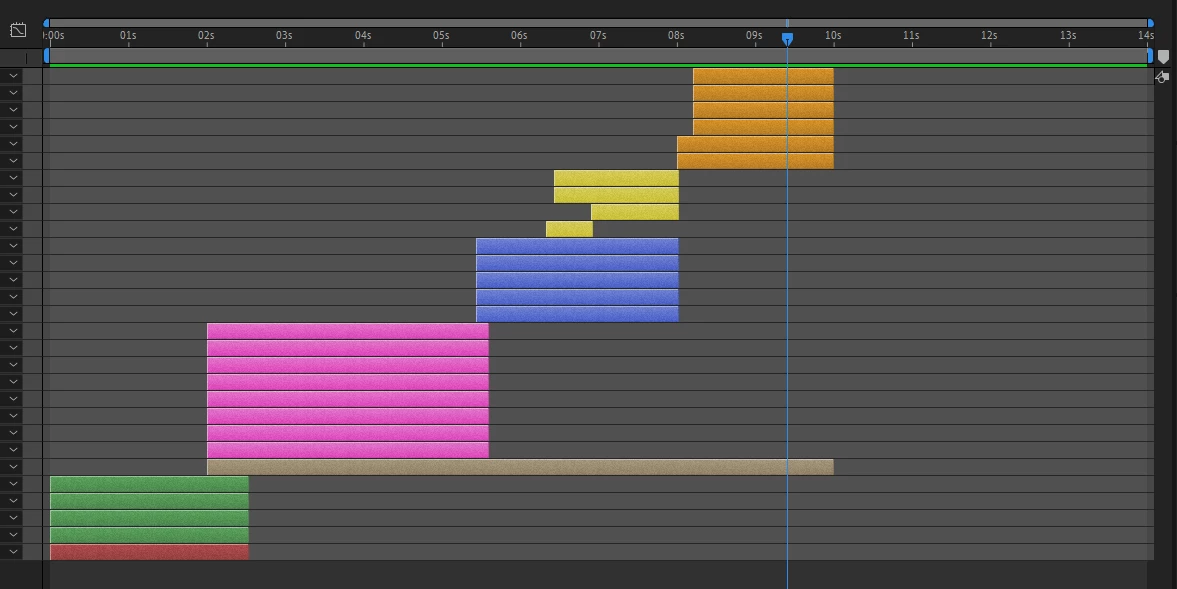
I have a 10 second video that I want to make 14 seconds. Attempting to extend the layers but click + shift or alt only extends the back half of the layer.

If there is no work around, in the future, if I make an animation too fast, how can I quickly change the layers to add 2-3 seconds to the whole thing and not just display the last layers for the addition time? 

Thank you.
 

This topic has been closed for replies.
Correct answer Rick Gerard

Drop that comp in a new comp that is longer then apply Time Remapping to the nested comp. You could also just pre-compose all the layers adjusting the comp to the length of the layers, then apply Time Remapping. One TR is applied you can change the speed of the original comp without any problems. If some of the layers are video, you may have to experiment with different frame blending modes. It all depends on the footage.

1 reply

Rick GerardCommunity ExpertCorrect answer
Community Expert
April 1, 2020

Drop that comp in a new comp that is longer then apply Time Remapping to the nested comp. You could also just pre-compose all the layers adjusting the comp to the length of the layers, then apply Time Remapping. One TR is applied you can change the speed of the original comp without any problems. If some of the layers are video, you may have to experiment with different frame blending modes. It all depends on the footage.

Team Castle
Known Participant
April 1, 2020

Thank you, I will experiement with Time Remapping! Appreciate the input and advice.