
Bluecloud7
Inspiring
June 7, 2019
Question

Extremely slow exports-Help

  • June 7, 2019
  • 1 reply
  • 944 views

Hi,

I wonder if anyone can help me.

Recently had a few deadlines and the exporting has been an absolute nightmare and really affecting my deadlines. I have to admit, the projects are a bit heavy (using a couple of App promo templates,  some have video clips, effects and camera movement) , but now for a 30 second project its going to take at least 50 mins to render, is this speed normal?  Last week a 2 min video also took 50 minutes to render. I have set up the Media Cache folder in another hard disk and I think I have the right specs? If anyone can help me with some tips that would be amazing, thanks in advance.

Here are the specs: AE CC 2019:
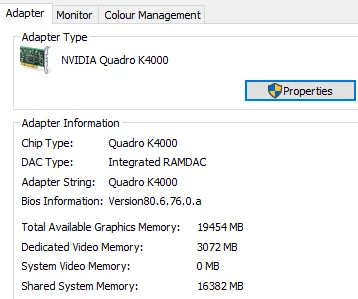
This topic has been closed for replies.

1 reply

Jose Panadero
Community Expert
Community Expert
June 7, 2019

I think this is absolutely normal if your composition is a complex one (3D, motion blur, maybe glows). What you can do is to check if your system is using the GPU for processing. Go to File Project Settings > Video Rendering and Effects > Mercury GPU Acceleration (CUDA).

Anyway, even in those scenarios, After Effects does no take full advantage of GPU power for a lot of effects. With the latest versions, a lot of effects are GPU accelerated but maybe you are using some not GPU-accelerated effects in your composition.

Bluecloud7
Inspiring
June 7, 2019

Hi Jose thank you so much. I went to preferences and here is what I got: It says GPU Acceleration cold not be loaded and that I need a new driver update..could this be the problem?

Jose Panadero
Community Expert
Community Expert
June 7, 2019

Yes, it could be. Your After Effects is rendering only on your CPU. Try to download the latest driver for your envidia graphic card, test it and tell us if you get better render times.
