
Participating Frequently
August 15, 2023
Question

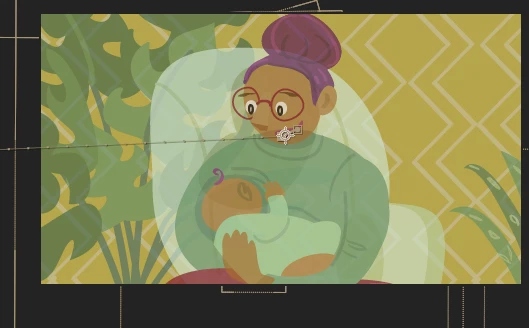
Fading out a comp, shows layers transparency

  • August 15, 2023
  • 2 replies
  • 206 views

Hi, I have an animation and then in the parent layer I want to fade out that inimation but when I doo I see though all the layers that made up that animation, even they are all solid.
see below, as the animation fade we can see though all teh elements.
Is there a way to avoid this, or must I screen shot just prior to the last frame and fade that? (and have no movement).
Cheers

MArk

This topic has been closed for replies.

2 replies

Mylenium
Legend
August 15, 2023

You are clearly using continuous rasterization, which affects this behavior. you may want to study the online help on the matter.


Mylenium

Participating Frequently
August 15, 2023

I am indeed... ok, if the issue is related to that Ill take a look. Thanks for pointing me in the right direction.

Mylenium
Legend
August 15, 2023

Pre-compose the artwork, fade it as a single layer. Otherwise simply reverse the logic - have a duplicate of the background fade in to cover up the other stuff.


Mylenium

Participating Frequently
August 15, 2023

Thanks for the answer, I did find a way around it, (time constraints on the job) but the issue remains. The Parent layer I mentioned is infact the same as if I pre-composed the animation as you suggested. I do not try to fade the layers all individually in the animation, but in the parent composition. and yet is still showed through the layer elements of the animation.