Inspiring
January 28, 2025
Answered

FAQ: Where Is The Option to Turn Off the 3D Reference Axis?

  • January 28, 2025
  • 1 reply
  • 506 views

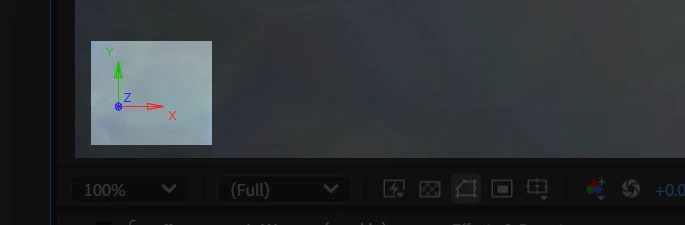
How can I turn this axis off - I’ve looked in and toggled a bunch of View Options, but alas.


Thanks,
 

Correct answer JohnColombo17100380

Sorry, I thought that's what you were asking. I think we'd need a response from the product team for the definitive response. @JohnColombo17100380 might know. I hope they can give you a response soon. Sorry for the hassle.


Thanks,
Kevin


HI @Marc Trzepla,

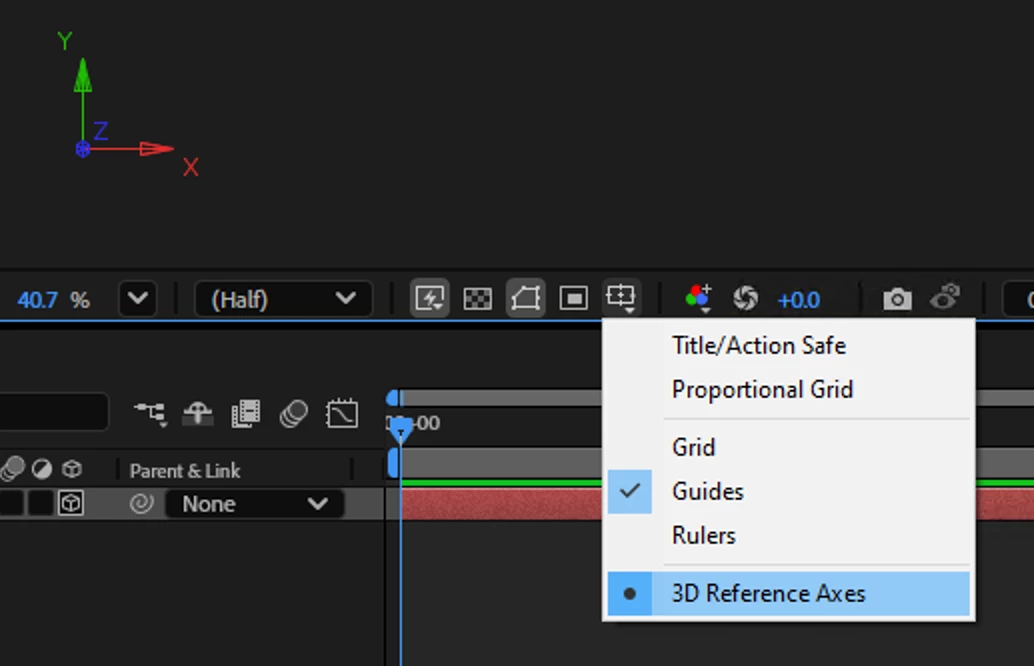
You can disable the 3D Reference Axis in the pop-out menu where grid and guides are toggled.
Cheers,

- John, After Effects Engineering Team 


1 reply

Kevin-Monahan
Community Manager
Community Manager
January 29, 2025

Have you tried switching off 3D Transform Gizmos options in View Options yet? Let us know, @Marc Trzepla. I hope we can assist in solving this one.


Thanks,
Kevin


Kevin Monahan - Sr. Community & Engagement Strategist – Pro Video and Audio
Inspiring
January 29, 2025

My 3D Transform Gizmos are already off.


Is turning off 3D Transform Gizmos supposed to hide this camera-world axis displayed in the lower left hand corner? If not, perhaps my issue should not have been merged with this one.

Kevin-Monahan
Community Manager
Community Manager
January 30, 2025

Sorry, I thought that's what you were asking. I think we'd need a response from the product team for the definitive response. @JohnColombo17100380 might know. I hope they can give you a response soon. Sorry for the hassle.


Thanks,
Kevin


Kevin Monahan - Sr. Community & Engagement Strategist – Pro Video and Audio
