


August 17, 2009
Question

FAQ: Why doesn't AVI appear as an export format in the Render Queue?

  • August 17, 2009
  • 4 replies
  • 126776 views

[For information on rendering and exporting, see "Basics of rendering and exporting".]

On Windows versions of After Effects, AVI appears listed with the more comprehensive name, "Video for Windows". In fact, it's the format specified by the default Output Module template. The Format Options button will reveal the AVI/VfW codecs available on your system.
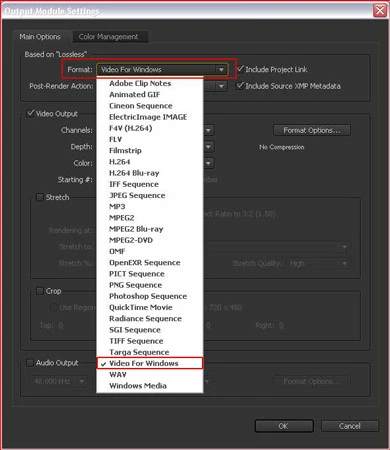
On Mac systems, AVI/Video for Windows is not available as a direct export option (except through the File > Export path, which is really not recommended). Export a lossless intermediate file from the Render Queue instead (for example, a Quicktime file). You can then use a number of converter applications (including Quicktime Pro, for example) to convert this intermediate file to an AVI file.

4 replies

Inspiring
October 6, 2023

I agree it's ridiculous and avi should be an option on Mac, but I want to point out that you can render uncompressed quicktime files, which should serve the same function in most cases. Under "Format Options" choose uncompressed.

Participant
November 17, 2022

Why is Quicktime even listed as option on Windows machinse when the support for this has stopped in 2016! 

More importantly, how does one get the H.264 option to come up as an Export -> Output Module option- what do I need to install?

Running Windows 11

TIA

designbyemmag
Participant
April 6, 2022

How is this still the only answer I can find about this in 2022? This answer is over 10 years old and it seems to still be the only available solution for exporting .AVI on a Mac. Completely ridiculous adobe.

Participant
June 16, 2022

Same here. Trying to export alpha clips. If I do it with quicktime (.mov) the file is 7gb large. With webm on my windows pc, which I no longer own, the file was maybe like 50mb? Wow apple.

Participant
September 16, 2022

Did either of you find a solution for AVI export in After Effects 2022? If so, please advise.

If not, what is your workflow for creating an AVI from something created in AE 2022?

Participating Frequently
January 29, 2021

Seriously? Use a file converter if you're on Mac? You making a professional software and I pay for if (not so cheap). But for simple operation I must pay someone else. Quictime pro is no longer available. AVI is not something weird, it's one of standards and should be everywhere. I have no words