
Participant
August 26, 2017
Answered

Feathering an Ellipse Masked Solid turns becoming Squared

  • August 26, 2017
  • 1 reply
  • 479 views

Hello,

I am running Ae CC 2017.

I created a White Solid (2000pixels by 2000pixels, same size as comp) and apply an Ellipse Mask on it.

I scaled it down to 50% of the comp.

I feather the edges.

However, instead of a continuous radial feathering effect (looking a bit like a radial blur) the feathering is boxed in by the "bound box" of the Solid. This creates visible straight cut of lines.
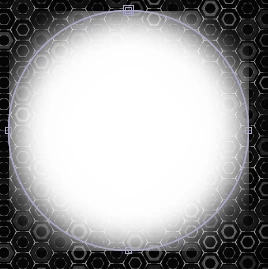
How do I solve this?

Pardon if information is missing. This is my first forum post. Ever.

Ryan

    This topic has been closed for replies.
    Correct answer Roei Tzoref

    welcome to the forums.

    this is normal. in this case, instead of feathering, you can achieve the same effect by using a blur effect. box blur or fast box blur will do.

    it's either that or reducing your mask. either with the expansion parameter or manually.

    1 reply

    Roei Tzoref
    Roei TzorefCorrect answer
    Legend
    August 26, 2017

    welcome to the forums.

    this is normal. in this case, instead of feathering, you can achieve the same effect by using a blur effect. box blur or fast box blur will do.

    it's either that or reducing your mask. either with the expansion parameter or manually.