Inspiring
January 25, 2022
Answered

file path for replacing the footage via script ae

  • January 25, 2022
  • 1 reply
  • 1281 views

How to convert windows file path into  An Extendscript File object. (that is  app.project.item(index).replace(file)

and convert 
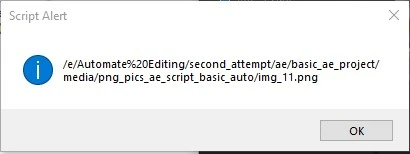
"E:\Automate Editing\second_attempt\ae\basic_ae_project\media\png_pics_ae_script_basic_auto\img_11.png" into this image 
i got that path by using 

app.project.item(index).mainSource.file

I am tryinng for days to ge this tried encodeURI and File.encode too. How to get the path for file to replace  the footage. Thanks in advance.
This topic has been closed for replies.
Correct answer Paul Tuersley

It's difficult to answer fully without understanding where you're trying to get the replacement file path from. Are you just trying to copy / paste it from the file explorer?


I'm not especially familiar with dealing with this issue but it's probably related to the backslash character being reserved for escape characters (you might want to google that). So if you're not careful handling those strings those backslashes will vanish completely. If you were getting replacement paths using something like a file select dialog then this wouldn't be an issue anyway, only if you were copy/pasting it from somewhere.


Instead of a backslash I think either a forward slash or two backslashes would work. It doesn't need to look exactly like that screengrab, there are a number of filepath formats accepted:


var theFile = new File("E:\\Automate Editing\\second.....");

var theFile2 = new File("E:/Automate Editing/second.....");

alert("exists = " + theFile.exists + " " + theFile2.exists);

alert(theFile.absoluteURI + " " + theFile2.absoluteURI);

 

1 reply

Paul TuersleyCorrect answer
Inspiring
January 25, 2022

It's difficult to answer fully without understanding where you're trying to get the replacement file path from. Are you just trying to copy / paste it from the file explorer?


I'm not especially familiar with dealing with this issue but it's probably related to the backslash character being reserved for escape characters (you might want to google that). So if you're not careful handling those strings those backslashes will vanish completely. If you were getting replacement paths using something like a file select dialog then this wouldn't be an issue anyway, only if you were copy/pasting it from somewhere.


Instead of a backslash I think either a forward slash or two backslashes would work. It doesn't need to look exactly like that screengrab, there are a number of filepath formats accepted:


var theFile = new File("E:\\Automate Editing\\second.....");

var theFile2 = new File("E:/Automate Editing/second.....");

alert("exists = " + theFile.exists + " " + theFile2.exists);

alert(theFile.absoluteURI + " " + theFile2.absoluteURI);
 

Inspiring
January 26, 2022

yes it worked i used File(path) with \\ for file path. Thanks a lot.