


Participant
November 22, 2023
Answered

File Version Error

  • November 22, 2023
  • 2 replies
  • 800 views

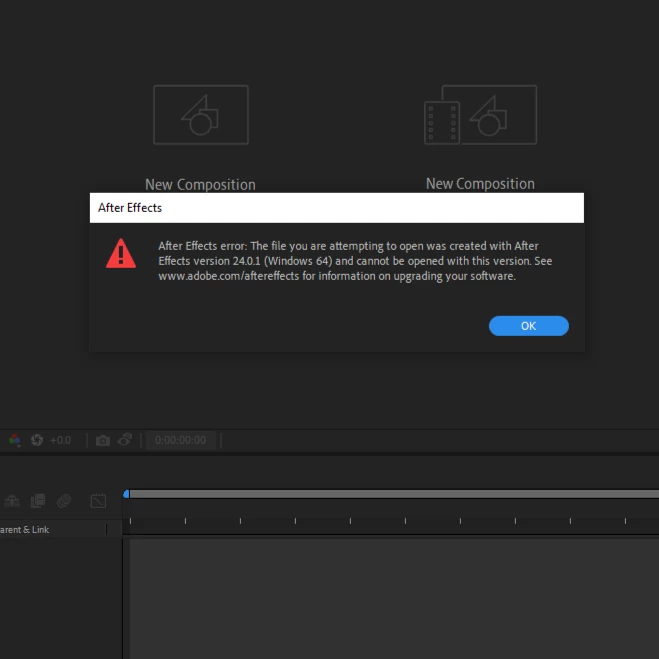
Created a new project at the end of October and saved the file. On November 14 I went back to that project and AE autoconverted the file to a different version and I was able to make more edits. Today I try to open the file and it says the file was created with AE version 24.01 and cannot be opened with this version. Not sure how to get AE to open the file. Appreciate any suggestions. 
This topic has been closed for replies.
Correct answer Claudette317117709qt6

Thank you!


I saw it said the 2023 version, went into the creative cloud and updated it to the 2024. 

2 replies

Warren Heaton
Community Expert
Community Expert
November 22, 2023

In Windows Explorer, right-click on the After Effects project file and see if After Effects 2024 shows up in the list.  Any version of 24.x should be able to open that project file.


If you only see After Effects 2023 or older, you'll need to install 2024 to open this project file.

Claudette317117709qt6AuthorCorrect answer
Participant
December 7, 2023

Thank you!


I saw it said the 2023 version, went into the creative cloud and updated it to the 2024. 

nishu_kush
Legend
November 22, 2023

That's strange!

Have you downgraded After Effects? What's the version of After Effects that's currently installed on your computer? Check if you've multiple versions installed. If so, open the file correct version.

Let us know.


Thanks,

Nishu