Inspiring
September 9, 2023
Answered
Fill name
- September 9, 2023
- 1 reply
- 174 views
Does anyone know the name of that text fill?

There is no plug-in that will do that automatically. You have two options. You could create a bunch of animated colors using a solid as the source and apply a couple of pattern and color effects, then use the Text layer as a Track Matte. For example, create a gray solid, add CC Light Sweep, then Colorama. Adjust the center Direction and Width of the beam, then animate the phase shift of Colorama using a simple time * 180 expression. Then, add a Text layer and set it as a Track Matte for the Colorama layer.
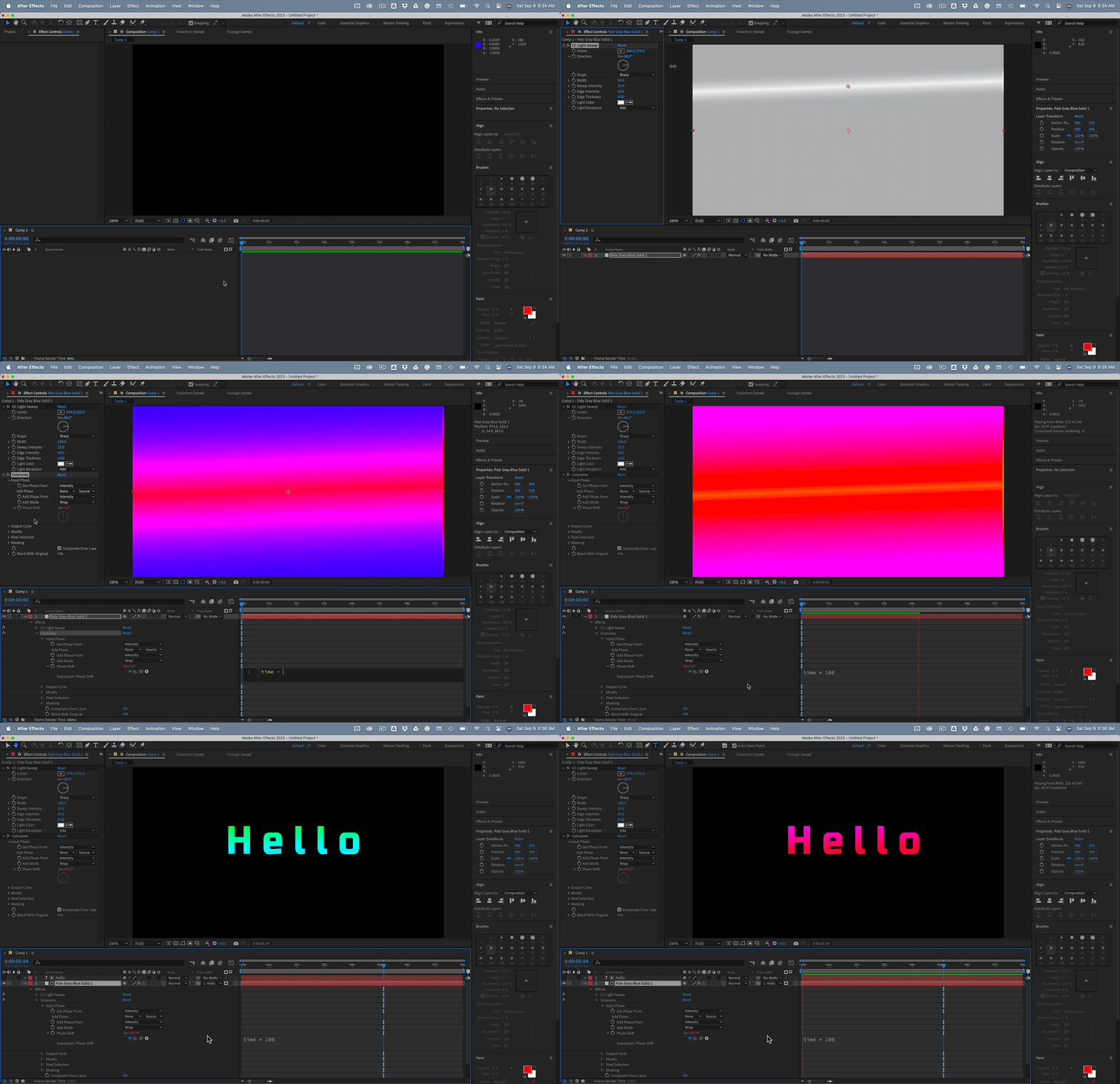
This is only one of a couple thousand different workflows that could be used to generate animated fills for a text layer.
You can then start stacking up other layers to create the drop shadow, the outlines on the text layer, and the background.
Already have an account? Login
No account yet? Create an account
Enter your E-mail address. We'll send you an e-mail with instructions to reset your password.


 AdChoices