
Legend
December 16, 2021
Answered

Finished my Shatter Effect of a Background Layer, However Cannot View it ALONG WITH the Rest of Proj
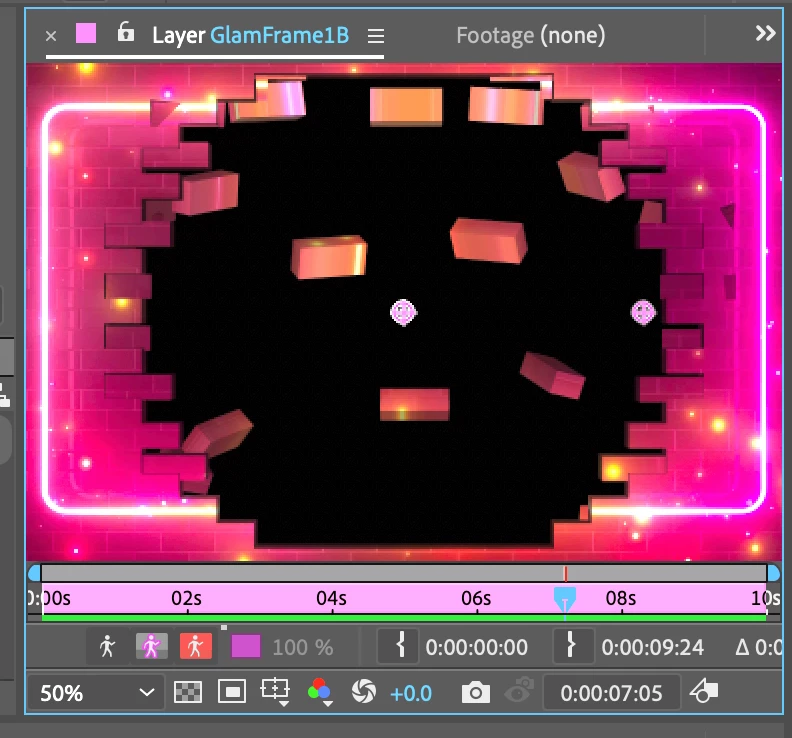
  • December 16, 2021
  • 2 replies
  • 314 views

-I understand double-clicking on main comp (from shatter effected layer) will return me to the main project,  yet it is without this layer shown!

-I also understand that double clicking on this shatter effected layer (from the main comp) will bring me back to this screen, without view of any other layers.

-I have watched tutorials and reads a bunch already, but 

How Does One Review BOTH in the Totality of the Whole Composition? 


Thank you to however actually knows this answer!

This topic has been closed for replies.
Correct answer One&Done
My Notes up to Solution!
-I was working with Shatter Mode, and finished the effect, however it was placed on a Quicktime file rather than a preComp
-Unless creating a precomp would bring the effect with
-To sum up the issue I am facing, I added effect to a quicktime layer, but this will not allow me to see the slide and effect now with the rest of the project in unison
-Was able to import the original file and place the effect onto it via copy/paste
-However effect still not seen with rest of project, BUT slide now playing with whole thing
-I feel perhaps I may have shattered later in time than the duration of the clip itself
-BINGO! This was the solution to my problem!

2 replies

Mrtn Ritter
Participating Frequently
December 16, 2021

There are 3 views in AE.

You have footage view, which is the most original view of an item. You get there, if you double click a footage from the project panel.

You have layer view, which is the footage + effect (if there is one applied, otherwise it's the same a footage view). You get there, if you double click a layer (which is not a precomp) from the comp panel.

And finally you have comp view, which is the whole composition with everthing you created. You get there, if you double click a comp from the project panel.


This might be confusing, but actually, you just need footage view to apply trackers and comp view for all the rest. If you want to look at a individual layer without the others, you can just single this one with a click. Also, you can create precomps, to organize your work hierarchically. You can switch off effect to see an individual effect or the layer without effects at all.


How Does One Review BOTH in the Totality of the Whole Composition? 


I think you want to see the layer view and the comp view at the same time (sorry, I'm not a native english speaker). To do so, just open both views by double clicking. There will be two tabs in the viewer panel, just like in your screenshot. Drag one tab next to the other. Docking options are highlighting. Place the tab, where you like.


I can only guess what you are creating and how the project is build up. I would have put the layer with the effect in it's own comp (precomp) so I can open it in its own comp view to see it seperated from the other elements. This way, no need for layer view, just two comp views, if you want to look at both at the same time.


*Martin

One&DoneAuthor
Legend
December 23, 2021

Thank you! Your English & Intellegence is Remarkable!

Community Expert
December 16, 2021

You are looking at the Layer Panel. Switch to the Composition Panel to see all layers.